

What is SiPhotoEditor?
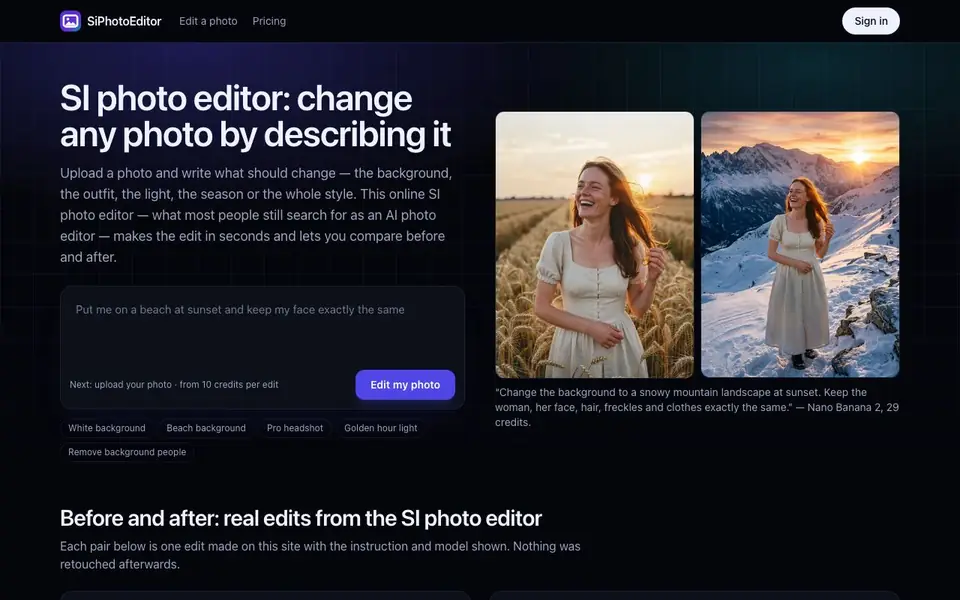
SiPhotoEditor is an online tool that edits your photos based on text instructions. You can change backgrounds, outfits, lighting, weather, room styles, or turn photos into anime or watercolor art. It shows before-and-after sliders so you can see exactly what changed.
To use it, upload a photo from your device. Your browser removes location data before the image leaves your device. Then describe the change in plain words, or tap a quick edit like "White background" or "Golden hour light". The tool processes the edit and lets you compare the result with the original using a slider.
The site offers several AI models for different tasks, such as Nano Banana 2 for background changes while keeping faces identical, Seedream 5 Flash for quick low-cost edits, and Flux 3 for photoreal retouching. Each edit costs credits, starting from 17 credits per edit. You can keep editing a result step by step, which makes it easy to undo changes you don't like.
SiPhotoEditor features
- Text-based editing: Describe any change in plain words and the AI applies it to your photo.
- Quick edit presets: One-tap instructions for white background, beach background, headshots, and more.
- Before/after slider: Drag to compare the original and edited versions side by side.
- Multiple AI models: Choose from models optimized for backgrounds, restyling, light changes, or fine detail.
- Step-by-step editing: Keep editing a result with new instructions and undo steps you don't like.
What you can do with SiPhotoEditor
- Change a product photo background to clean white for an online store.
- Swap a person's coat to a red leather jacket without a new photoshoot.
- Restyle a room as a warm Japandi interior with new furniture and plants.
- Turn a portrait into a hand-drawn anime illustration with cel shading.
How to get started with SiPhotoEditor
- Upload a photo by dragging it in or picking it from your device.
- Describe the change in plain words or tap a quick edit preset.
- Compare the result with the slider, download it, or keep editing with another instruction.
Tips for better results with SiPhotoEditor
- Write very specific instructions that name what to keep unchanged, like the face, clothes, or layout, to prevent the AI from altering important details in your photo.
- Use SiPhotoEditor's quick edit presets for common tasks like white backgrounds or golden hour light, then refine with your own text to save credits on simple changes.
- Pick the right model in SiPhotoEditor for your task: choose Nano Banana 2 for background swaps that must keep faces identical, or Seedream 5 Flash for cheaper, faster edits.
- Edit step by step instead of trying to do everything in one instruction, so you can undo each change and compare versions with the before-and-after slider as you go.
SiPhotoEditor pricing
SiPhotoEditor is a paid product. Check siphotoeditor.com for current plans and whether a demo or trial is offered.
What to check before you rely on SiPhotoEditor
- Check the credit cost per edit before you start, since prices vary by model from 17 credits up, and the site does not list a full price table for all models.
- Verify whether your plan includes enough credits for your expected number of edits, as the website does not state any package details or credit bundles.
- Confirm that the tool supports your image format and file size, since the site does not specify upload limits or accepted file types anywhere.
Who SiPhotoEditor is for
SiPhotoEditor suits e-commerce sellers, photographers, interior designers and social media creators. If that is not you, the AI photo editors below may fit better.
Similar tools compared with SiPhotoEditor
| Tool | What it is | Pricing |
|---|---|---|
| SiPhotoEditor | AI photo editor by description | Paid |
| SiImageGen | AI image generator and photo editor | Freemium |
| Clipdrop | AI photo editing and image generation suite | See website |
| Photoroom | AI photo editor for e-commerce product visuals | Freemium |
| Picsart | All-in-one AI creative platform | Freemium |
SiPhotoEditor FAQ
How does SiPhotoEditor work?
You upload a photo and write what should change, like the background, outfit, or lighting. The AI model processes your instruction and shows the edited result. You can compare before and after with a slider and download the final image.
What can I edit with SiPhotoEditor?
You can change backgrounds, clothes, lighting, weather, seasons, room styles, and fix old or damaged photos. You can also turn photos into anime, watercolor, or vintage film styles. The site lists many example edits with instructions.
How much does SiPhotoEditor cost?
The site mentions credits per edit, starting from 17 credits per edit, and different models cost different amounts. It does not state a specific price per credit or list subscription plans on the page. Check the Pricing section on the website for details.
Which AI model should I use?
The site provides a guide: Nano Banana 2 for backgrounds or clothes while keeping faces identical, Seedream 5 Flash for quick low-cost edits, Qwen Image 3 for light and weather, GPT Image 2.5 for multi-step instructions, Nano Banana Pro for fine detail, and Flux 3 for photoreal retouching.
Does SiPhotoEditor offer a free plan or trial?
The SiPhotoEditor website does not mention a free plan or trial. It shows pricing starting from 17 credits per edit, and you pay for credits as you go. To see current pricing options and whether any trial credits are available, check the Pricing page on the site.
Can SiPhotoEditor export edited photos in high resolution or specific formats?
SiPhotoEditor lets you download the result after editing, but the website does not specify which file formats or resolutions are available for export. For details on export options, such as JPEG or PNG and maximum resolution, check the site's help or FAQ section.
Does SiPhotoEditor work on mobile devices or require an account?
SiPhotoEditor is an online tool, so it works in any browser on a phone, tablet, or computer. The website does not mention whether you need to create an account to use it. For sign-in requirements and mobile-specific features, check the site's sign-in page or terms.


