

What is SiImageGen?
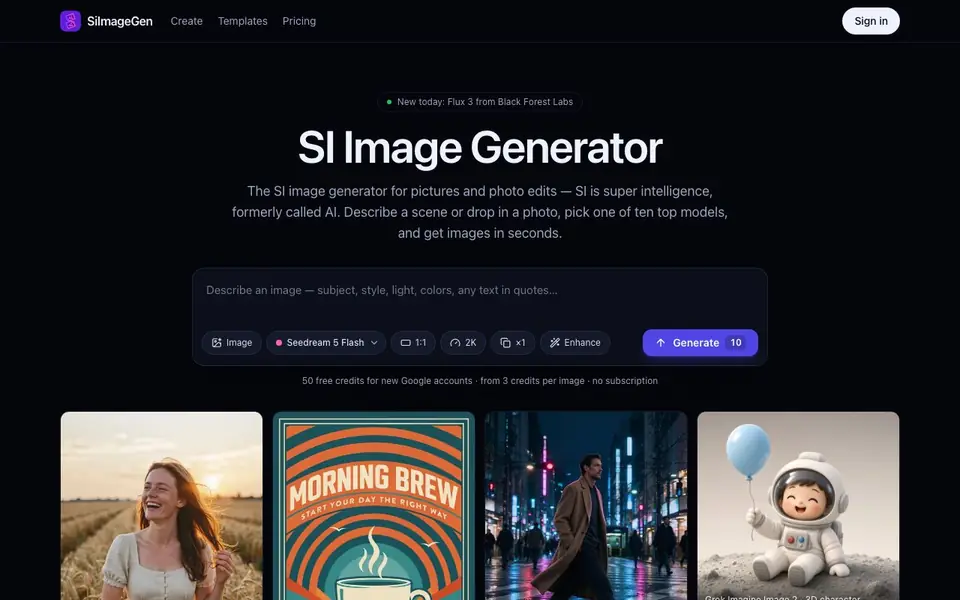
SiImageGen brings multiple leading image models into one place with a single credit balance. You describe a scene or upload a photo, pick a model, and get finished images in seconds. It also works as a photo editor, letting you keep your subject while changing the background, lighting, or style with plain instructions.
To start, write one or two sentences describing your picture, including any text you want in quotes. The Enhance button can turn a short idea into a detailed prompt. Then choose a model and aspect ratio, and the credit cost updates before you generate. Results appear in your Create feed, where you can download, reuse settings, or continue editing.
Each model has strengths, from photoreal people to readable typography. You can switch models per image instead of being locked into one. New models arrive quickly, and you only pay for images you actually receive. The site mentions 80 free credits for new Google accounts and prices starting at 5 credits per image.
SiImageGen features
- Multiple models: Access ten top image models like Flux 3, Nano Banana 2, and Seedream 5 in one place.
- Credit system: Pay per image with no subscription, using a single credit balance across all models.
- Photo editing: Upload a photo and change backgrounds, lighting, or style with simple instructions.
- Enhance prompt: Rewrite a short idea into a detailed prompt with one click.
- Aspect ratio options: Choose square, 16:9, 3:4, or 9:16 shapes for different platforms.
What you can do with SiImageGen
- Create product photos with studio or lifestyle backgrounds without a photo shoot.
- Make social posts and thumbnails in the exact shape each platform needs.
- Design posters, flyers, and logos with readable text using Ideogram or Qwen Image.
- Edit existing photos to change seasons, lighting, or remove clutter.
How to get started with SiImageGen
- Describe your picture in one or two sentences, including any text in quotes.
- Pick a model and aspect ratio, then generate your image.
- Open results in your Create feed to download, reuse settings, or edit further.
Tips for better results with SiImageGen
- Write one or two full sentences describing your scene, including any text you want inside quotes, so SiImageGen knows exactly what to render.
- Use the Enhance button to expand a short idea into a detailed prompt, then review the credit cost before you generate with SiImageGen.
- Match the model to the job: pick Ideogram or Qwen Image for readable text, and Seedream or Flux for photoreal people and scenes.
- After generating, open the result in your Create feed and press Edit this image to refine lighting, background, or style without starting over.
SiImageGen pricing
SiImageGen has a free way to start, with paid plans for heavier use. Check siimagegen.com for current limits and prices.
What to check before you rely on SiImageGen
- Check whether the 80 free credits for new Google accounts apply to you, since the site does not state if other signup methods get credits.
- Confirm the credit cost per image for your chosen model and aspect ratio before generating, as prices start at 5 credits but vary.
- Verify the export formats and resolution options available for downloads, as the website does not list specific file types or sizes.
Who SiImageGen is for
SiImageGen suits marketers, small business owners, social media creators and designers. If that is not you, the AI image generators below may fit better.
Similar tools compared with SiImageGen
| Tool | What it is | Pricing |
|---|---|---|
| SiImageGen | AI image generator and photo editor | Freemium |
| FreeSiTools | Free AI image prompt generator | Free |
| SiPhotoEditor | AI photo editor by description | Paid |
| Civitai | AI art community and model library | Freemium |
| Krea | Creative AI suite for images and videos | Freemium |
SiImageGen FAQ
What does SiImageGen do?
It generates new images from text descriptions and edits existing photos. You pick from ten AI models, and it returns finished pictures in seconds. You can also upload a photo and change its background or style with plain instructions.
How does pricing work?
You pay per image with credits, not a subscription. New Google accounts get 80 free credits, and images start at 5 credits each. A credit costs about 0.90 cents on the Starter pack, according to the site.
Which AI models are available?
The site lists Flux 3, Nano Banana 2 and Pro, Seedream 5 Flash and Pro, GPT Image 2.5, Ideogram 4.5, Qwen Image 3, Grok Imagine Image 2, and Recraft 4.1 Flash. Each model has different strengths and credit costs.
Can I edit my own photos with it?
Yes. You can upload a photo and use the same box as an editor. For example, you can keep a product bottle but change the background to a beach or marble counter. The site shows before-and-after examples of this.
Can SiImageGen export images in formats like PNG or JPEG, and can I connect it to other apps?
The SiImageGen website does not mention specific export formats or integrations with other apps. It focuses on generating and editing images within its own interface, where you can download results from your Create feed. For details on export options or integrations, check the site's help or contact section.
Does SiImageGen work on mobile devices or only in a web browser?
The SiImageGen website does not specify whether it has a mobile app or is browser-only. It appears to be a web-based tool, so you likely access it through a browser on any device. For confirmation about mobile support, check the site's FAQ or support pages.


