

What is Sezwhere?
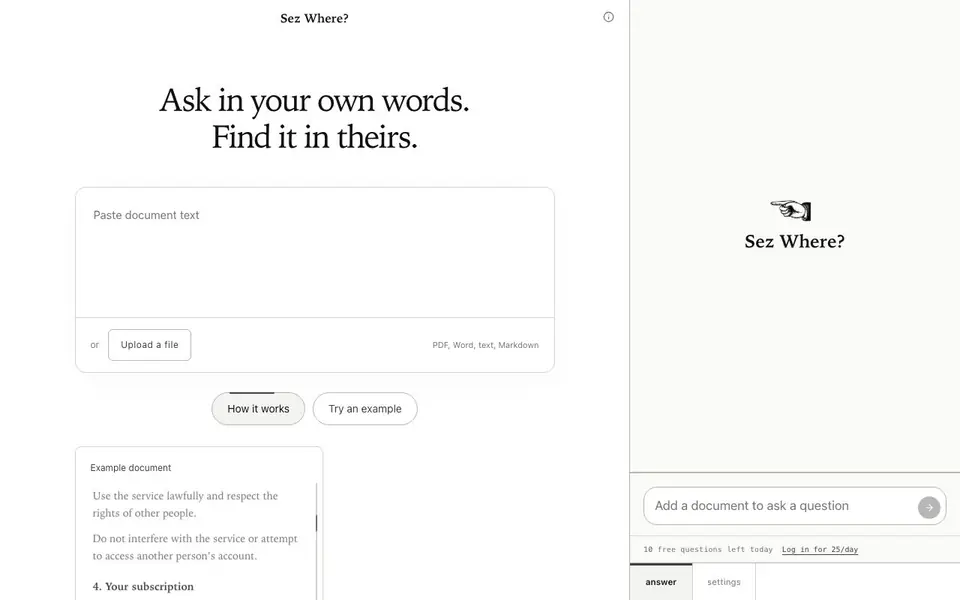
Sez Where? is a tool that helps you find specific information in your documents by asking questions in plain language. Instead of scanning through pages, you type a question like "Am I locked into this plan?" and it points you to the relevant clause or passage. It supports PDF, Word, text, and Markdown files, so you can upload the document you need to search.
To use it, you either paste your text directly or upload a file. Then you ask your question in your own words. The tool finds the passages that answer your question and shows you where they are in the document. You can try an example to see how it works before using your own files.
Sez Where? is useful for anyone who needs to quickly locate information in contracts, terms of service, research papers, or any lengthy document. The website mentions a free tier with 10 questions per day, and logging in gives you 25 questions per day. It does not specify any paid plans or additional features beyond the daily question limits.
Sezwhere features
- Question-based search: Ask questions in natural language and get pointed to relevant passages.
- File upload: Upload PDF, Word, text, or Markdown files to search within them.
- Paste text: Paste text directly into the tool if you don't have a file.
- Example document: Try a sample document to see how the tool works before using your own.
- Daily free questions: Get 10 free questions per day, or log in for 25 per day.
What you can do with Sezwhere
- Find a specific clause in a contract or terms of service.
- Locate a key point in a research paper or report.
- Check what a document says about a particular topic.
- Verify details in a policy or agreement before making a decision.
How to get started with Sezwhere
- Go to the Sez Where? website and either paste your text or upload a file.
- Type your question in your own words in the question box.
- Review the passages the tool highlights as answers to your question.
Tips for better results with Sezwhere
- Upload your document in PDF, Word, text, or Markdown format to let Sez Where? search the full text accurately, rather than pasting only part of it.
- Ask one specific question at a time, like "What happens if I cancel?" so Sez Where? can point you to the exact clause without mixing multiple topics.
- Use the example document first to see how Sez Where? phrases answers, then test your own file with a simple question to confirm the tool understands your wording.
- Log in to Sez Where? to raise your daily question limit from 10 to 25, and keep track of how many you have left before starting a long search session.
Sezwhere pricing
Sezwhere has a free way to start, with paid plans for heavier use. Check sezwhere.com for current limits and prices.
What to check before you rely on Sezwhere
- Check the daily question limit before starting: Sez Where? gives 10 free questions per day, or 25 if you log in, and the website does not state what happens after you use them.
- Verify that your document is in a supported format (PDF, Word, text, or Markdown) because Sez Where? only accepts those file types for upload.
- Confirm whether Sez Where? stores or shares your uploaded documents, since the website does not state any data retention or privacy policy for your files.
Who Sezwhere is for
Sezwhere suits professionals, students, researchers and anyone reading long documents. If that is not you, the AI research tools below may fit better.
Similar tools compared with Sezwhere
| Tool | What it is | Pricing |
|---|---|---|
| Sezwhere | Document question answering tool | Freemium |
| OpenSI | AI model comparison and pricing tool | See website |
| ChatPDF | AI chat and summarizer for PDFs | Freemium |
| Consensus | AI search engine for research papers | See website |
| Scite | AI research assistant with smart citations | Free trial |
Sezwhere FAQ
What file types can I upload?
You can upload PDF, Word, text, and Markdown files. Alternatively, you can paste text directly into the tool.
How many questions can I ask for free?
You get 10 free questions per day. If you log in, you get 25 questions per day. The website does not mention any paid plans beyond these limits.
What kind of documents is this best for?
It is useful for any document where you need to find specific information, such as contracts, terms of service, research papers, or reports. You can try an example document to see how it works.
How does the tool find answers?
You ask a question in your own words, and the tool points you to the relevant passages in your document. It does not explain the method, but it shows you where the answer is located.
Does Sezwhere require an account to use the free questions?
Sezwhere gives you 10 free questions per day without logging in. If you log in, you get 25 questions per day. The website does not mention any other account requirements, so you can start using the tool right away without signing up.
Can Sezwhere export the answers it finds, or does it only show them on screen?
Sezwhere shows you the passages that answer your question directly on the page. The website does not mention any export options, such as downloading or copying the results. You can check the tool's interface for any export or share buttons after you run a search.
Is Sezwhere available as a mobile app or only in the web browser?
Sezwhere is a web-based tool, so you can use it in any browser on your computer, tablet, or phone. The website does not mention a dedicated mobile app for iOS or Android. You can access it by going to sezwhere.com on your device's browser.


