

What is refont.ai?
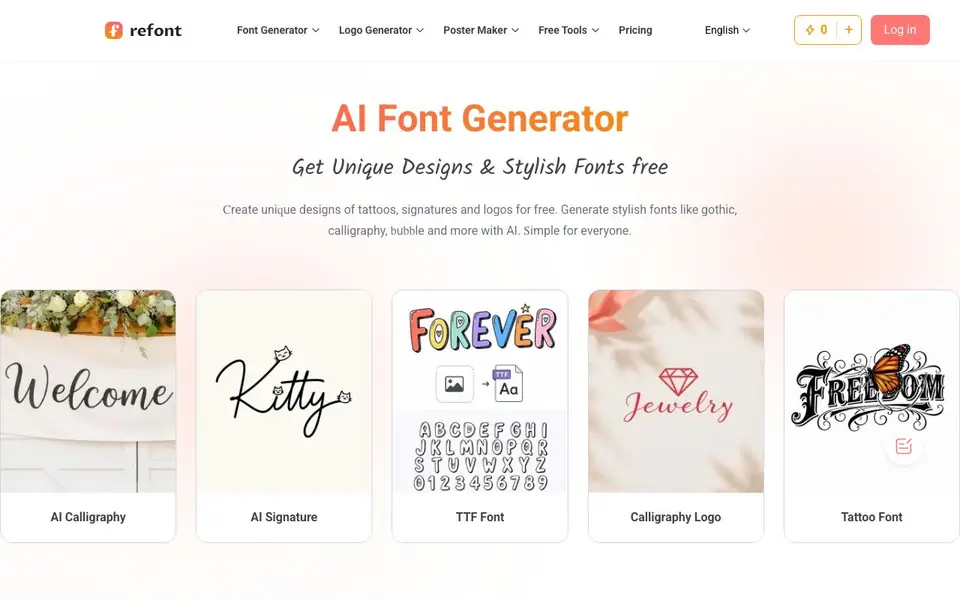
Refont is an AI font generator that creates unique designs like tattoos, signatures, and logos for free. You can generate stylish fonts in gothic, calligraphy, bubble, and other popular styles. It is designed to be simple for everyone, from casual users to professionals.
You start by choosing a tool, such as AI Calligraphy, AI Signature, or TTF Font. Then you type your text and the AI transforms it into your chosen style. You can browse over 100 font styles, customize them instantly, and download font style images for posters, branding, or social media.
Refont suits creators, students, designers, and professionals. It includes tools like a handwriting generator, handwritten greeting cards, and fancy text effects. The website mentions recognition by over one million creators and global media, but it does not state specific pricing details.
refont.ai features
- AI Calligraphy: Generates elegant calligraphy in cursive, clerical, or famous calligrapher styles for invitations and logos.
- AI Signature: Creates clean one-stroke signatures in English or European styles with personality for branding.
- Handwriting Generator: Mimics your real handwriting to produce natural, human-like letters and notes.
- Fancy Fonts: Produces expressive fancy text, emoji-style text, and Lenny Face effects for social posts.
- Font Styles Library: Offers 100+ popular font styles like gothic, graffiti, bubble, and Y2K to browse and customize.
What you can do with refont.ai
- Design stylish Instagram bios with fancy font generators.
- Create professional team signatures for brand decks.
- Generate custom signature fonts for product packaging.
- Turn personal notes into a real handwriting font.
How to get started with refont.ai
- Choose a tool like AI Calligraphy, AI Signature, or TTF Font from the homepage.
- Type or paste your text into the generator.
- Generate and download your styled font image or design.
Tips for better results with refont.ai
- Start with a clear tool like AI Calligraphy or AI Signature, then type your text exactly as you want it styled, since Refont transforms the input directly.
- Browse the 100+ font styles library before generating, then customize the chosen style instantly to match your poster, branding, or social media needs.
- Use Refont's handwriting generator to mimic your own handwriting by providing a sample, then refine the output until the letters look natural and human-like.
- For signatures, test different English or European styles in Refont to find one with the right personality, and generate multiple versions to compare.
- Download font style images directly from Refont for use in posters or branding, and check that the image resolution suits your intended print or digital format.
refont.ai pricing
refont.ai’s homepage does not list prices. Check refont.ai for current plans.
What to check before you rely on refont.ai
- Check whether Refont's free tier includes commercial use for logos or branding, since the website does not state licensing terms.
- Verify the output format options before relying on Refont for a project, as the site does not list supported download file types.
- Confirm if Refont requires an account or login to save or download your generated fonts, since the website does not specify this.
- Review Refont's privacy policy to see how your input text and generated designs are handled, as no data usage details are provided.
Who refont.ai is for
refont.ai suits creators, students, designers and professionals. If that is not you, the AI design tools below may fit better.
Similar tools compared with refont.ai
| Tool | What it is | Pricing |
|---|---|---|
| refont.ai | AI font, signature, and logo generator | See website |
| Looka | AI logo maker and brand identity platform | Freemium |
| Uizard | AI-powered UI design and prototyping tool | Freemium |
| Clipdrop | AI photo editing and image generation suite | See website |
| Interior AI | AI interior design and virtual staging app | Freemium |
refont.ai FAQ
What can I create with Refont?
You can create unique designs like tattoos, signatures, and logos. It also generates stylish fonts in gothic, calligraphy, bubble, and other styles, plus handwritten letters and greeting cards.
Is Refont free to use?
The website says you can create designs for free, but it does not specify whether there are paid plans. Check the Pricing link on the site for current details.
Who is Refont for?
It is designed for creators, students, designers, and professionals. The tools are simple enough for anyone, whether you are making social media content or professional branding.
Can I generate a font in my own handwriting?
Yes, the handwriting generator mimics your real handwriting to produce natural, human-like writing. You can turn your notes into a handwriting font, as mentioned by a user review.
Can I download the fonts I create with Refont as TTF files?
Refont includes a TTF Font tool, so you can generate fonts in that format. The website does not specify whether you can download the generated TTF file directly, but the tool is available for you to use. Check the TTF Font tool on the site for download options.
Does Refont work on mobile devices?
Refont is a web-based tool, so you can access it from any device with a browser, including smartphones and tablets. The website does not mention dedicated mobile apps, but the interface is designed to be simple for everyone. Try it on your mobile browser to see if it works well for you.
What does the free plan on Refont include?
Refont is described as free to use, and the website highlights that you can create unique designs like tattoos, signatures, and logos for free. It does not list specific limits on usage or features. For details on any paid plans, check the Pricing page on the site.


