

What is Raccoon AI?
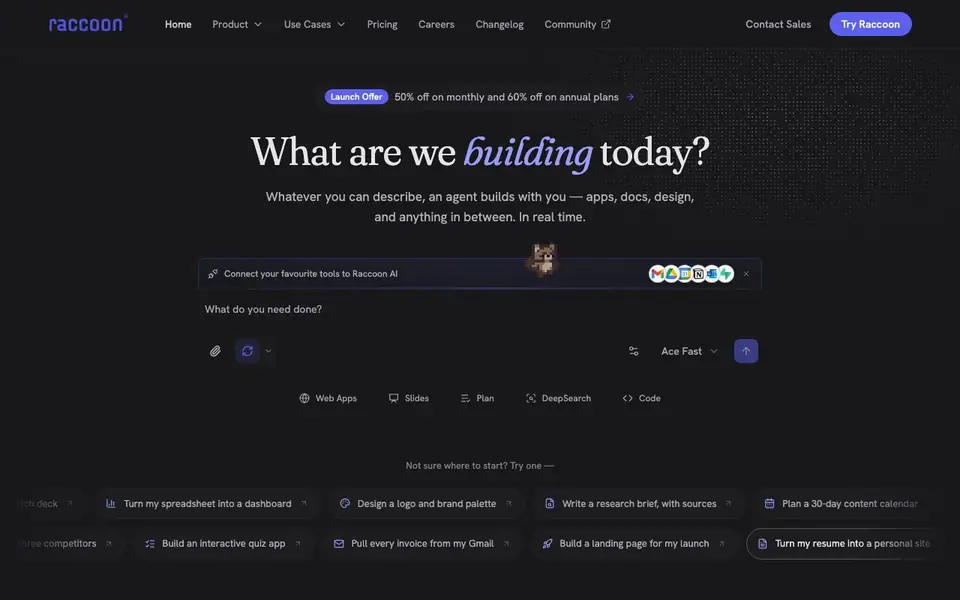
Raccoon AI is a general-purpose collaborative AI agent. It turns your ideas into finished work, from web apps and presentations to data analysis and designs. You describe what you want, and it plans, builds, and ships the result in real time, all in one workspace.
To start, you type, talk, sketch, or drop in files and screenshots. Raccoon AI then spins up its own cloud computer and lays out a live checklist you can see and steer. It works in full view, showing every reasoning step, search, and action. You can jump in at any point, point at elements, send notes, or change direction without starting over. You can also rewind to any step or fork a new path.
Raccoon AI connects to Gmail, Drive, GitHub, and 50+ other tools, so it works inside your real accounts. You can teach it workflows once, and it remembers them for reuse. It suits professionals and builders who want to automate end-to-end tasks. The website notes it is free to start, with launch offers of 50% off monthly and 60% off annual plans.
Raccoon AI features
- Multi-modal input: Type, talk, sketch, or drop in files and screenshots to describe what you need.
- Live planning checklist: See and steer the work as a visible checklist before and during execution.
- Tool connectors: Plug into Gmail, Drive, GitHub, and 50+ other apps in your real stack.
- Skill memory: Teach it a workflow once, and it keeps it reusable and editable for future tasks.
- Rewind and branch: Go back to any moment or fork a session to explore a different path.
What you can do with Raccoon AI
- Build a booking site for your studio from a simple description.
- Turn a spreadsheet into an interactive dashboard with live data.
- Create a 10-slide pitch deck for your next investor meeting.
- Automate pulling invoices from Gmail and organizing them into a tracker.
How to get started with Raccoon AI
- Go to Raccoon AI's website and click Try Raccoon to start.
- Describe your task in plain language, or drop in files and screenshots.
- Watch the agent plan and build in real time, then steer, rewind, or ship when done.
Tips for better results with Raccoon AI
- Start Raccoon AI with a clear, specific outcome like 'build a booking site for my studio' to give it a concrete target for planning and execution.
- Use Raccoon AI's live checklist to steer work early; point at elements or send notes to adjust direction without restarting the whole session.
- Connect Raccoon AI to your real accounts like Gmail or Drive before starting, so it can pull data and work inside your actual workflows.
- Teach Raccoon AI a workflow once, then reuse it for similar tasks to save time and keep results consistent across projects.
Raccoon AI pricing
Raccoon AI has a free way to start, with paid plans for heavier use. Check raccoonai.tech for current limits and prices.
What to check before you rely on Raccoon AI
- Check the pricing page for exact free tier limits and what the 50% or 60% launch discounts apply to, since the website does not list plan details.
- Verify which of the 50+ tool connectors you actually need are supported, as the website does not list them all explicitly.
- Confirm data privacy and storage policies for your files and connected accounts, as the website does not state how your data is handled.
Who Raccoon AI is for
Raccoon AI suits professionals, builders, small business owners and creators. If that is not you, the AI app builders below may fit better.
Similar tools compared with Raccoon AI
| Tool | What it is | Pricing |
|---|---|---|
| Raccoon AI | Collaborative AI agent for building anything | Freemium |
| SiGameGen | AI game builder from one sentence | Freemium |
| Durable | AI business builder and website maker | Freemium |
| Lovable | AI app and website builder | Freemium |
| Replit | AI app and website builder | Freemium |
Raccoon AI FAQ
What can I build with Raccoon AI?
You can build web apps, presentations, data dashboards, designs, videos, images, documents, and automated workflows. It is general-purpose, so if you can describe it, it can likely build it.
Is Raccoon AI free to use?
The website says it is free to start, and your first build takes minutes. It also mentions launch offers with 50% off monthly and 60% off annual plans, so there are paid tiers.
How does Raccoon AI connect to my tools?
It offers 50+ connectors including Gmail, Drive, GitHub, and your database. You switch these on, and Raccoon works inside your real accounts, applying your workflows.
Can I control what Raccoon AI does?
Yes. It plans in the open as a live checklist, and you can jump in anytime to point at elements, send notes, or change direction. You can also rewind to any step or fork a new path.
What can Raccoon AI export or publish, and can I use my own domain?
Raccoon AI can publish your work to a live link or deploy it to your own domain in one click, according to the website. It also mentions files, data, and running servers are kept for you to return to. For specific export formats beyond that, check the product documentation or contact sales.
Does Raccoon AI work on mobile devices or only on desktop?
The Raccoon AI website does not mention specific device or platform support. It describes a cloud computer and a workspace you can access, but it does not state whether it runs on mobile, tablet, or only desktop. To confirm, check the website's changelog or contact support for platform details.
What does the free plan of Raccoon AI include, and what are the paid plan limits?
The Raccoon AI website says it is free to start, and it mentions launch offers of 50% off monthly and 60% off annual plans. It does not specify what features are included in the free plan or the limits of paid plans. For exact details, visit the pricing page on the website.


