

What is Maskr.io?
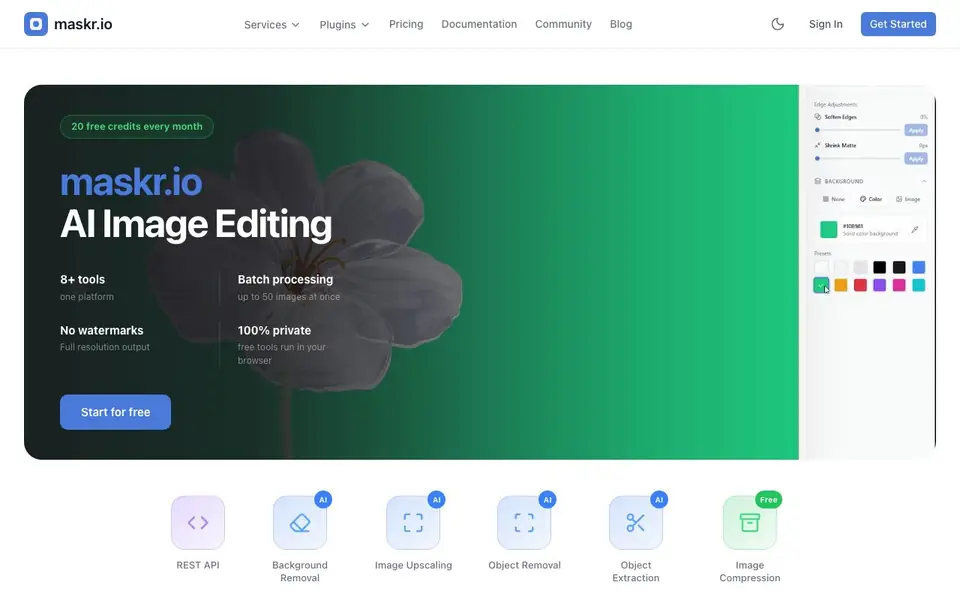
Maskr.io is an image processing ecosystem that brings together eight or more AI-powered tools on one platform. You can remove backgrounds, upscale images, remove or extract objects, compress files, convert formats, and resize images. It is built for designers and developers who need reliable, private image editing at scale.
You start by signing up and using your 20 free monthly credits. The free tools run entirely in your browser, so your images stay private. For larger jobs, you can process up to 50 images at once in batch mode. Output comes without watermarks and at full resolution, which is great for professional work.
The platform also offers a REST API, so you can integrate these tools into your own applications. Plugins are available for Figma, Adobe Photoshop, and Adobe Illustrator. This makes it suitable for both hands-on editing and automated workflows, with documentation and a help center to guide you.
Maskr.io features
- Background removal: Automatically cut out the background from your images with AI.
- Image upscaling: Enlarge images while preserving quality and detail.
- Object removal: Erase unwanted objects from your photos cleanly.
- Object extraction: Isolate specific objects from an image for reuse.
- Batch processing: Handle up to 50 images at once to save time.
What you can do with Maskr.io
- Remove backgrounds from product photos for your online store.
- Upscale low-resolution images before printing or publishing.
- Batch compress a folder of images to speed up your website.
- Extract objects from photos to use in design mockups.
How to get started with Maskr.io
- Sign up for a free account to get 20 monthly credits.
- Choose a tool like background removal or upscaling from the services list.
- Upload images individually or in batches, then download the result without watermarks.
Tips for better results with Maskr.io
- Start with the 20 free monthly credits to test Maskr.io on your own images before committing to a paid plan, and track your usage in the dashboard.
- Use Maskr.io's batch mode to process up to 50 images at once, which saves time when you have large folders of product photos or design assets.
- Run free tools directly in your browser for private editing, then switch to the REST API or plugins for automated workflows in Figma, Photoshop, or Illustrator.
- For object removal or extraction, upload the clearest image possible and test different source photos to see which yields the cleanest result with Maskr.io.
Maskr.io pricing
Maskr.io has a free way to start, with paid plans for heavier use. Check maskr.io for current limits and prices.
What to check before you rely on Maskr.io
- Check whether your 20 free monthly credits renew automatically or if you need to upgrade, since the website does not state renewal or rollover terms.
- Verify if the free browser-based tools have any file size or resolution limits, as the site does not list maximum upload dimensions.
- Confirm which output formats and compression levels are available for each tool, because the website does not specify export options beyond full resolution.
Who Maskr.io is for
Maskr.io suits designers, developers and e-commerce sellers. If that is not you, the AI photo editors below may fit better.
Similar tools compared with Maskr.io
| Tool | What it is | Pricing |
|---|---|---|
| Maskr.io | AI image editing platform with API | Freemium |
| SiPhotoEditor | AI photo editor by description | Paid |
| SiImageGen | AI image generator and photo editor | Freemium |
| Clipdrop | AI photo editing and image generation suite | See website |
| Photoroom | AI photo editor for e-commerce product visuals | Freemium |
Maskr.io FAQ
Is Maskr.io free to use?
You get 20 free credits every month. The free tools run in your browser. For more usage, you can check the pricing page on the website for paid plans.
Can I process multiple images at once?
Yes. Maskr.io supports batch processing of up to 50 images at a time, which is useful for large projects or bulk edits.
Are my images private?
The website states that free tools run in your browser, which means your images stay on your device and are not uploaded. This is a strong privacy feature.
Can developers integrate Maskr.io into their own apps?
Yes. Maskr.io provides a REST API, along with documentation and an API reference, so you can build image processing into your own software.
What file formats can Maskr.io export or convert to?
Maskr.io includes a format conversion tool, but the website does not list the specific output formats it supports. To see which file types you can convert to, check the Services or Documentation sections on the Maskr.io site.
Does Maskr.io work on mobile devices or only on desktop?
Maskr.io's free tools run in your browser, so they should work on any device with a modern browser, including mobile phones and tablets. The website does not mention dedicated mobile apps, so for the best experience, use a desktop browser if you need advanced features.
What does the free plan on Maskr.io include besides the 20 credits?
With Maskr.io's free plan, you get 20 credits every month, which you can use across all tools. The free tools run in your browser, and output comes without watermarks at full resolution. For larger jobs, batch processing up to 50 images is available, but the website does not specify if batch is limited to paid plans.


