

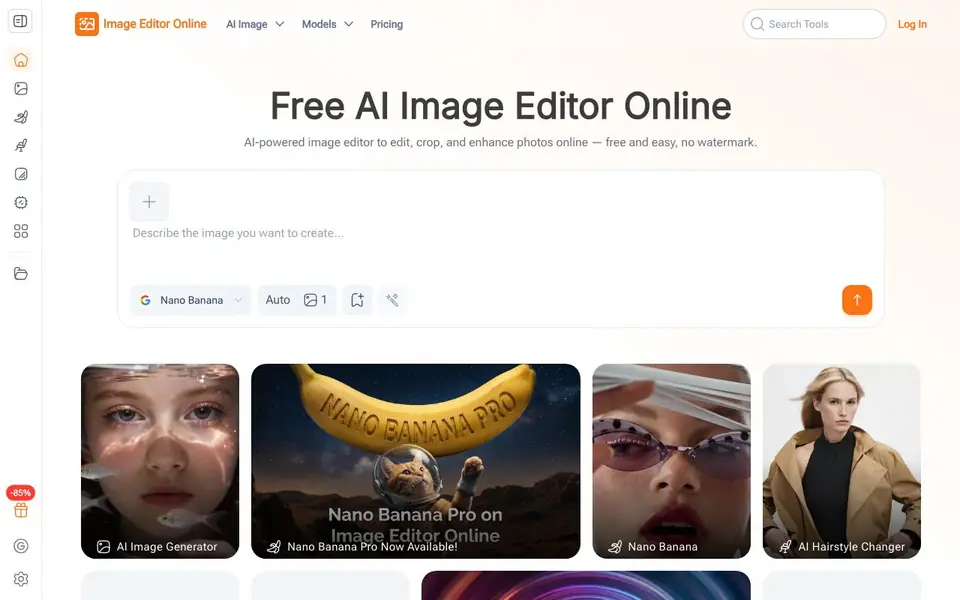
What is Image Editor?
Image Editor Online is a free AI-powered tool that makes photo editing simple and fast. It supports background removal, pose adjustment, AI clothes, and style transfer. You can edit photos and create visuals using natural language prompts, with multiple AI models and hundreds of templates. It is designed for portraits, products, and creative projects, helping you create professional visuals without advanced editing skills.
To get started, you choose an AI model that fits your editing needs, such as Nano Banana, Flux Kontext, Seedream, or GPT. Then you upload your photo and either pick a preset prompt or type a description of your desired changes. The AI processes your image in a few seconds to a minute, and you can preview and download the result in high resolution for free, with no watermark.
The tool is suited for content creators, educators, and marketers who want quick results without complex software. It offers continuous editing, so you can refine images repeatedly in one place. The website mentions it is trusted by over 100 organizations and has created 50k+ pictures, but it does not state specific pricing details beyond being free to use.
Image Editor features
- Natural language editing: Describe what you want in text, and the AI edits the photo automatically.
- Multiple AI models: Choose from Nano Banana, Flux Kontext, Seedream, and GPT for different editing styles.
- Preset prompts and styles: Click ready-made templates and prompts if you don't want to write your own.
- Continuous editing: Refine images repeatedly in one place until you are satisfied with the result.
- Free high-resolution downloads: Download your edited images in high quality at no cost, with no watermark.
What you can do with Image Editor
- Remove backgrounds from product photos for e-commerce listings.
- Apply style transfer to portraits for creative social media posts.
- Enhance colors and details in personal photos for printing.
- Create posters or learning materials using preset prompts and templates.
How to get started with Image Editor
- Choose an AI model that fits your editing needs.
- Upload your image and either pick a preset prompt or type a description of your desired changes.
- Generate the result, preview it, and download the high-quality edited photo instantly.
Tips for better results with Image Editor
- Start with a preset prompt if you are unsure how to phrase your edit, then refine the result with your own text for better control.
- Try different AI models like Nano Banana or Seedream on the same photo to see which style matches your intended outcome best.
- Use Image Editor Online's continuous editing to make small changes one at a time, checking each result before moving to the next step.
- Describe your edit with specific details, such as colors, objects, or lighting, to help Image Editor Online understand exactly what you want.
Image Editor pricing
Image Editor is free to use according to its website.
What to check before you rely on Image Editor
- Confirm the free plan includes commercial use if you need images for business, as the website does not state usage rights.
- Check if the tool supports your file format and resolution needs, since the site does not list accepted upload formats.
- Verify whether your edits are stored or shared, as the website does not explain data privacy or retention policies.
Who Image Editor is for
Image Editor suits content creators, educators, marketers and beginners. If that is not you, the AI photo editors below may fit better.
Similar tools compared with Image Editor
| Tool | What it is | Pricing |
|---|---|---|
| Image Editor | Free AI photo editor with text prompts | Free |
| SiPhotoEditor | AI photo editor by description | Paid |
| SiImageGen | AI image generator and photo editor | Freemium |
| Clipdrop | AI photo editing and image generation suite | See website |
| Photoroom | AI photo editor for e-commerce product visuals | Freemium |
Image Editor FAQ
Is Image Editor Online really free?
Yes, the website states it is free to use and offers high-quality free downloads with no watermark. There is no mention of a paid plan, so you can use it without cost.
Do I need to sign up to use it?
No, the title and description say 'No Sign-Up' is required. You can start editing photos immediately without creating an account.
What can I edit with this tool?
You can remove backgrounds, adjust poses, change clothes, apply style transfer, and enhance photos. It also supports cropping and upscaling, and you can create visuals for social media, posters, or learning materials.
Which AI models are available?
The website mentions models like Nano Banana, Flux Kontext, Seedream, and GPT. Each model has unique strengths, so you can choose one based on your editing needs.
Can Image Editor Online export my edited photos in formats other than JPEG or PNG?
The Image Editor Online website does not specify which export formats are available beyond high-resolution downloads. To see the exact formats you can export, check the download options within the tool after editing. The site focuses on free, watermark-free downloads but doesn't list all file types.
Does Image Editor Online work on mobile devices or only on desktop computers?
Image Editor Online is described as an online tool, but the website does not mention specific device support. Since it's web-based, it likely works in any browser, but for the best experience, check the site on your mobile device or desktop. The site doesn't state any platform limitations.
What does the free plan of Image Editor Online include, and are there any limits on usage?
Image Editor Online is free to use, and the website mentions free high-resolution downloads with no watermark. It does not state any limits on the number of edits or downloads. For details on any usage caps, you'd need to check the pricing page or terms, which aren't detailed in the main site content.


