

What is Free AI PDF Reader?
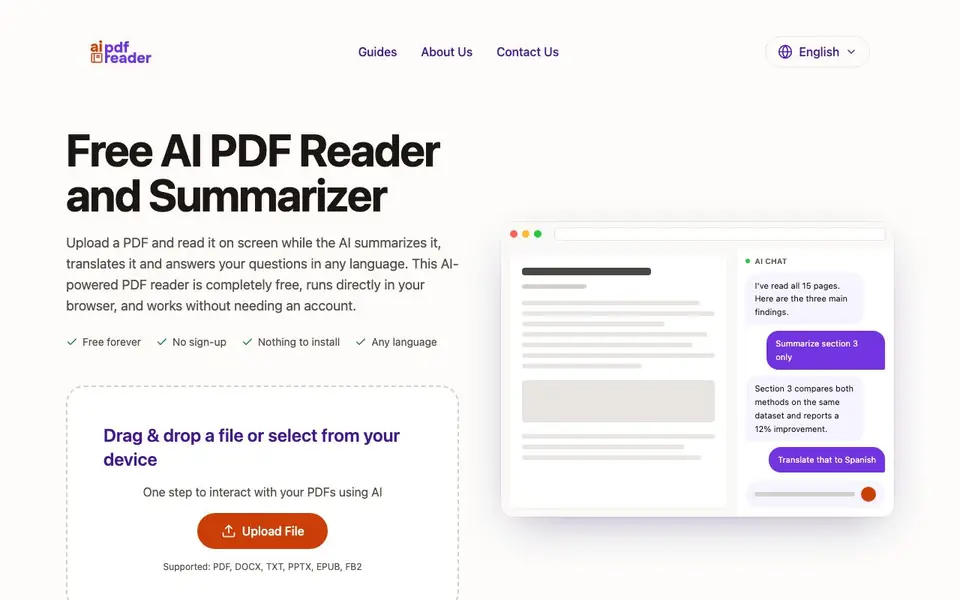
This is a free, browser-based AI tool that reads your PDFs and lets you interact with them. It summarizes entire documents, translates text, and answers your questions in a chat. You don't need to sign up or install anything, and it works with PDF, DOCX, TXT, PPTX, EPUB, and FB2 files up to 30 MB each.
To use it, you drag and drop a file or pick one from your device. The AI reads the whole document and shows key points in a summary. The original PDF stays on screen beside the chat, so you can check any claim against the website. You can ask follow-up questions, request a specific section, or translate text into another language.
It suits students, professionals, and anyone dealing with long documents. The tool also handles scanned PDFs using OCR, extracting text from images so they become readable and searchable. The website notes it reads the entire document, not just the first few pages, and offers sample files to try.
Free AI PDF Reader features
- Chat with PDF: Ask questions in plain language and get answers drawn only from your uploaded document.
- Instant summaries: Long reports become short briefs, and you can request tighter or expanded versions.
- Two-way translation: Translate document text or your questions into any language, independent of the file's language.
- Side-by-side view: The document viewer stays next to the chat, so you can verify AI answers against the original pages.
- OCR for scanned files: Extract text from scanned or photographed pages, making them readable and searchable.
What you can do with Free AI PDF Reader
- Summarize a research paper to quickly grasp its methods and results.
- Translate a contract clause into another language for easier understanding.
- Ask questions about a financial report and get answers with page references.
- Extract text from a scanned invoice so you can search and query it.
How to get started with Free AI PDF Reader
- Drag and drop a PDF or other supported file into the upload area.
- Read the AI-generated summary that appears after the document is processed.
- Use the chat to ask questions, request translations, or dive into specific sections.
Tips for better results with Free AI PDF Reader
- Upload a clean, text-based PDF first to test the tool's core features, then try a scanned file to see how well the OCR handles it before relying on it for important work.
- Ask follow-up questions in the chat to drill into specific sections or terms; the AI reads the entire document, so you can request a tighter summary or expand a single part as needed.
- Use the side-by-side view to verify every AI answer against the original page it cites; this lets you catch errors or hallucinations before you act on the information.
- Try the sample files on the Free AI PDF Reader site to see how summaries and translations behave on different document types, then upload your own files with similar structures for consistent results.
Free AI PDF Reader pricing
Free AI PDF Reader is free to use according to its website.
What to check before you rely on Free AI PDF Reader
- Check whether the free plan has any hidden limits on the number of uploads or chat messages per day, since the website does not state these details.
- Verify that your document contains no sensitive personal data before uploading, because the site does not explain how your files are stored or whether they are deleted after processing.
- Confirm that the output format meets your needs, as the website does not specify whether you can export summaries or translations as files, or if you can only copy them from the chat.
Who Free AI PDF Reader is for
Free AI PDF Reader suits students, researchers, legal professionals and business analysts. If that is not you, the AI research tools below may fit better.
Similar tools compared with Free AI PDF Reader
| Tool | What it is | Pricing |
|---|---|---|
| Free AI PDF Reader | Free AI PDF reader and summarizer | Free |
| OpenSI | AI model comparison and pricing tool | See website |
| ChatPDF | AI chat and summarizer for PDFs | Freemium |
| Consensus | AI search engine for research papers | See website |
| Scite | AI research assistant with smart citations | Free trial |
Free AI PDF Reader FAQ
Is this PDF reader really free?
Yes, the website states it is completely free, with no sign-up required and nothing to install. There is no mention of any paid plans or limits on usage.
What file formats are supported?
You can upload PDF, DOCX, TXT, PPTX, EPUB, and FB2 files. Each file can be up to 30 MB in size.
Can it read scanned PDFs?
Yes, the tool uses AI OCR to extract text from scanned or photographed pages. Once extracted, the file behaves like any other PDF and can be summarized, searched, and queried.
Does the AI answer questions from the web or only from my document?
The website says answers are drawn from the PDF you uploaded, not from the open web. This keeps responses relevant to your specific document.
Does Free AI PDF Reader work on my phone or tablet?
Free AI PDF Reader runs directly in your browser, so you can use it on any device with a modern web browser, including phones and tablets. There is no app to install. Just open the website, upload your file, and start chatting with your PDF.
What can Free AI PDF Reader export or download after processing my document?
The website does not mention any export or download features for summaries, translations, or chat answers. You can view the original PDF alongside the chat and copy text from the interface. For specific export options, check the website's guides or contact support.
Is there a file size limit or any hidden restriction with Free AI PDF Reader?
Free AI PDF Reader supports files up to 30 MB each, and the site states it is free forever with no sign-up. There is no mention of limits on the number of files you can process or on chat length. If you hit a limit, it is not documented on the website.


