

What is Foca Upscaler?
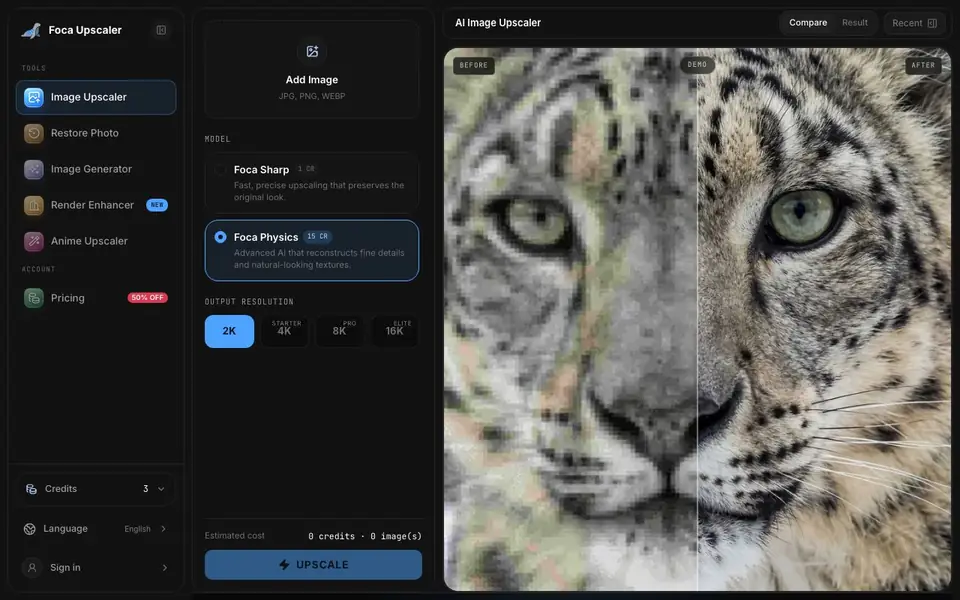
Foca Upscaler is an AI image upscaler that enlarges blurry or low-resolution images while keeping them looking natural. It offers two models: Foca Sharp for fast, artifact-free upscaling of graphics and text, and Foca Physics for reconstructing organic details like skin pores, fabric weaves, and brick textures. Output resolutions go up to 16K, and the tool is free to start.
You upload a JPG or PNG image, pick a model, choose your output resolution (2K, 4K, 8K, or 16K), and click Upscale. The tool processes your image in seconds and shows a before-and-after comparison. You can then download the high-fidelity result, which is print-ready at 300 DPI.
Foca Upscaler suits designers, photographers, e-commerce sellers, and architects who need clean, professional enlargements. the website says it preserves original structure rather than inventing fake details, and it supports batch processing on paid plans. Free credits are available to start, with paid plans for heavier use.
Foca Upscaler features
- Dual-engine models: Choose Foca Sharp for graphics or Foca Physics for texture reconstruction.
- Up to 16K output: Enlarge images to 2K, 4K, 8K, or 16K resolution.
- Physics-aware recovery: Reconstructs skin pores, fabric weaves, and brick textures naturally.
- Batch processing: Process multiple images at once on paid plans.
- Print-ready output: Delivers 300 DPI results suitable for professional workflows.
What you can do with Foca Upscaler
- Upscale product photos for sharp e-commerce listings.
- Enlarge portraits while keeping skin texture and hair strands natural.
- Enhance 3D renders without inventing new details.
- Restore architectural images with straight lines and believable materials.
How to get started with Foca Upscaler
- Drag and drop your low-res JPG or PNG image into the workspace.
- Select Foca Sharp for graphics or Foca Physics for texture reconstruction.
- Click Upscale, preview the comparison, and download your high-resolution image.
Tips for better results with Foca Upscaler
- Choose Foca Sharp for graphics and text to avoid artifacts, and Foca Physics for portraits or textures where natural detail matters most.
- Start with a free credit on Foca Upscaler to test both models on your own image before committing to a paid plan.
- Match the output resolution to your actual need, since higher settings like 8K or 16K cost more credits per image.
- For batch work, upload multiple images at once on a paid plan to save time and keep your workflow consistent with Foca Upscaler.
Foca Upscaler pricing
Foca Upscaler has a free way to start, with paid plans for heavier use. Check focaupscaler.com for current limits and prices.
What to check before you rely on Foca Upscaler
- Check how many free credits you get at signup, since the website does not state the exact number or what happens when they run out.
- Verify whether your image format is supported, as the upload area lists JPG, PNG, and WEBP but does not mention others like TIFF.
- Confirm the pricing for paid plans, because the website shows a freemium label but does not list specific prices or credit costs beyond the per-model rates shown.
Who Foca Upscaler is for
Foca Upscaler suits designers, photographers, e-commerce sellers and architects. If that is not you, the AI photo editors below may fit better.
Similar tools compared with Foca Upscaler
| Tool | What it is | Pricing |
|---|---|---|
| Foca Upscaler | AI image upscaler for natural detail | Freemium |
| SiPhotoEditor | AI photo editor by description | Paid |
| SiImageGen | AI image generator and photo editor | Freemium |
| Clipdrop | AI photo editing and image generation suite | See website |
| Photoroom | AI photo editor for e-commerce product visuals | Freemium |
Foca Upscaler FAQ
What makes Foca different from other AI image upscalers?
Foca uses a dual-engine system. Foca Sharp gives fast, artifact-free clarity for graphics and text, while Foca Physics reconstructs organic details like skin pores and fabric weaves. It prioritizes fidelity, enhancing what is there rather than inventing fake details.
Is Foca Upscaler free?
The website says it is free to start, and you get 3 credits when you sign in. Paid plans are available as pay-as-you-go or monthly/yearly subscriptions, with credits issued upfront and daily bonuses.
What file formats and resolutions does it support?
You can upload JPG, PNG, and WEBP images. Output resolutions go up to 2K, 4K, 8K, and 16K, depending on your plan. The free tier supports up to 4K on paid plans, with higher tiers for 8K and 16K.
Who is Foca Upscaler best for?
It suits designers, photographers, e-commerce sellers, and architects who need clean, professional enlargements. the website highlights use cases like portraits, 3D renders, architecture, and product shots, with print-ready output at 300 DPI.
Can Foca Upscaler handle batch processing, and is it available on the free plan?
Foca Upscaler supports batch processing, but the website says this is available on paid plans. The free plan gives you credits to start, so you can test single images. For batch work, you would need to upgrade to a paid plan. Check the pricing page for details on what each plan includes.
Does Foca Upscaler work on mobile devices or only on desktop?
The Foca Upscaler website does not specify whether it works on mobile devices or only on desktop. Since it is a web-based tool, you can likely access it through a browser on any device, but the website does not confirm this. For the most accurate information, check the site's help or support section.
What happens to my uploaded images after I upscale them with Foca Upscaler?
The Foca Upscaler website does not provide details on how it handles your uploaded images after processing. It does not mention data retention, privacy, or deletion policies. If you are concerned about your data, you should review the site's privacy policy or contact their support team for clarification.


