

What is EzRemove?
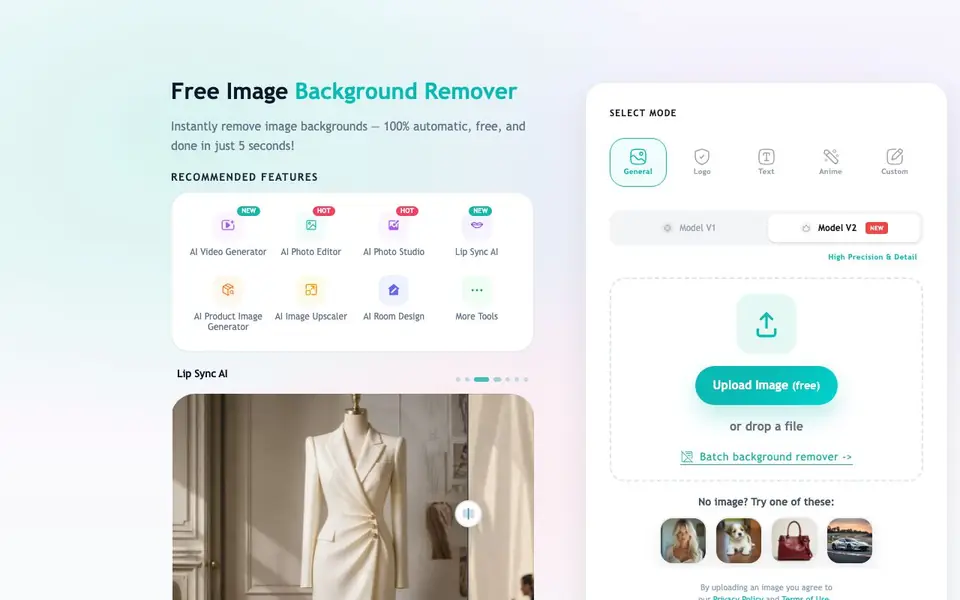
EzRemove is a free online tool that uses AI to remove backgrounds from your photos. You upload an image, and it automatically detects the subject and cuts it out, leaving a clean transparent background. It handles tricky details like hair and edges well, so your cutouts look natural. The whole process takes just a few seconds, and you can download the result as a PNG.
You can also edit the background after removal. Switch to a solid white or any color, or use the AI Background Generator to place your subject in a new scene like a studio, cafe, or beach. There's a batch mode too, so you can process multiple images at once. The tool offers different modes for general images, logos, text, anime, and custom needs, plus model options for high precision.
EzRemove suits eCommerce sellers, designers, photographers, and social media creators who need quick, consistent image cutouts. The website says it has processed 50 million images. You can start for free without signing up, just upload an image and see the result.
EzRemove features
- Automatic background removal: AI detects and removes backgrounds from your photos in seconds.
- Transparent PNG export: Get clean cutouts with transparent backgrounds, ready for any project.
- Background color change: Switch the background to white, a solid color, or any shade you need.
- AI background generator: Replace backgrounds with new scenes like studios, cafes, or beaches.
- Batch processing: Remove backgrounds from multiple images at once to speed up your workflow.
What you can do with EzRemove
- Remove backgrounds from product photos for eCommerce listings.
- Create transparent PNGs for profile pictures or social media graphics.
- Generate new scenes for product shots without reshooting.
- Batch-clean backgrounds for a full set of images from a shoot.
How to get started with EzRemove
- Go to EzRemove's website and upload your image for free.
- Choose a mode like General, Logo, or Custom, and let the AI remove the background.
- Preview the result, optionally change the background, then download your PNG.
Tips for better results with EzRemove
- Upload a high-resolution image with clear contrast between the subject and background to help EzRemove detect edges accurately, especially around hair and fine details.
- Try both Model V1 and Model V2 in EzRemove for tricky images, then compare the cutouts to pick the one that handles edges and transparency best for your specific photo.
- Use EzRemove's batch mode to process multiple product photos at once, ensuring consistent transparent backgrounds across your entire catalog without redoing each image individually.
- After removing the background, experiment with EzRemove's AI background generator to place your subject in a new scene, saving time on reshoots for social posts or ads.
EzRemove pricing
EzRemove is free to use according to its website.
What to check before you rely on EzRemove
- Check whether the free plan includes batch processing and AI background generation, as the website doesn't state any limits on these features for free users.
- Verify the maximum image file size and resolution EzRemove accepts, since the site doesn't list these details, and large files may fail to upload.
- Confirm the export format is always PNG with transparency, and check if you can download results without signing up, as the website doesn't specify account requirements for downloads.
Who EzRemove is for
EzRemove suits eCommerce sellers, designers, photographers and social media creators. If that is not you, the AI photo editors below may fit better.
Similar tools compared with EzRemove
| Tool | What it is | Pricing |
|---|---|---|
| EzRemove | Free AI background remover and editor | Free |
| SiPhotoEditor | AI photo editor by description | Paid |
| SiImageGen | AI image generator and photo editor | Freemium |
| Clipdrop | AI photo editing and image generation suite | See website |
| Photoroom | AI photo editor for e-commerce product visuals | Freemium |
EzRemove FAQ
Is EzRemove really free?
Yes, the website says the background remover is free. You can upload an image and remove the background without paying. There's no mention of a paid plan, so it appears to be completely free to use.
How fast does it remove backgrounds?
The tool works in seconds. The website says it can remove backgrounds in under 3 seconds and is 100% automatic. You just upload a photo and the AI handles the rest.
Can I change the background after removal?
Yes, after removing the background, you can switch it to a solid white or any color. You can also use the AI Background Generator to add a new scene like a studio, cafe, or beach, and preview it before downloading.
Does it work for batch processing?
Yes, EzRemove has a batch background removal feature. You can upload multiple photos at once and remove backgrounds from all of them in one go, which is useful for volume work like eCommerce listings or photo sets.
Does EzRemove work on mobile devices or only on desktop?
EzRemove is a web-based tool, so you can use it in any browser on a phone, tablet, or computer. The website does not mention dedicated apps, but as long as you can upload an image from your device's browser, you can remove backgrounds. For the best experience, a larger screen may help with fine details.
What can I do with the transparent PNG after using EzRemove?
After EzRemove removes the background, you get a transparent PNG that you can use in product listings, social media graphics, profile pictures, or any design project. You can also change the background to a solid color or use the AI generator to place your subject in a new scene. The website does not mention exporting to other formats, so PNG is the main output.
Does EzRemove require me to create an account or sign up?
No, you can start using EzRemove for free without signing up. Just upload an image and see the result. The website does not mention any account requirements for the free plan, so you can use it directly. If you need batch processing or advanced features, check the site for any additional terms.


