

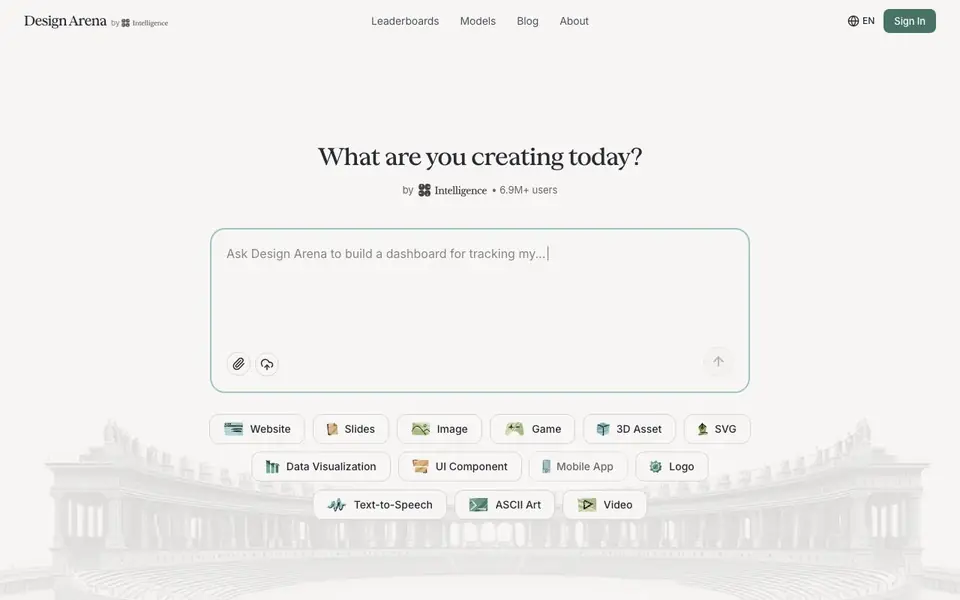
What is Design Arena?
Design Arena is a platform where you can create a wide range of things—websites, slides, images, games, 3D assets, data visualizations, and more—using some of the best AI models available. It acts as a crowdsourced benchmark, letting you see how different models perform on the same task and vote for the best results.
To use it, you describe what you want to build, and the platform shows you outputs from multiple AI models side by side. You can explore leaderboards across categories like frontend code, slides, images, video, and audio to see which models rank highest. With over 6.9 million users across 190+ countries, it's a community-driven space for discovering and comparing AI capabilities.
Design Arena suits anyone curious about AI model performance—developers, designers, and creators who want to pick the right tool for a specific job. The site also offers a blog and changelog for updates. Note that the website doesn't specify pricing details, so you'd need to check there for any costs or free access.
Design Arena features
- Model comparison: See outputs from multiple AI models for the same prompt side by side.
- Leaderboards: Browse rankings across categories like websites, images, video, and audio.
- Broad creation types: Build websites, slides, games, 3D assets, logos, and more.
- Community voting: Participate in crowdsourced benchmarking by voting on model outputs.
- Global reach: Join millions of users across 190+ countries in discovering AI models.
What you can do with Design Arena
- Compare AI models for building a website from a prompt.
- Evaluate which model creates the best slides for a presentation.
- Test image generation models for graphic design tasks.
- Find a top-ranked model for text-to-speech or video generation.
- Vote on model outputs to contribute to the benchmark.
How to get started with Design Arena
- Go to Design Arena and type what you want to create in the prompt box.
- Choose a creation type like website, slides, image, or game.
- Explore the model outputs and check leaderboards to see rankings.
Tips for better results with Design Arena
- Start with a specific, detailed prompt that describes the exact layout, style, and content you want, since Design Arena compares models on the same input and vagueness leads to inconsistent outputs.
- Use Design Arena's leaderboards to filter by category like website or slides, then run your prompt with the top-ranked models to see which produces results closest to your goal before committing.
- Vote on the outputs you like best in Design Arena, as your votes help refine the crowdsourced rankings and make future comparisons more accurate for the community.
- Try the same prompt across different model types, such as HTML slides versus Python-PPTX, to see which format suits your workflow, since Design Arena supports multiple approaches for the same task.
Design Arena pricing
Design Arena’s homepage does not list prices. Check designarena.ai for current plans.
What to check before you rely on Design Arena
- Check whether Design Arena requires an account or login to save your work or vote, since the website does not state access requirements for these features.
- Verify if your generated outputs can be exported or downloaded in usable formats, as the website does not list export options or file types.
- Review Design Arena's privacy policy and terms to see how your prompts and generated content are stored or shared, since the site does not explain data handling on its main page.
Who Design Arena is for
Design Arena suits developers, designers, AI enthusiasts and creators. If that is not you, the AI design tools below may fit better.
Similar tools compared with Design Arena
| Tool | What it is | Pricing |
|---|---|---|
| Design Arena | Crowdsourced benchmark for AI design | See website |
| Looka | AI logo maker and brand identity platform | Freemium |
| Uizard | AI-powered UI design and prototyping tool | Freemium |
| Clipdrop | AI photo editing and image generation suite | See website |
| Interior AI | AI interior design and virtual staging app | Freemium |
Design Arena FAQ
What can I create with Design Arena?
You can create websites, slides, images, games, 3D assets, data visualizations, UI components, mobile apps, logos, text-to-speech, ASCII art, and more. The platform shows how different AI models handle your request.
Is Design Arena free to use?
The website doesn't state pricing details. You'd need to check the site directly for any costs or free access information.
Who is Design Arena for?
It's for anyone interested in AI-generated design—developers, designers, and creators who want to compare models and find the best one for a specific task. It's also for those who enjoy voting in a community benchmark.
How do leaderboards work?
Leaderboards rank AI models across categories like frontend code, slides, images, video, and audio. They're based on crowdsourced voting from users, so you can see which models perform best in each area.
Can Design Arena export my creations to a file or another tool?
The Design Arena website does not mention export options or integrations with other tools. You can likely view and copy the outputs shown, but for specific export features, check the platform directly or contact their support. The site focuses on comparing models rather than detailing file handling.
Does Design Arena run on mobile devices or require a desktop browser?
Design Arena's website does not specify device or platform requirements. Since it is a web-based platform, you can probably access it from any modern browser on a phone, tablet, or computer. For the best experience, check the site on your device or look for any system requirements in their help or FAQ sections.
What does Design Arena's free plan include, if there is one?
The Design Arena website does not mention any pricing or free plan details. It is unclear whether you need to pay or create an account to use the platform. To find out what access is free, visit designarena.ai and look for pricing or sign-up information.


