

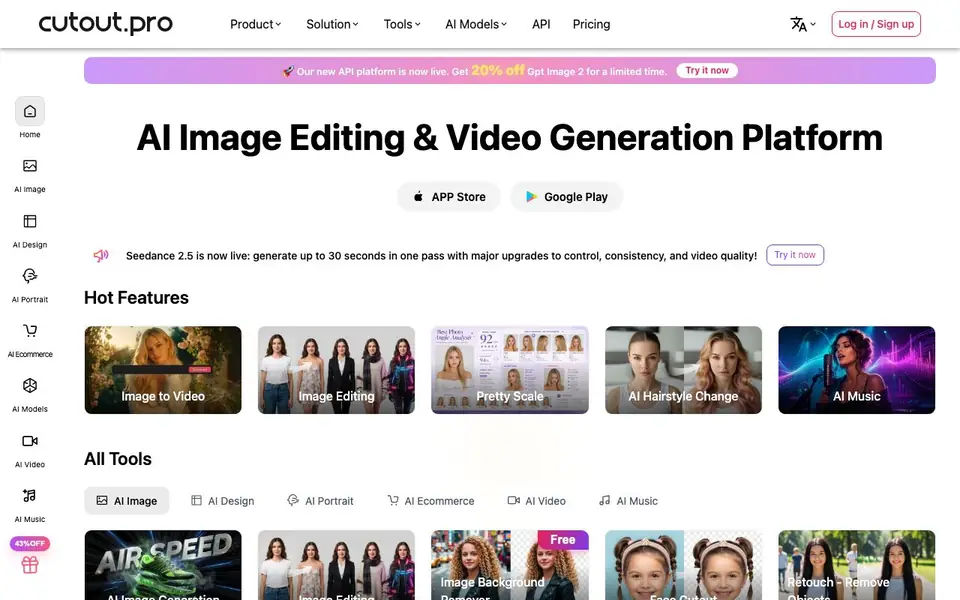
What is Cutout.Pro?
Cutout.Pro is an AI platform for editing images, generating videos, and creating music. It covers a wide range of visual tasks, from background removal and photo enhancement to AI-powered video generation and music creation. You can use it for personal creative projects, e-commerce product photos, or social media content.
You start by choosing a tool from categories like AI Image, AI Video, or AI Music. For photo editing, you upload an image and apply tools like background removal, retouching, or upscaling. For video, you can generate clips from text prompts using models like Seedance or Sora. The platform also offers an API for developers to integrate these features into their own apps.
The platform is designed for individuals and businesses. It mentions being trusted by over 25,000 businesses and offers batch processing for large volumes of photos. The website highlights a 98% uptime guarantee for its API and states that uploaded data is discarded immediately. A free tier is available to get started, with paid plans for more advanced features.
Cutout.Pro features
- Background Remover: Removes backgrounds from images in one click for clean product shots or portraits.
- Photo Enhancer & Upscaler: Improves image quality and increases resolution for sharper, more detailed photos.
- Image to Video: Turns static images into short animated video clips using AI models.
- Object Removal: Retouches photos by removing unwanted objects or people from the frame.
- AI Video Generation: Creates videos up to 30 seconds long from text prompts with models like Seedance 2.5.
What you can do with Cutout.Pro
- Remove backgrounds from e-commerce product photos in bulk.
- Generate short marketing videos from text descriptions.
- Enhance and upscale old or low-resolution photos for printing.
- Create custom portraits or wall art from your own images.
How to get started with Cutout.Pro
- Sign up for a free account on Cutout.Pro.
- Choose a tool from the AI Image, AI Video, or AI Music sections.
- Upload your image or enter a text prompt, then apply the tool and download the result.
Tips for better results with Cutout.Pro
- Start with the free tier to test background removal and upscaling on a few sample images before committing to a paid plan. This lets you judge quality for your specific use case.
- Use Cutout.Pro's batch processing for e-commerce photos to remove backgrounds from multiple images at once, saving time on repetitive tasks and ensuring consistent results across your product catalog.
- For video generation, write detailed text prompts that specify subject, motion, and style. Cutout.Pro's Seedance models respond better to clear descriptions, producing clips closer to your intended vision.
- When enhancing old photos, upload the highest resolution version you have. Cutout.Pro's upscaler works best with more source detail, so avoid compressing images before processing to get sharper results.
Cutout.Pro pricing
Cutout.Pro has a free way to start, with paid plans for heavier use. Check cutout.pro for current limits and prices.
What to check before you rely on Cutout.Pro
- Check the free tier's limits on image resolution, video length, or number of credits before starting a large project, as the website does not list specific quotas.
- Verify whether your uploaded files are stored or discarded immediately, since the site claims data is discarded but does not detail retention for all features.
- Confirm which export formats and file sizes are available for downloads, as the website does not state supported output types for edited images or generated videos.
Who Cutout.Pro is for
Cutout.Pro suits e-commerce sellers, social media creators, designers and developers. If that is not you, the AI photo editors below may fit better.
Similar tools compared with Cutout.Pro
| Tool | What it is | Pricing |
|---|---|---|
| Cutout.Pro | AI photo, video, and music creation platform | Freemium |
| SiPhotoEditor | AI photo editor by description | Paid |
| SiImageGen | AI image generator and photo editor | Freemium |
| Clipdrop | AI photo editing and image generation suite | See website |
| Photoroom | AI photo editor for e-commerce product visuals | Freemium |
Cutout.Pro FAQ
What can I do with Cutout.Pro?
You can edit photos, remove backgrounds, enhance image quality, generate videos from text or images, and create music. It covers a broad range of visual content creation tasks.
Is Cutout.Pro free to use?
Yes, there is a free tier to get started. The website also shows a 43% off promotion for paid plans, so you can upgrade for more advanced features or higher usage limits.
Can developers use Cutout.Pro?
Yes, Cutout.Pro offers an API for developers to integrate AI image and video processing into their own applications. The API promises a 98% uptime guarantee and immediate data deletion.
Who is Cutout.Pro best for?
It suits e-commerce sellers who need quick product photo edits, social media creators making videos, and businesses that process large volumes of images. The website mentions being trusted by over 25,000 businesses.
Does Cutout.Pro offer a mobile app or desktop software?
Cutout.Pro is available as a web platform and also has an app on the Apple App Store and Google Play. The website does not mention a separate desktop application, so you can use it through your browser or the mobile apps.
Can I use Cutout.Pro to edit photos in bulk for my e-commerce store?
Yes, Cutout.Pro supports batch processing for large volumes of photos, which is useful for e-commerce product images. The website highlights that it is trusted by over 25,000 businesses, and you can remove backgrounds or enhance multiple photos at once.
What happens to my uploaded data when I use Cutout.Pro?
Cutout.Pro states that uploaded data is discarded immediately after processing. This means your images and videos are not stored on their servers. For more details on data handling, check the website's privacy policy or terms of service.


