

What is codeflying?
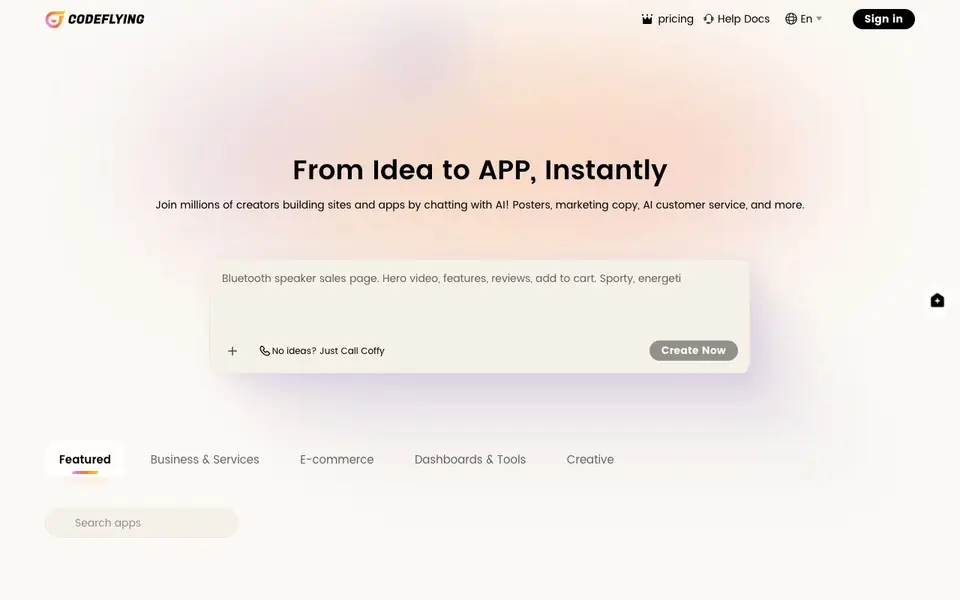
CodeFlying lets you describe your idea in plain language, and it builds a working app for you. You can create websites, mobile apps, and mini apps for platforms like Telegram, WhatsApp, and Line. It also includes AI marketing features and a smart customer agent to help you promote and support your creation.
To get started, you simply type what you want to build. The AI turns your description into a functional app. If you are not sure what to make, you can ask the built-in assistant, Coffy, for ideas. The process is designed to be fast, so you can go from idea to app in minutes.
CodeFlying is aimed at creators who want to launch apps without coding. It suits business owners, e-commerce sellers, and anyone needing dashboards or creative tools. The site mentions over one million creators already use it, but it does not list specific pricing or free plan details.
codeflying features
- Plain-language app creation: Describe your idea and CodeFlying builds the app for you.
- Multi-platform output: Create websites, mobile apps, and mini apps for Telegram, WhatsApp, and Line.
- Built-in AI marketing: Generate posters and marketing copy to promote your app.
- Smart customer agent: Add an AI-powered customer service bot to handle user questions.
- Idea assistance: Ask Coffy for suggestions if you do not have an app idea yet.
What you can do with codeflying
- Build a website for your business by describing it in a chat.
- Create a mini app for Telegram to engage your audience.
- Generate marketing posters and copy for your new app.
- Set up an AI customer service agent for your e-commerce store.
How to get started with codeflying
- Go to the CodeFlying website and sign in.
- Type your app idea in plain language, or ask Coffy for suggestions.
- Let the AI build your app, then use the built-in marketing and customer agent tools.
Tips for better results with codeflying
- Describe your app idea in specific detail, including features and target users, so CodeFlying can generate a more accurate result.
- Use CodeFlying's built-in assistant Coffy to brainstorm app concepts if you are unsure what to build.
- Ask CodeFlying to generate marketing posters and copy right after building your app to promote it effectively.
- Test the generated app on each platform you plan to use, such as Telegram or WhatsApp, since CodeFlying outputs vary by platform.
codeflying pricing
codeflying’s homepage does not list prices. Check codeflying.app for current plans.
What to check before you rely on codeflying
- Check whether CodeFlying offers a free plan or trial, since the website does not list pricing details.
- Verify what export formats or hosting options CodeFlying provides, as this is not stated on the site.
- Review CodeFlying's data privacy policy to confirm how your app and user data are handled, as this is not mentioned.
Who codeflying is for
codeflying suits creators, business owners and e-commerce sellers. If that is not you, the AI app builders below may fit better.
Similar tools compared with codeflying
| Tool | What it is | Pricing |
|---|---|---|
| codeflying | AI app builder from chat | See website |
| SiGameGen | AI game builder from one sentence | Freemium |
| Durable | AI business builder and website maker | Freemium |
| Lovable | AI app and website builder | Freemium |
| Replit | AI app and website builder | Freemium |
codeflying FAQ
What can I build with CodeFlying?
You can build websites, mobile apps, and mini apps for platforms like Telegram, WhatsApp, and Line. The site also mentions dashboards, e-commerce tools, and creative apps as featured categories.
Do I need coding skills to use CodeFlying?
No. CodeFlying is designed for you to describe your idea in plain language, and the AI builds the app for you. This makes it accessible to non-developers.
Does CodeFlying include marketing features?
Yes. It has built-in AI marketing tools that can generate posters and marketing copy. It also includes a smart customer agent for handling customer service.
Is CodeFlying free?
The website does not state pricing or a free plan. You would need to check the pricing page on the site for details.
What platforms can I export my CodeFlying app to?
CodeFlying can create websites, mobile apps, and mini apps for Telegram, WhatsApp, and Line. The website does not list other export destinations, so if you need a specific platform, check the help docs or contact support to confirm whether it is supported.
Does CodeFlying require me to create an account before I start building?
The CodeFlying website does not mention whether an account is required to start building. To get started, you typically need to sign in, but the exact steps are not detailed on the homepage. Check the help docs or the sign-in page for the most accurate information.
Can I use CodeFlying to build a customer service bot for my business?
Yes, CodeFlying includes a smart customer agent feature that lets you add an AI-powered customer service bot to handle user questions. This is designed for business owners and e-commerce sellers, so you can set it up to support your store or website directly from your created app.


