

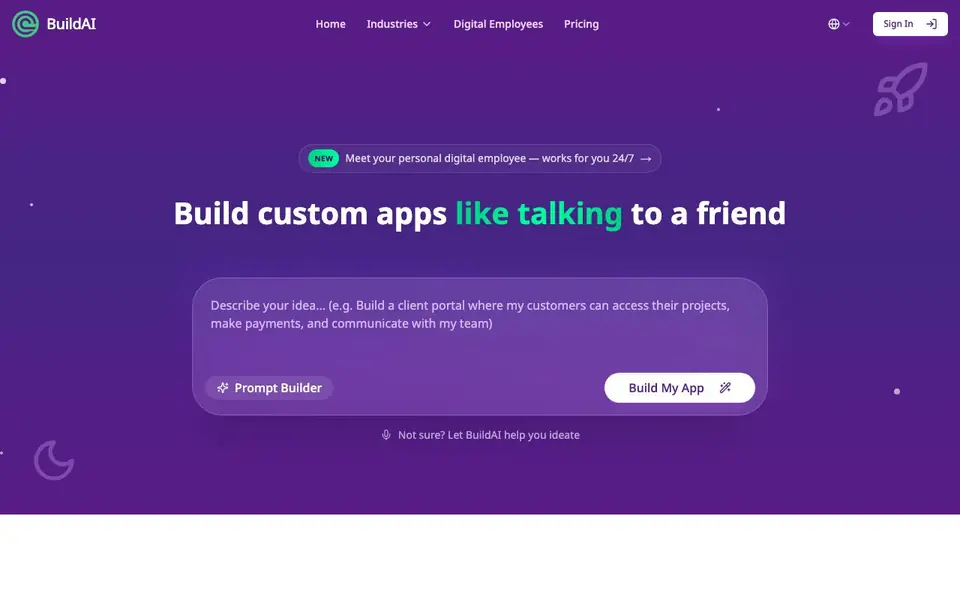
What is BuildAI?
BuildAI lets you create custom AI apps and websites by describing what you need, like you would to a colleague. It handles the technical parts—databases, authentication, and deployment—so you can focus on the idea. You can launch products, serve customers with personalized AI experiences, or build internal systems like client portals and dashboards.
Getting started is simple. You describe your app in plain language, BuildAI builds a working version with AI features, payments, and user accounts, and then you launch it on your own domain. The platform includes a built-in database, user authentication with role-based access, and payment and subscription tools. You can also connect to thousands of other tools and services to automate workflows.
BuildAI suits founders, businesses, and non-technical people who want custom software without hiring engineers. It also offers digital employees—AI agents that work for your users around the clock. The website shares customer results like saved admin hours, fewer order errors, and faster onboarding, but it does not list specific pricing plans on the homepage.
BuildAI features
- Prompt Builder: Describe your app idea in plain language and get a working app built for you.
- Built-in database: A powerful database is included with no setup required.
- User authentication: Manage users out of the box with role-based access control.
- Payments and subscriptions: Add payment tiers and recurring revenue in minutes.
- Digital employees: Build AI agents that work for your users 24/7 and learn from your content.
What you can do with BuildAI
- Launch a product idea without a technical co-founder or funding.
- Serve customers with personalized AI experiences on autopilot.
- Build internal systems like client portals, workflows, and dashboards.
- Create subscription-based apps with payment gateways and user tiers.
How to get started with BuildAI
- Describe your app idea in plain language using the Prompt Builder.
- Review the working app that BuildAI generates with AI, payments, and users built in.
- Launch it on your own domain and start growing your user base.
Tips for better results with BuildAI
- Describe your app to BuildAI as if explaining it to a colleague, including specific features and user roles, to get a more accurate working version on the first try.
- Use BuildAI's built-in database and authentication to handle user accounts and data storage, so you can focus on refining your app's core functionality and user experience.
- Test different payment tiers and subscription setups within BuildAI to see which pricing structure fits your business model, then adjust based on customer feedback.
- Connect BuildAI to your existing tools and services to automate workflows, reducing manual work and ensuring your app integrates smoothly with your current operations.
- Leverage BuildAI's digital employees to handle repetitive tasks for your users, freeing you to concentrate on growing your product and serving customers better.
BuildAI pricing
BuildAI’s homepage does not list prices. Check buildai.space for current plans.
What to check before you rely on BuildAI
- Check if BuildAI's pricing plans are listed on its website, as the homepage does not show specific costs, so you may need to contact them directly.
- Verify what data and privacy protections BuildAI offers for your app's user information, since the website does not detail these policies.
- Confirm which export formats and integration options BuildAI supports for moving your data or connecting to other tools, as this is not specified in the available information.
Who BuildAI is for
BuildAI suits founders, small business owners, non-technical builders and operations managers. If that is not you, the AI app builders below may fit better.
Similar tools compared with BuildAI
| Tool | What it is | Pricing |
|---|---|---|
| BuildAI | No-code AI app and website builder | See website |
| SiGameGen | AI game builder from one sentence | Freemium |
| Durable | AI business builder and website maker | Freemium |
| Lovable | AI app and website builder | Freemium |
| Replit | AI app and website builder | Freemium |
BuildAI FAQ
Do I need to know how to code to use BuildAI?
No. BuildAI is designed for people without coding skills. You describe your app like you would to a colleague, and it handles the technical parts like databases, authentication, and deployment.
What can I build with BuildAI?
You can build products to launch, apps or websites to serve customers, and internal systems like client portals, workflows, dashboards, and intake forms. It also supports digital employees that work for your users.
Does BuildAI handle payments and user accounts?
Yes. It includes built-in user authentication with role-based access, and you can add payments and subscriptions in minutes. You can create tiers, gate access, and generate recurring revenue.
What does BuildAI cost?
The homepage does not state specific pricing. You can check the Pricing section on BuildAI's website for plan details and costs.
Can I use BuildAI on my mobile phone or tablet?
The BuildAI website does not specify whether it works on mobile devices. You can try accessing buildai.space from your phone or tablet to see if the interface is usable. For a definitive answer, check the site's documentation or contact their support team.
Does BuildAI let me export my app's code or data?
The BuildAI website does not mention exporting code or data. It focuses on building and launching apps on your own domain. If you need to export your project or its data, check the platform's settings or help section after you start using it, or reach out to their support.
What integrations does BuildAI support with other tools?
BuildAI says you can connect to thousands of tools and services to automate workflows. The website does not list specific integrations, but it implies broad compatibility. For a detailed list, look for an integrations page on buildai.space or contact their support for specifics.


