

What is BlackInk AI?
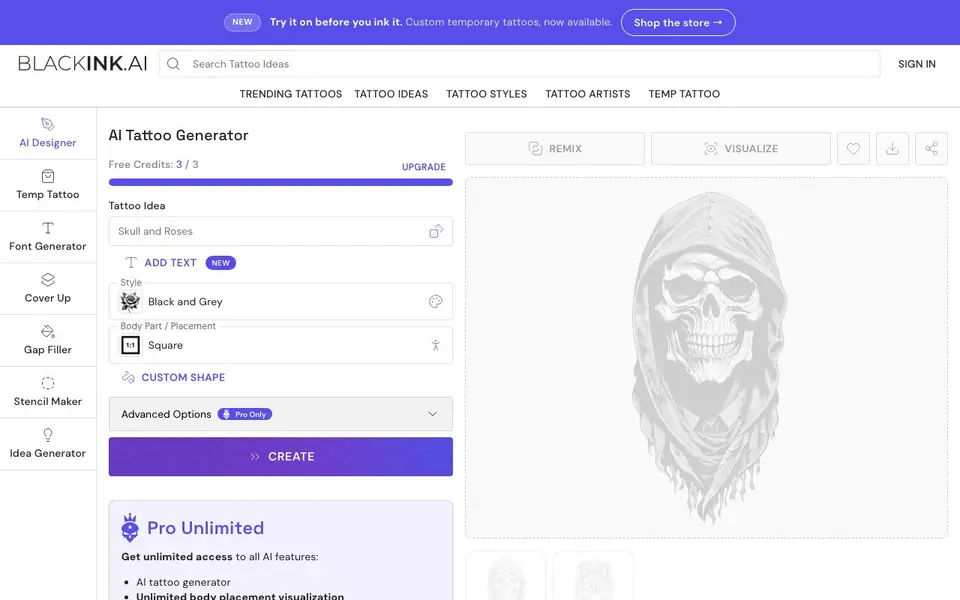
BlackInk AI is a tattoo design app that turns your ideas into visual concepts in seconds. You describe what you want, pick a style and placement, and the AI generates multiple tattoo designs for you to browse. It is built for tattoo lovers, first-timers, artists, and illustrators who want to explore options before committing to ink.
To get started, you type a tattoo idea, choose from 28 styles, and select a body part for placement. The free plan gives you 3 credits to create designs. A Pro plan unlocks unlimited generations, advanced options like complexity and line weight control, image-to-stencil conversion, and 4x resolution downloads. You can also visualize designs on different body parts to see how they fit.
The tool suits anyone exploring tattoo ideas, artists presenting options to clients, or illustrators seeking inspiration. The website mentions a custom temporary tattoo service so you can try a design before getting it permanently inked. BlackInk reports over 10 million custom designs and 1.5 million users worldwide.
BlackInk AI features
- Idea generator: Type a concept and get multiple tattoo designs in seconds.
- Style selection: Choose from 28 tattoo styles to match your vision.
- Body placement visualization: See how a design looks on different body parts.
- Stencil maker: Convert an image into a tattoo stencil for your artist.
- Pro unlimited access: Generate unlimited designs with advanced control options.
What you can do with BlackInk AI
- Create a custom tattoo design before your artist appointment.
- Visualize a tattoo on your arm or leg to test the placement.
- Generate multiple design options to show a tattoo artist.
- Explore different styles and compositions for creative inspiration.
How to get started with BlackInk AI
- Sign in and use your 3 free credits to start generating designs.
- Enter a tattoo idea, choose a style and body placement, then hit create.
- Browse the generated designs and upgrade to Pro for unlimited options.
Tips for better results with BlackInk AI
- Describe your tattoo idea with specific details like symbols, colors, or themes in BlackInk AI to get designs that match your vision more closely.
- Try different styles and body placements in BlackInk AI to see how the same idea changes, helping you narrow down what feels right before committing.
- Use the remix feature to tweak a generated design you like, adjusting elements until you get a version that feels closer to what you want.
- Start with your 3 free credits to test a few ideas and styles, then upgrade to Pro only if you need unlimited generations or advanced controls.
- Generate multiple options for the same idea and compare them side by side, so you can pick the strongest concept to show your tattoo artist.
BlackInk AI pricing
BlackInk AI has a free way to start, with paid plans for heavier use. Check blackink.ai for current limits and prices.
What to check before you rely on BlackInk AI
- Check whether the free plan's 3 credits are enough for your needs, since the website does not list prices for additional credits beyond the Pro plan.
- Verify the Pro plan's cost and billing terms, as the website does not state pricing details for the unlimited subscription.
- Confirm the export formats and resolution available on the free plan, since the website only mentions 4x downloads as a Pro feature.
- Review the privacy policy to see how your tattoo ideas and uploaded images are stored or used, as this is not described on the main page.
Who BlackInk AI is for
BlackInk AI suits tattoo enthusiasts, first-timers, tattoo artists and illustrators. If that is not you, the AI design tools below may fit better.
Similar tools compared with BlackInk AI
| Tool | What it is | Pricing |
|---|---|---|
| BlackInk AI | AI tattoo design and visualization app | Freemium |
| Looka | AI logo maker and brand identity platform | Freemium |
| Uizard | AI-powered UI design and prototyping tool | Freemium |
| Clipdrop | AI photo editing and image generation suite | See website |
| Interior AI | AI interior design and virtual staging app | Freemium |
BlackInk AI FAQ
Is BlackInk AI free to use?
Yes, you get 3 free credits to generate tattoo designs. For unlimited access, there is a Pro plan that unlocks all AI features, advanced controls, and higher resolution downloads.
What can I do with the AI tattoo generator?
You can describe a tattoo idea, pick a style and body placement, and the AI creates custom designs. You can also visualize designs on different body parts and convert images to stencils with Pro.
Who is BlackInk AI for?
It is for tattoo enthusiasts exploring ideas, first-timers trying out looks, tattoo artists generating options for clients, and illustrators seeking style inspiration.
Can I try a tattoo before getting it permanently inked?
Yes, the website offers custom temporary tattoos. You can try a design on before committing to a permanent tattoo, which is a separate service from the AI generator.
Does BlackInk AI have a mobile app or is it only on the web?
The BlackInk AI website does not mention a dedicated mobile app. You can use BlackInk AI directly in your web browser on any device with internet access. For the most current information about app availability, check the official BlackInk AI website.
What does the free plan of BlackInk AI include besides the 3 credits?
The free plan gives you 3 credits to create designs. With those credits, you can generate tattoo ideas, choose from 28 styles, and visualize designs on body parts. The website does not specify other free features, so check the pricing page for details on what else may be included.
Can BlackInk AI export or download my tattoo designs in high resolution?
BlackInk AI offers 4x super resolution downloads, but this is listed as a Pro-only feature. The website does not specify what export formats are available on the free plan. For exact download options, review the pricing or feature list on the BlackInk AI site.


