

What is Artedge AI?
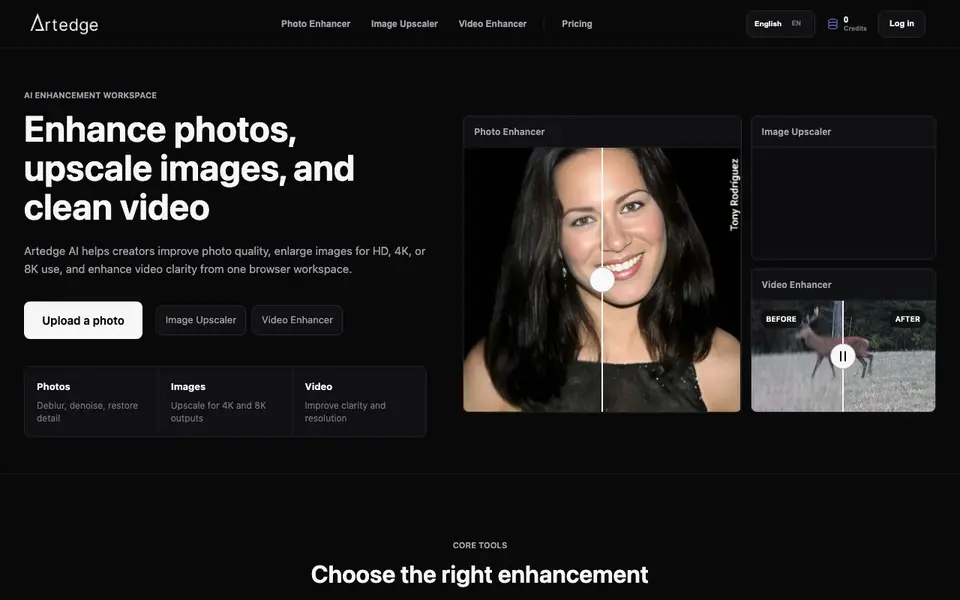
Artedge AI is an online workspace for creators who need cleaner media without a complex editing suite. It combines three core tools: an AI photo enhancer for blurry or noisy images, an image upscaler for larger exports, and a video enhancer for clearer clips. You can handle all these tasks from one browser tab.
To get started, you upload a photo, image, or video clip. The tool keeps your file visible while the task prepares. You can use the recommended settings for a fast result, or open advanced controls when you need a specific resolution or workflow. After processing, you review the output and download the improved media.
This tool suits e-commerce sellers cleaning product photos, people restoring old portraits, and marketers preparing social videos or thumbnails. The website does not mention any file size limits or supported formats, so you may want to check those details before uploading large files.
Artedge AI features
- AI Photo Enhancer: Improves soft, noisy, or low-detail photos for portraits, product shots, documents, and social visuals.
- Image Upscaler: Increases image resolution for larger exports, sharper crops, print preparation, and 4K or 8K assets.
- Video Enhancer: Enhances clips online by improving clarity and reducing visual softness for cleaner high-resolution results.
- Simple defaults: Each tool keeps default settings simple, with advanced controls available when you need more precision.
- Browser workspace: All three enhancement tools work in one online workspace without a complex editing suite.
What you can do with Artedge AI
- Clean product images and sharpen detail for e-commerce storefronts and marketplace listings.
- Restore older photos and improve face detail for personal archives and printing.
- Prepare clearer campaign visuals, social clips, and thumbnails for marketing.
- Upscale small images to HD, 4K, or 8K for presentations and creative projects.
How to get started with Artedge AI
- Upload a photo, image, or video clip to the Artedge AI workspace.
- Use the recommended quality settings, or open advanced controls for specific resolutions.
- Review the finished output and download the enhanced media for your project.
Tips for better results with Artedge AI
- Start with the recommended settings in Artedge AI for a fast result, then switch to advanced controls only when you need a specific resolution or workflow.
- Upload the clearest version of your file you have, since Artedge AI works best when it enhances existing detail rather than inventing missing information from heavily degraded media.
- Use Artedge AI's image upscaler when the main issue is resolution, and the photo enhancer when the image is blurry or noisy, to match the tool to the actual problem.
- Review the output on-screen before downloading from Artedge AI, and compare it to the original to confirm the enhancement meets your needs for the final export.
- checks
Artedge AI pricing
Artedge AI’s homepage does not list prices. Check artedge.ai for current plans.
What to check before you rely on Artedge AI
- Check whether Artedge AI states supported file formats and maximum upload sizes, since the website does not list these details before you upload.
- Confirm the pricing and credit system for Artedge AI, as the website does not display any plan costs or credit limits.
- Verify the export formats and resolution options Artedge AI provides, because the site does not specify which download formats are available after processing.
Who Artedge AI is for
Artedge AI suits e-commerce sellers, photographers, marketers and creators. If that is not you, the AI photo editors below may fit better.
Similar tools compared with Artedge AI
| Tool | What it is | Pricing |
|---|---|---|
| Artedge AI | AI photo, image, and video enhancer | See website |
| SiPhotoEditor | AI photo editor by description | Paid |
| SiImageGen | AI image generator and photo editor | Freemium |
| Clipdrop | AI photo editing and image generation suite | See website |
| Photoroom | AI photo editor for e-commerce product visuals | Freemium |
Artedge AI FAQ
What can Artedge AI enhance?
Artedge AI can enhance photos, upscale images, and improve video clarity. You can deblur, denoise, and restore detail in photos, enlarge images for HD, 4K, or 8K use, and clean up soft or compressed video clips.
What is the difference between photo enhancement and image upscaling?
Photo enhancement is for blurry, noisy, or faded images, improving detail and edges. Image upscaling is for small images that need larger output, increasing resolution for HD, 4K, or 8K presentation. Use each based on your main problem.
Can Artedge AI enhance video quality online?
Yes, Artedge AI has a video enhancer that works online in your browser. It improves clarity, reduces visual softness, and prepares cleaner high-resolution video results from your clips.
Is Artedge AI free to use?
The website does not state pricing details or whether a free plan exists. You can check the Pricing section on Artedge AI's website for current plans and credit options.
Does Artedge AI require an account to use the tools?
The website does not mention whether you need an account to use Artedge AI. It shows a login option and a credits counter, which suggests you may need to log in or have credits, but the site does not specify the account requirements. Check the pricing or login page for details.
What file formats can Artedge AI handle for uploads?
Artedge AI's website does not list specific file formats for photos, images, or videos. It only says you can upload a photo, image, or video clip. To confirm which formats are supported, you may need to try uploading a file or contact support, as the site does not provide this information.
Can Artedge AI export enhanced files in formats like PNG or MP4?
The website does not mention export formats for Artedge AI. It only says you can download the enhanced output after processing. For details on available export formats, such as PNG or MP4, you should check the tool after uploading a file or look for documentation on the site.


