

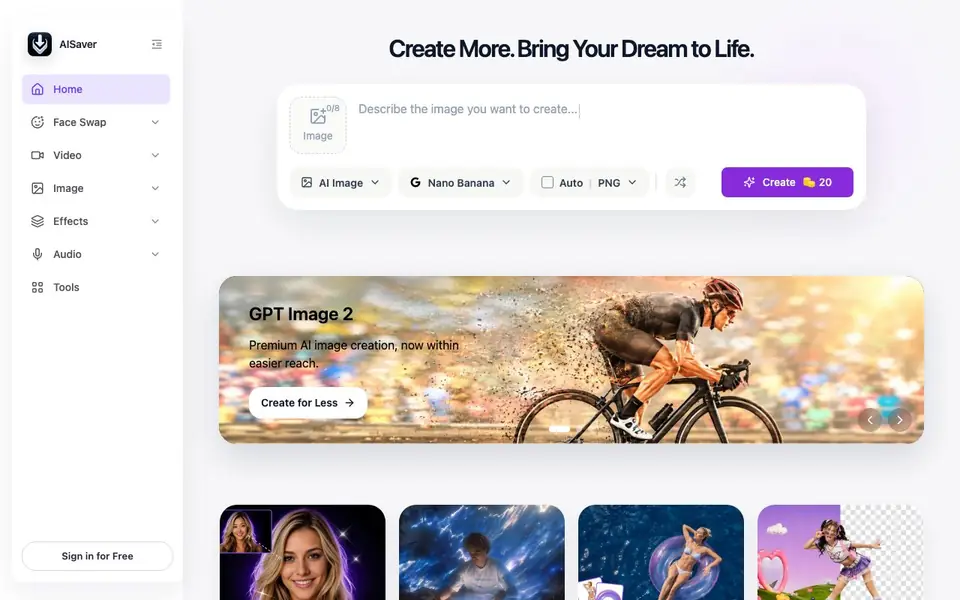
What is AISaver?
AISaver is an all-in-one online platform for creating and editing images and videos with AI. It focuses on face swap tools for photos, videos, and GIFs, including multiple face swaps in one file. It also offers video tools like image-to-video, video enhancement, and watermark removal, plus image tools such as an AI photo editor, image enhancer, and clothes changer.
You start by choosing a tool, like Video Face Swap or Image to Video. You upload your file or describe an image, and the AI processes it online. The platform integrates models like Nano Banana Pro, Kling AI, and Seedance 2.0 to power generation and editing. Results are delivered quickly, and you can sign in for free to get started.
AISaver suits social media creators, marketers, and everyday users who want fast, accessible editing without professional software. The site highlights over 20 million global users and 800 organizations. It does not specify file size limits or processing times, so you should check the website for those details.
AISaver features
- Video Face Swap: Replace faces in videos with realistic motion tracking and expression preservation.
- Photo Face Swap: Swap faces in images with natural skin tones and accurate facial alignment.
- Multiple Face Swap: Swap several faces in one image or video at once with clean blending.
- Image to Video: Turn static photos into dynamic AI videos with smooth motion effects.
- Image Enhancer: Brighten low-detail images quickly to improve clarity.
What you can do with AISaver
- Create fun face swap videos for social media entertainment.
- Swap faces in group photos for team content or creative projects.
- Generate short AI videos from still images for marketing clips.
- Enhance low-quality photos before sharing them online.
How to get started with AISaver
- Go to AISaver's website and choose a tool like Face Swap or Image to Video.
- Upload your photo, video, or GIF, or describe an image you want to create.
- Let the AI process your file online, then download the result.
Tips for better results with AISaver
- Start with a clear, well-lit source photo of the face you want to swap, as AISaver matches skin tones and lighting to the target image for more natural results.
- For video face swaps, use short clips with steady camera movement and minimal obstructions, so AISaver can track expressions and motion accurately without glitches.
- Try the Multiple Face Swap tool for group photos, but upload a high-resolution image first, because AISaver blends several faces better when details are sharp and distinct.
- Use the Image Enhancer on low-quality photos before applying other edits, since AISaver boosts clarity first, which improves the final output of face swaps or video generation.
AISaver pricing
AISaver has a free way to start, with paid plans for heavier use. Check aisaver.io for current limits and prices.
What to check before you rely on AISaver
- Check the website for file size limits and processing times, as AISaver does not state these details, and they may affect your workflow for large videos or images.
- Review the free plan's watermarks or resolution caps before relying on AISaver for professional work, since the pricing label is freemium but specifics are not listed.
- Confirm your data privacy and storage policies on AISaver's site, because it does not explain how uploaded files are handled or whether they are deleted after processing.
Who AISaver is for
AISaver suits creators, marketers, social media users and designers. If that is not you, the AI photo editors below may fit better.
Similar tools compared with AISaver
| Tool | What it is | Pricing |
|---|---|---|
| AISaver | AI face swap and media creation platform | Freemium |
| SiPhotoEditor | AI photo editor by description | Paid |
| SiImageGen | AI image generator and photo editor | Freemium |
| Clipdrop | AI photo editing and image generation suite | See website |
| Photoroom | AI photo editor for e-commerce product visuals | Freemium |
AISaver FAQ
What can I do with AISaver?
You can swap faces in videos, photos, and GIFs, including multiple faces at once. You can also turn images into videos, enhance videos and images, remove watermarks, and change clothes in photos.
Is AISaver free to use?
The site says you can sign in for free, and it mentions creating for less. It does not clearly state whether all tools are free or if there are paid plans, so check the website for current pricing details.
Who is AISaver for?
It is built for creators, marketers, designers, and everyday users who want quick AI editing. The site highlights over 20 million global users and 800 organizations, suggesting it serves both individuals and businesses.
What AI models does AISaver use?
AISaver integrates models like Nano Banana Pro, Nano Banana, Kling AI, and Seedance 2.0. These power image and video generation with sharper details and smoother rendering, according to the site.
Can AISaver export my edited videos or images in different formats?
The AISaver website does not mention specific export formats or download options. You can check the tool's interface after processing a file to see what formats are available. For detailed information, visit the website's help or FAQ section.
Does AISaver work on mobile devices or only on desktop?
AISaver is an online platform, so you can access it through a web browser on any device with internet, including smartphones and tablets. The website does not specify dedicated mobile apps, but the browser version should work on most devices.
What does the free plan of AISaver include, and are there limits?
AISaver is freemium, meaning you can sign in for free to start using tools. The website does not detail what the free plan includes or its limits, such as number of files or processing time. For specifics, check the pricing or subscription page on the site.


