

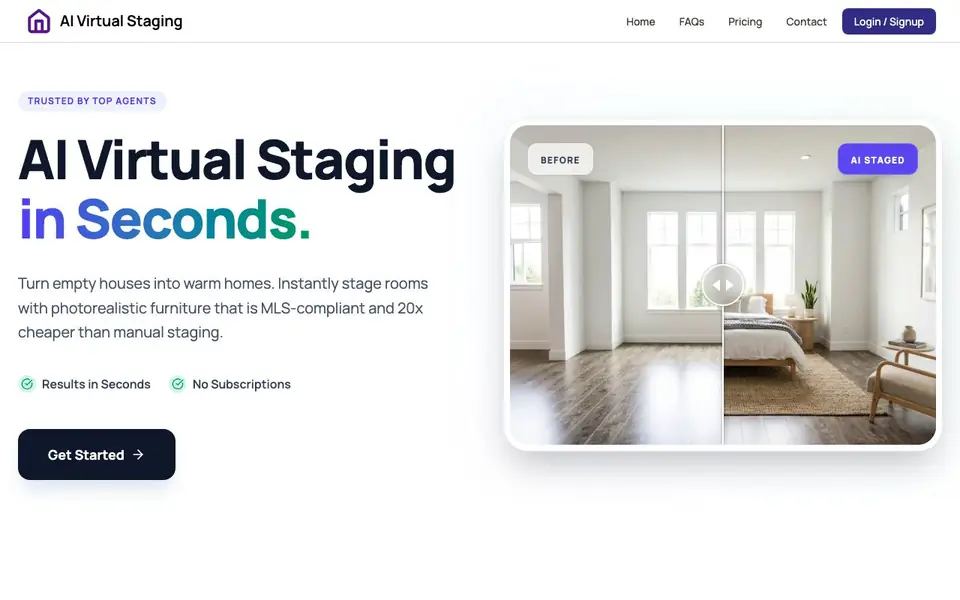
What is AI Virtual Staging?
AI Virtual Staging turns empty or furnished room photos into staged, photorealistic images for real estate listings. It is built for agents, brokers, property managers, home sellers, builders, and investors who want faster listing turnaround and lower marketing costs. The tool claims results are 20x cheaper than manual staging and fully MLS-compliant.
You start by uploading a high-res JPG, PNG, or WEBP photo of a room. Then you choose an interior style and toggle furniture removal or addition. The AI engine renders furniture with realistic shadows and lighting in under 30 seconds. You can download high-resolution images up to 4K, ready to list.
The website highlights benefits like stronger first impressions, faster listing turnaround, lower costs, and consistent design quality. It supports luxury homes, rentals, new developments, and renovation projects. It also mentions unlimited regenerations until you are satisfied, and that the room layout stays untouched. The site does not state specific pricing details, so you would need to check the Pricing page for costs.
AI Virtual Staging features
- Instant staging: Generates staged images in about 20 seconds per photo.
- MLS-compliant results: Preserves perspective and lighting to meet MLS guidelines.
- High-resolution output: Delivers images up to 4K for professional listings.
- Style selection: Lets you choose preferred interior styles for each room.
- Furniture toggle: Adds or removes furniture with a single click.
What you can do with AI Virtual Staging
- Stage vacant rooms to attract more buyer inquiries.
- Showcase rental units without physical furniture costs.
- Market new developments before construction finishes.
- Highlight renovation potential for fix-and-flip properties.
How to get started with AI Virtual Staging
- Upload a photo of an empty or furnished room in JPG, PNG, or WEBP format.
- Select your preferred interior style and toggle furniture removal or addition.
- Let the AI generate the staged image, then download the high-resolution result.
Tips for better results with AI Virtual Staging
- Upload a high-resolution photo with good lighting and a clear view of the room, as the AI preserves perspective and shadows for MLS compliance.
- Choose a style that matches the property's architecture and target buyer, and use the furniture toggle to remove clutter before adding new pieces.
- Regenerate unlimited times until the furniture placement and lighting look natural, since the tool claims to keep the room layout untouched.
- Use AI Virtual Staging for vacant or furnished rooms, and compare the staged result against the original photo to ensure the perspective stays accurate.
AI Virtual Staging pricing
AI Virtual Staging’s homepage does not list prices. Check aivirtualstaging.net for current plans.
What to check before you rely on AI Virtual Staging
- Check the Pricing page for costs, since the website does not state specific prices or whether a subscription is required.
- Verify the tool's output meets your local MLS guidelines, even though the site claims full compliance, as rules vary by region.
- Confirm the supported image formats and maximum file size before uploading, as the site only mentions JPG, PNG, and WEBP without limits.
Who AI Virtual Staging is for
AI Virtual Staging suits real estate agents, brokers and agencies, property managers, home sellers, builders and developers and investors and flippers. If that is not you, the AI photo editors below may fit better.
Similar tools compared with AI Virtual Staging
| Tool | What it is | Pricing |
|---|---|---|
| AI Virtual Staging | AI virtual staging for real estate photos | See website |
| SiPhotoEditor | AI photo editor by description | Paid |
| SiImageGen | AI image generator and photo editor | Freemium |
| Clipdrop | AI photo editing and image generation suite | See website |
| Photoroom | AI photo editor for e-commerce product visuals | Freemium |
AI Virtual Staging FAQ
What does AI Virtual Staging do?
It takes photos of empty or furnished rooms and adds realistic furniture and decor using AI. You upload a photo, choose a style, and get a staged image in seconds, ready for real estate listings.
Is the result MLS-compliant?
Yes, the website says the tool preserves perspective and lighting to ensure compliance with MLS guidelines. This means the staged images should not misrepresent the property's layout.
How fast is the staging process?
The AI generates the staged image in under 30 seconds, with an instant turnaround of about 20 seconds. You can also regenerate unlimited times until you are satisfied with the result.
What are the pricing options?
The website mentions 'no subscriptions' and that it is 20x cheaper than manual staging, but it does not list specific prices. Check the Pricing page on the site for current plans and costs.
What image formats and file sizes does AI Virtual Staging accept for uploads?
AI Virtual Staging accepts high-resolution JPG, PNG, and WEBP photos. The website does not specify file size limits, so for best results, use the highest resolution images you have. If you encounter upload issues, check the site's FAQ or contact support for details.
Does AI Virtual Staging require an account or subscription to use?
The website mentions a Login/Signup option and states there are no subscriptions. It does not clarify whether an account is mandatory for using the tool. To know if you can try it without signing up, visit the Pricing or Contact page or start the signup process to see the requirements.
Can AI Virtual Staging export images in formats other than JPG or PNG?
AI Virtual Staging delivers high-resolution images up to 4K, but the website does not specify the export file formats. It mentions downloading images that are MLS-ready. For exact export options, check the site's FAQ or contact support for clarification.


