

What is ai image editor?
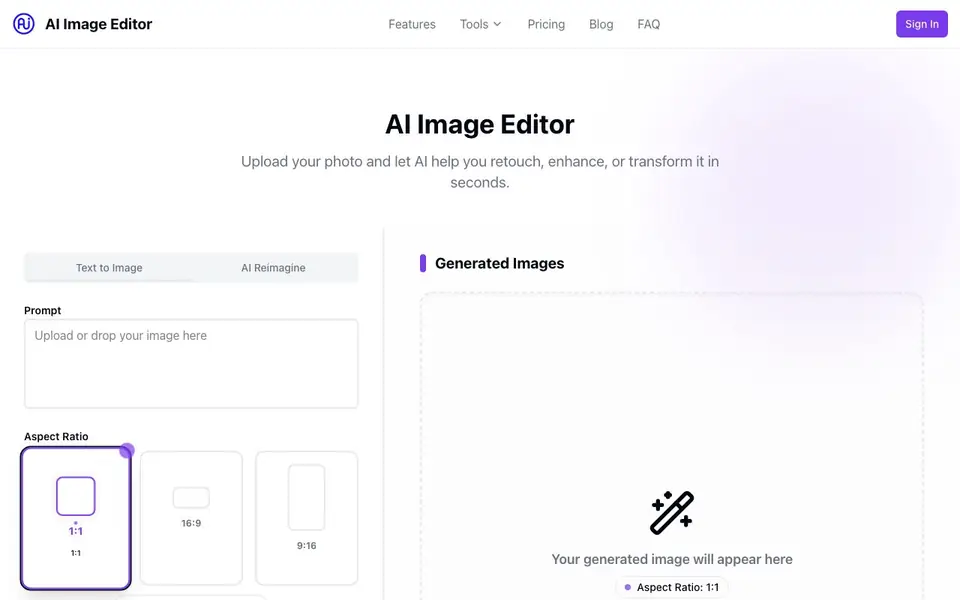
AI Image Editor is an online tool that brings several photo editing and image generation features into one place. You can upload your own photos and use AI to remove backgrounds, retouch skin and lighting, apply creative filters, or upscale images without losing quality. It also includes a text-to-image generator and an AI outfit generator that lets you try different clothing styles on your own photo.
To get started, you upload an image by dragging and dropping it or selecting it from your device. Then you pick an editing tool, such as background removal, filters, or retouching. The AI processes the image and you download the result. For the outfit generator, you upload a photo and choose a style, and the tool shows you how it looks. For text-to-image, you type a prompt, pick an aspect ratio, and spend credits to generate a new image.
The tool is designed for anyone, even without design skills. It has a free plan with limited features, including 5 free edits per month and basic background removal. Paid plans start at $19.99 per month for more credits and advanced tools. The website mentions features like batch editing and 4K export on higher plans, but does not specify all supported file formats.
ai image editor features
- AI Background Removal: Automatically remove or replace image backgrounds with one click.
- Photo Retouching: Enhance skin, adjust lighting, and fix imperfections instantly.
- Creative Filters: Apply artistic styles, color grading, and modern effects effortlessly.
- Image Upscaling: Increase resolution without losing quality using AI upscaling.
- AI Outfit Generator: Upload your photo and try different outfits, clothing styles, and fashion looks.
What you can do with ai image editor
- Remove backgrounds from product photos for e-commerce listings.
- Retouch portraits to improve skin and lighting before sharing.
- Upscale low-resolution images for printing or larger displays.
- Try on different outfits virtually to explore new fashion styles.
- Generate new images from text prompts for creative projects.
How to get started with ai image editor
- Upload your image by dragging and dropping it or selecting it from your device.
- Choose an editing tool like background removal, filters, retouching, or upscaling.
- Download your enhanced image instantly after the AI processes it.
Tips for better results with ai image editor
- Start with a high-resolution, well-lit photo when using AI Image Editor, especially for background removal and retouching, to get cleaner and more accurate results.
- For text-to-image generation in AI Image Editor, write detailed prompts that specify subject, style, lighting, and composition, and choose the aspect ratio before spending your credits.
- Use AI Image Editor's free plan for simple tasks like basic background removal or image resizing, and save your monthly 5 edits for projects where the paid features matter most.
- When using AI Image Editor's outfit generator, upload a front-facing, full-body photo with clear clothing lines so the AI can map new styles onto your figure accurately.
ai image editor pricing
ai image editor has a free way to start, with paid plans for heavier use. Check aiimageeditor.info for current limits and prices.
What to check before you rely on ai image editor
- Confirm how many credits remain on your AI Image Editor plan before starting a batch of edits, since text-to-image generation costs 3 credits per image and paid plans include set amounts.
- Check whether AI Image Editor supports the file format you need to export, as the website lists features like 4K export on Premium but does not specify all accepted input or output formats.
- Review the free plan limits on AI Image Editor before relying on it for work, since it includes only 5 edits per month and basic background removal, which may not suit frequent use.
Who ai image editor is for
ai image editor suits content creators, e-commerce sellers, social media users and casual editors. If that is not you, the AI photo editors below may fit better.
Similar tools compared with ai image editor
| Tool | What it is | Pricing |
|---|---|---|
| ai image editor | AI photo editor and outfit generator | Freemium |
| SiPhotoEditor | AI photo editor by description | Paid |
| SiImageGen | AI image generator and photo editor | Freemium |
| Clipdrop | AI photo editing and image generation suite | See website |
| Photoroom | AI photo editor for e-commerce product visuals | Freemium |
ai image editor FAQ
Is the AI Image Editor free to use?
Yes, there is a free plan that includes limited features, such as basic background removal, limited filters, image resizing, and 5 free edits per month. For more credits and advanced tools, you can upgrade to a paid plan.
Can I remove backgrounds from photos?
Yes, the tool has an AI background removal feature that automatically removes or replaces image backgrounds with one click. The free plan includes basic background removal, while higher plans offer high-quality background removal.
Do I need design skills to use this tool?
No, the tool is designed to be user-friendly and does not require design skills. You just upload an image, choose a tool, and download the result. The website emphasizes that professional photo editing is made available to everyone.
What file formats are supported?
The website does not specify which file formats are supported. You can check the tool's FAQ section or try uploading a common format like JPG or PNG to see if it works.
Can AI Image Editor export images in 4K resolution?
Yes, AI Image Editor supports 4K export, but this feature is available only on the Premium plan, which costs $39.99 per month. The website mentions 4K export support on that plan, so if you need high-resolution output, you'll need to upgrade from the free or Pro plans.
Does AI Image Editor offer a free trial or a free plan with credits?
AI Image Editor has a free plan that includes 5 free edits per month, basic background removal, limited filters, and image resizing. It does not mention a separate trial. For more credits and advanced features, you can upgrade to Pro at $19.99 per month or Premium at $39.99 per month.
Can I use AI Image Editor on my mobile phone or tablet?
The AI Image Editor website does not specify whether it works on mobile devices or has dedicated apps. Since it's an online tool, you may be able to access it through a mobile browser, but the site doesn't confirm this. Check the website or contact support for device compatibility details.


