
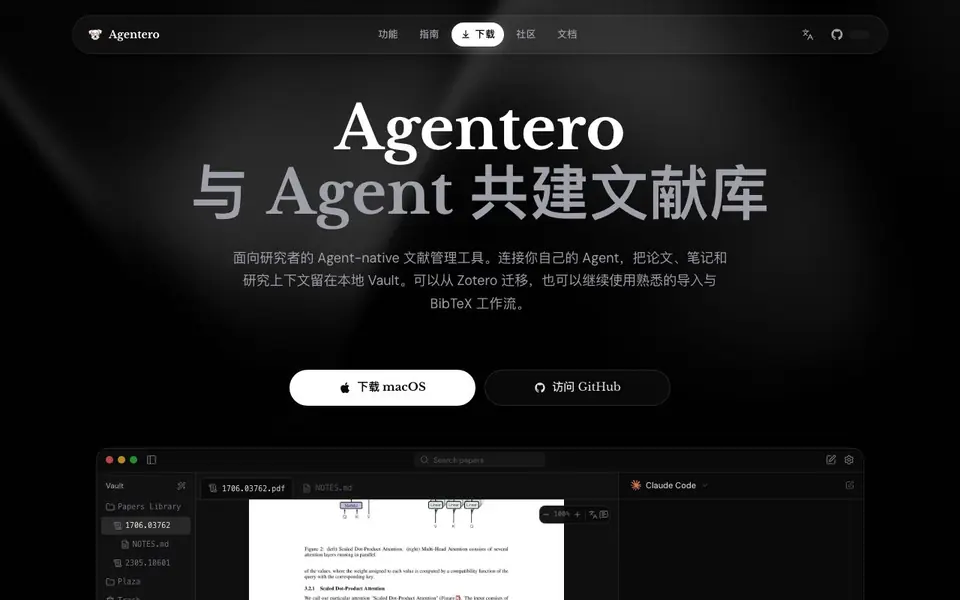
What is Agentero?
Agentero is a desktop app for researchers who want to build a personal knowledge base from academic papers. It keeps your PDFs, notes, and annotations in a local Vault, so your research context stays on your machine. You can import your existing Zotero library, including tags and notes, and continue using familiar workflows like browser extensions and BibTeX export.
When you open a PDF, Agentero automatically recognizes figures, tables, and equations, making them searchable and structured. You can select any formula or paragraph and ask your own AI agent—like Claude Code, Codex, or OpenCode—to explain it, with the full paper context provided. The agent's answers are saved into your notes as wikilinks, and related papers surface automatically.
Over time, your notes form a knowledge graph that you can browse and navigate. You can also access a remote Vault over SSH, translate papers with side-by-side original and translated text, and use the CLI to integrate your library into scripts. Agentero is open source under the MIT license and available for macOS, Windows, and Linux.
Agentero features
- Local Vault: Stores your papers, notes, and relationships in a folder you choose, keeping data on your machine.
- AI PDF conversation: Ask your own agent about any part of a paper, with full context from the document.
- Figure and formula recognition: Automatically detects and structures tables, equations, and figures in PDFs.
- Knowledge graph: Builds a visible, navigable graph from your notes and wikilinks.
- Zotero import: One-click import of your existing Zotero library with tags, notes, and attachments preserved.
What you can do with Agentero
- Import your Zotero library and continue your research without losing your notes.
- Ask an AI agent to explain a complex formula or figure in a paper you're reading.
- Build a personal knowledge graph of related papers and concepts as you read.
- Export your references as BibTeX or BibLaTeX for your next publication.
How to get started with Agentero
- Download the Agentero desktop app for your platform from the website or GitHub Releases.
- Import your existing Zotero library or start adding papers via browser extension or RSS.
- Open a PDF, select any text or formula, and ask your connected AI agent to explain it.
Tips for better results with Agentero
- Import your Zotero library first so tags and notes carry over, then open a PDF and let Agentero recognize figures and formulas before asking questions.
- Select a specific formula or paragraph and ask your own agent through Agentero, then save the answer as a wikilink to grow your knowledge graph over time.
- Use Agentero's CLI to script your library workflows, and connect a remote Vault over SSH if you need access from another machine while keeping data local.
- Export references as BibTeX or BibLaTeX from Agentero when writing papers, and check the knowledge graph regularly to spot related papers you might have missed.
- checks
Agentero pricing
Agentero’s homepage does not list prices. Check agentero.app for current plans.
What to check before you rely on Agentero
- Check whether the pricing label means a paid plan exists, since the website does not state any cost or subscription details.
- Verify that your chosen AI agent is installed locally and supports the ACP protocol, as Agentero does not bundle a model.
- Confirm your platform is covered by the listed downloads, and note that Android and iOS builds appear available but the website does not specify their feature parity.
Who Agentero is for
Agentero suits researchers, academics, graduate students and scientists. If that is not you, the AI research tools below may fit better.
Similar tools compared with Agentero
| Tool | What it is | Pricing |
|---|---|---|
| Agentero | Agent-native literature management tool | See website |
| OpenSI | AI model comparison and pricing tool | See website |
| ChatPDF | AI chat and summarizer for PDFs | Freemium |
| Consensus | AI search engine for research papers | See website |
| Scite | AI research assistant with smart citations | Free trial |
Agentero FAQ
Is Agentero a replacement for Zotero?
Agentero is designed to complement Zotero, not replace it. You can import your existing Zotero library, keep using browser extensions and magic wand workflows, and export BibTeX/BibLaTeX anytime. It adds a local Vault and deep PDF reading with AI.
Does my research data leave my computer?
By default, no. Your papers, PDFs, notes, and relationships stay in your local Vault. Only features you explicitly enable, like DOI metadata lookup, translation services, or your locally installed agents, access third-party services.
Which AI agents can I connect to Agentero?
Agentero connects to agents installed on your machine via the ACP protocol, such as Claude Code, Codex, OpenCode, and others. It doesn't lock you into a specific model or cloud provider, and your context stays local.
What platforms does Agentero support and is it free?
The desktop app supports macOS, Windows, and Linux, plus a CLI. The project is open source under the MIT license, and installers are available from the website or GitHub Releases. The website doesn't mention any paid plans.
Can Agentero import my Zotero library with all my tags and notes?
Yes, Agentero supports one-click import of your existing Zotero library, including tags, notes, and attachments. This preserves your research context and lets you continue using familiar workflows like browser extensions and BibTeX export. The import is designed to keep your notes and organization intact.
Does Agentero work on my Android or iOS device?
Agentero provides Android APK and iOS TestFlight builds, in addition to desktop versions for macOS, Windows, and Linux. The website lists these mobile options, so you can use Agentero on your phone or tablet as well. Check the download page for the latest versions.
What does the free plan of Agentero include?
Agentero is open source under the MIT license, and the website does not mention any paid tiers or limitations. You can download the app for free from the official site or GitHub Releases. For details on what the free version includes, review the documentation or community channels.


