
What is Yippity?
Yippity is an AI-powered quiz generator built for teachers. You start with your own material—paste a passage or upload a text-based PDF—and it drafts multiple-choice and written-answer questions. You set the class level, then review and edit every question and answer before sharing. No blank-prompt guessing; the tool works from what you already teach.
To use it, you paste at least 200 characters of text or upload a PDF. Yippity generates a draft quiz in about 20 seconds. You can adjust the questions, set the class level, and import an existing quiz if you have one. Then you add a class once, share a link, and give each student a private access code—no student emails or accounts needed.
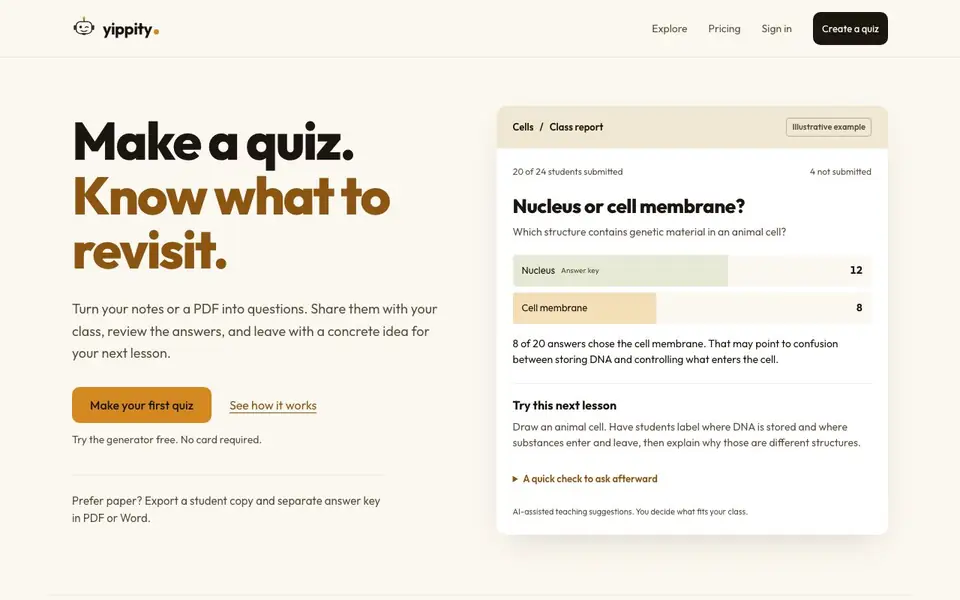
After students submit, Yippity scores multiple-choice answers against your key and lets you check AI-suggested marks for written answers. The class report shows who submitted and question-by-question results, with evidence-based teaching suggestions for what to revisit. You can also export a student copy and separate answer key as PDF or Word for paper use. The tool is free to try without a card, and your saved quizzes stay private in your Library.
Yippity features
- Text to quiz: Paste any teaching passage and get a draft quiz in about 20 seconds.
- PDF to quiz: Upload a text-based PDF and convert it into questions automatically.
- Class roster: Add a class once and reuse its roster for multiple quizzes.
- Private access codes: Share a link and give each student a code—no student accounts needed.
- Class report: See who submitted, question-by-question results, and AI-suggested teaching activities.
What you can do with Yippity
- Create a quiz from your lecture notes for a quick check of understanding.
- Convert a textbook chapter PDF into questions for homework or review.
- Share a quiz link with your class and track who has submitted.
- Export a printable quiz with a separate answer key for paper-based testing.
How to get started with Yippity
- Paste your teaching material or upload a PDF, then generate a draft quiz.
- Review and edit questions, set the class level, and add your class roster.
- Share the link, collect answers, and review the class report to decide what to reteach.
Tips for better results with Yippity
- Paste at least 200 characters of your own teaching material, not a generic topic, so Yippity drafts questions that match what you actually cover in class.
- After Yippity generates the draft, set the class level and then edit every question and answer before sharing—this ensures the quiz fits your students' needs.
- Use Yippity's import feature to bring in an existing quiz you already have, so you don't have to rewrite questions you've already vetted.
- Close the assignment in Yippity to generate the class report, then use the evidence-based teaching suggestions to decide what to revisit in your next lesson.
Yippity pricing
Yippity has a free way to start, with paid plans for heavier use. Check yippity.io for current limits and prices.
What to check before you rely on Yippity
- Check whether the free plan lets you create and save enough quizzes for your whole teaching load, since the website does not list specific free limits.
- Verify that your PDF is text-based, not scanned, because Yippity only converts text-based PDFs into questions.
- Confirm the export format you need is available before relying on Yippity for paper quizzes; the website mentions PDF and Word exports but does not detail all options.
Who Yippity is for
Yippity suits teachers, educators and tutors. If that is not you, the AI tools for students below may fit better.
Similar tools compared with Yippity
| Tool | What it is | Pricing |
|---|---|---|
| Yippity | AI quiz and question generator for teachers | Freemium |
| Gauth | AI homework helper with step-by-step answers | Freemium |
| Khanmigo | AI teaching assistant and tutor | Freemium |
| ChatPDF | AI chat and summarizer for PDFs | Freemium |
| Jenni AI | AI academic writing and research assistant | Freemium |
Yippity FAQ
Do my students need an account?
No. Students get a private access code and do not need to sign up or provide an email. You just share a link through your usual channels.
Does Yippity mark everything for me?
Multiple-choice answers are scored automatically against your answer key. For written answers, Yippity suggests marks, but you can check and adjust them before finalizing.
What will the class report tell me?
The report shows who submitted and who is missing, plus question-by-question results. It also suggests teaching activities based on the evidence, so you know what to revisit.
Can I just make a printable quiz?
Yes. You can export an answer-free student copy and a separate teacher key as PDF or editable Word. Your saved quiz stays private; printing does not publish it.
Can Yippity export quizzes to formats other than PDF or Word?
The Yippity website mentions exporting a student copy and separate answer key as PDF or Word. It does not mention other export formats like Google Forms, Moodle, or CSV. For the most current list of export options, check the Yippity site or contact their support.
Does Yippity work on tablets or smartphones?
Yippity is a web-based tool, so you can likely access it through a browser on any device with internet, including tablets and smartphones. The website does not specify dedicated apps or platform limitations. To confirm how it behaves on your device, try the free generator or check the site's help section.
What does the free plan include, and are there limits on quizzes or students?
Yippity is free to try without a card, and you can generate a quiz from pasted text or a PDF. The website does not state specific limits on the number of quizzes, students, or questions for the free plan. For exact details on what the free tier includes, check the pricing page or sign up to see your limits.


