

What is Quizlet?
Quizlet is a study platform where you can turn your own material into interactive learning resources. It works with recorded lectures, written notes, or typed content. You get study guides, flashcards, practice tests, and games built from what you already have.
You start by signing up for free, then you can input your notes or lecture recordings. Quizlet instantly creates study materials from that input. You can review quickly, play learning games, or join study sessions with friends. The Pomodoro timer helps you stay focused during sessions.
It is designed for students and teachers. Teachers can use it for low-prep activities like bell ringers or homework, and it integrates with Google Classroom. The site says Quizlet is free for teachers. There are also premium plans like Quizlet Plus, though the homepage does not list specific prices.
Quizlet features
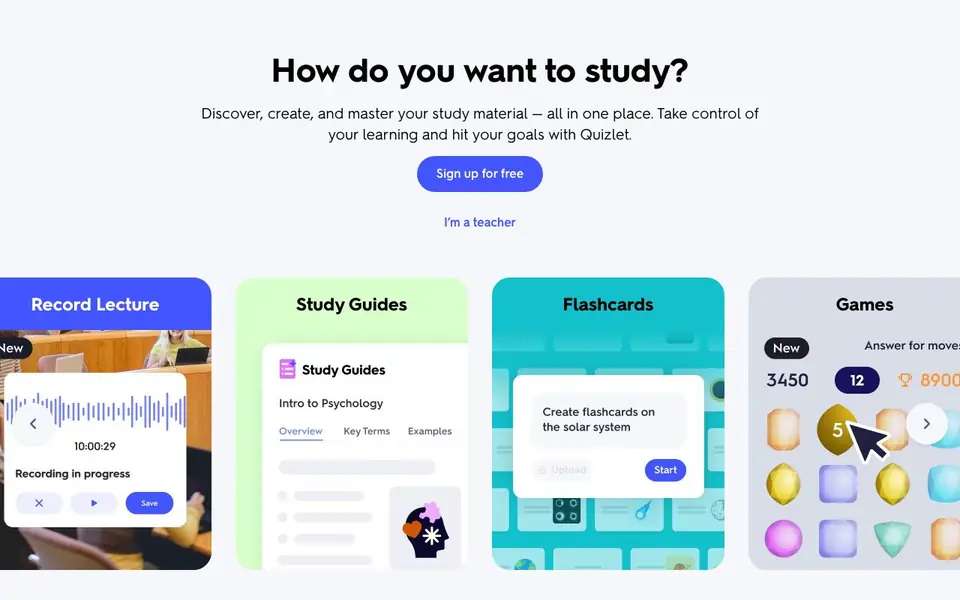
- Record Lecture: Capture a lecture and turn it into study guides and flashcards automatically.
- Study Guides: Generate organized study guides from your own notes or recordings.
- Flashcards: Create digital flashcards from your material to review anytime.
- Practice Tests: Build practice questions and quizzes from your own content for exam prep.
- Learning Games: Play interactive games on the go to reinforce what you study.
What you can do with Quizlet
- Turn lecture recordings into flashcards for exam review.
- Create practice tests from your class notes before a big quiz.
- Assign homework activities to students through Google Classroom.
- Study with friends in shared study sessions using games.
How to get started with Quizlet
- Sign up for a free account on the Quizlet website.
- Input your notes, recordings, or typed material into the platform.
- Choose what to generate, like flashcards or practice tests, and start studying.
Tips for better results with Quizlet
- Record a lecture directly in Quizlet to generate flashcards and study guides, then review them within 24 hours while the material is fresh.
- Upload your own typed notes or written material instead of relying on generic content, so Quizlet builds practice tests and games from exactly what you need to know.
- Use Quizlet's Pomodoro timer during study sessions to break your review into focused intervals, which helps you retain more from the flashcards and games you create.
- Join a study session with friends using Quizlet's shared games to test each other on your own material, making exam prep more interactive and less solitary.
Quizlet pricing
Quizlet has a free way to start, with paid plans for heavier use. Check quizlet.com for current limits and prices.
What to check before you rely on Quizlet
- Check whether your free plan includes all features like recording lectures and practice tests, since the website only says sign up for free without detailing limits.
- Verify if Quizlet Plus pricing is listed before upgrading, as the homepage mentions premium plans but does not state specific costs.
- Confirm that your lecture recordings are processed securely and that you own the content, since the site does not explain data handling or privacy for uploaded audio.
Who Quizlet is for
Quizlet suits students, teachers and lifelong learners. If that is not you, the AI tools for students below may fit better.
Similar tools compared with Quizlet
| Tool | What it is | Pricing |
|---|---|---|
| Quizlet | AI study tools for flashcards and tests | Freemium |
| Gauth | AI homework helper with step-by-step answers | Freemium |
| Khanmigo | AI teaching assistant and tutor | Freemium |
| ChatPDF | AI chat and summarizer for PDFs | Freemium |
| Jenni AI | AI academic writing and research assistant | Freemium |
Quizlet FAQ
Is Quizlet free to use?
Yes, you can sign up for free and access basic features like flashcards and study modes. The site also says Quizlet is free for teachers. There are paid plans like Quizlet Plus, but the homepage does not list specific prices.
How does Quizlet turn my notes into study materials?
You can input recorded lectures, written notes, or typed content. Quizlet then automatically generates study guides, flashcards, practice tests, and games from that material, so you study what you actually need to know.
Who is Quizlet best for?
It is built for students and teachers. Students can use it to study any subject, while teachers can create low-prep activities like bell ringers or homework. It also integrates with Google Classroom for easy assignment.
Can I study with others on Quizlet?
Yes, you can join study sessions with friends. The platform includes learning games and study groups, so you can review together and stay motivated.
Can Quizlet export my study materials or connect to other apps besides Google Classroom?
Quizlet's website mentions Google Classroom integration for teachers, but it does not list any other export options or app connections. To see if Quizlet can export your flashcards or study guides to another tool, check the app's settings or the Help center for current integration details.
Does Quizlet work on mobile devices and which platforms does it support?
Quizlet's website includes a link to 'Get the app,' which indicates it has mobile apps. The site does not specify which operating systems those apps support, so check the app store for your device to confirm availability. The web version works in any browser.
What does the free Quizlet plan include, and what is not included?
The free Quizlet plan lets you sign up and create study materials from notes or recordings, including flashcards, practice tests, and games. The website does not list specific limits for free accounts or what features require Quizlet Plus. For exact plan details, visit the Quizlet Plus page or the Help center.


