

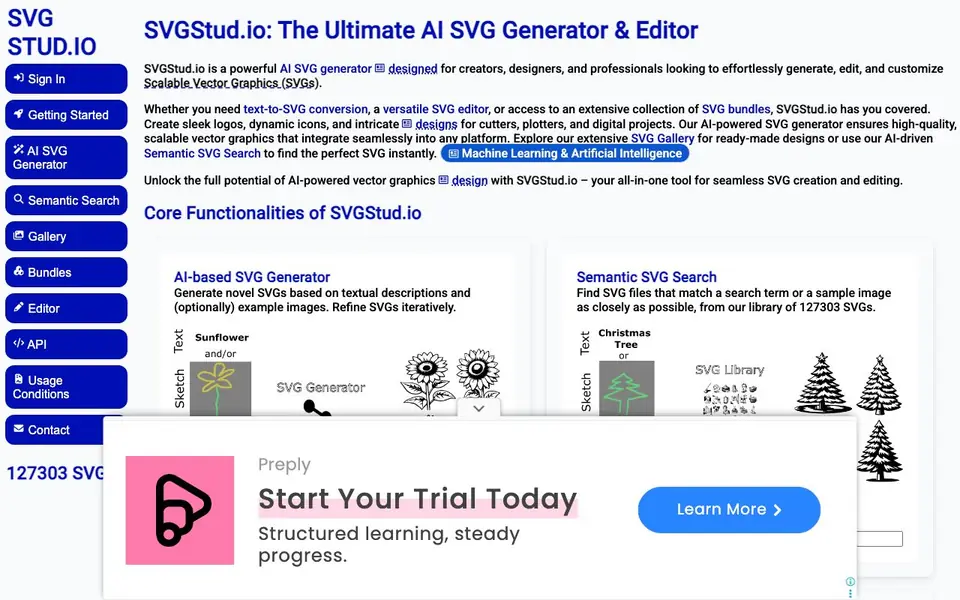
What is SVGStud.io?
SVGStud.io is an AI-powered tool for creating and editing Scalable Vector Graphics (SVGs). It turns text descriptions into vector graphics, letting you generate logos, icons, and other designs without manual drawing. You can also refine your creations iteratively and polish them in a browser-based editor.
To start, you describe the SVG you want, optionally add an example image, and the AI generates a novel design. You can then use the built-in SVG editor to tweak colors, shapes, and paths. The platform also includes a semantic search that finds matching SVGs from a library of over 127,000 designs, plus a gallery for browsing.
SVGStud.io suits creators, designers, and professionals working on web, print, or digital projects. It's especially handy for making cut files for plotters and cutters. During the preview phase, the tool is free to use, with a daily limit on the generator. All generated SVGs are added to the public library and are licensed under CC-BY-SA 4.0.
SVGStud.io features
- AI SVG Generator: Creates new SVGs from text descriptions, with optional example images for guidance.
- Semantic SVG Search: Finds SVGs that match your search term or sample image from a library of 127,303 designs.
- SVG Gallery: Browse all 127,303 SVGs in the library to discover ready-made designs.
- SVG Editor: Edit your generated SVGs directly in the browser using SVGEdit.
- Style Selection: Choose from styles like cartoon, contour, icon, line art, logo, manga, papercut, and silhouette.
What you can do with SVGStud.io
- Generate a custom logo by describing it in text.
- Search for a specific icon using a sample image.
- Browse the gallery for inspiration for your next design.
- Edit a generated SVG to fine-tune colors and shapes.
How to get started with SVGStud.io
- Sign in or start creating on the SVGStud.io website.
- Use the AI SVG Generator to describe your desired SVG, optionally adding an example image.
- Refine the result in the SVG Editor, or use Semantic Search to find existing designs.
Tips for better results with SVGStud.io
- Describe your SVG with specific colors, shapes, and layout details to guide the AI generator, then refine iteratively until the design matches your vision.
- Use the style selection feature in SVGStud.io to choose cartoon, line art, or logo styles before generating, which helps produce results closer to your intended look.
- After generating, open the built-in SVG editor to fine-tune paths and colors manually, especially for precise adjustments the AI may not get right.
- Leverage SVGStud.io's semantic search with a sample image to find existing SVGs that match your concept, saving time instead of generating from scratch.
SVGStud.io pricing
SVGStud.io has a free way to start, with paid plans for heavier use. Check svgstud.io for current limits and prices.
What to check before you rely on SVGStud.io
- Check the daily usage limit on the SVG generator during the free preview phase, as exceeding it may pause your work until the next day.
- Verify that your prompts contain no personal or sensitive information, since SVGStud.io logs inputs and adds all generated SVGs to the public library.
- Confirm the CC-BY-SA 4.0 license terms before using generated SVGs commercially, as this license requires attribution and share-alike conditions.
Who SVGStud.io is for
SVGStud.io suits designers, creators, professionals and hobbyists. If that is not you, the AI image generators below may fit better.
Similar tools compared with SVGStud.io
| Tool | What it is | Pricing |
|---|---|---|
| SVGStud.io | AI SVG generator and editor | Freemium |
| SiImageGen | AI image generator and photo editor | Freemium |
| FreeSiTools | Free AI image prompt generator | Free |
| SiPhotoEditor | AI photo editor by description | Paid |
| Civitai | AI art community and model library | Freemium |
SVGStud.io FAQ
Is SVGStud.io free to use?
Yes, during the preview phase, SVGStud.io is completely free. Core features like SVG Bundles and Semantic Search are freely accessible, and the SVG Generator has a daily usage limit per user.
What can I create with SVGStud.io?
You can create logos, icons, and intricate designs for cutters, plotters, and digital projects. The AI generator turns text descriptions into SVGs, and you can refine them in the editor.
How does the semantic search work?
You can search for SVGs that match a search term or a sample image. The tool finds the closest matches from a library of over 127,000 SVGs.
Are there any usage conditions I should know?
SVGStud.io logs user inputs, and all generated SVGs are added to the public library. SVGs are licensed under CC-BY-SA 4.0, so avoid including personal or sensitive information in prompts.
Can I use SVGStud.io on my mobile device or tablet?
SVGStud.io is a browser-based tool, so you can access it on any device with a modern web browser, including smartphones and tablets. The website does not mention dedicated mobile apps, but you can use the generator, search, and editor directly from your mobile browser.
Does SVGStud.io offer an API for developers?
Yes, SVGStud.io has an API, as indicated in the site's navigation menu. However, the website does not provide details on how to access or use it. For specific information about endpoints, authentication, and pricing, you should check the API section on the site or contact the support team.
What file formats can I export from SVGStud.io?
SVGStud.io focuses on SVG files, and the built-in editor uses SVGEdit, which typically allows you to save your work as SVG. The website does not mention exporting to other formats like PNG or PDF. If you need a different format, you can download the SVG and convert it using other software.


