

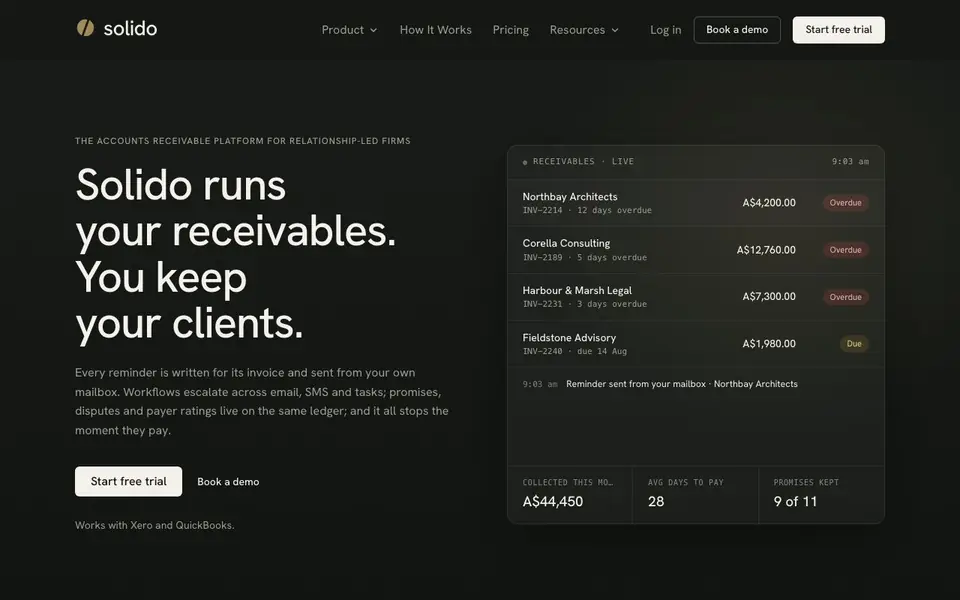
What is Solido?
Solido is an accounts receivable platform built for firms that value client relationships. It automates the entire invoice chasing process, from the first gentle reminder to firmer escalation steps. Every reminder is written specifically for the invoice it's chasing and sent from your own mailbox, so replies land back with you, not in a separate system.
Getting started takes about five minutes. You connect your ledger (Xero or QuickBooks) and your mailbox (Microsoft 365 or Google Workspace). Then you pick a schedule, and Solido queues your first reminders. The system drafts reminders from your ledger data, so you don't type amounts or due dates by hand. It stops sending reminders the moment a payment syncs back.
Solido also tracks promises, disputes, and payer ratings on the same ledger. You can record a promised payment date and reminders wait until it passes. Disputed invoices can be paused without losing history. Reporting shows DSO, ageing, and payer ratings, with figures kept separate per currency. The website offers a free trial and a demo booking.
Solido features
- AI-written reminders: Each reminder email is drafted specifically for its invoice and approved by you before sending.
- Send from your mailbox: Reminders go out under your name and signature, so replies come back to you.
- Multi-channel workflows: Escalate across email, SMS, and tasks in one sequence, timed against each invoice's due date.
- Promise tracking: Record a promised payment date and reminders automatically wait until that date passes.
- Dispute management: Park a disputed invoice with a note, then resume chasing once it's resolved without losing history.
What you can do with Solido
- Chase overdue invoices automatically with personalized reminders that stop once payment is received.
- Escalate unpaid invoices from email to SMS and tasks, copying in a director only if earlier steps fail.
- Track client promises and disputes directly on the same ledger as the invoice.
- Monitor DSO, ageing, and payer ratings with reporting that updates as invoices sync and payments land.
How to get started with Solido
- Connect your ledger by linking Xero or QuickBooks, and invoices and contacts sync automatically.
- Authenticate your mailbox with Microsoft 365 or Google Workspace so reminders send under your name.
- Pick your schedule using defaults or set your own, and your first reminders are queued.
Tips for better results with Solido
- Connect Xero or QuickBooks and your mailbox first, then let Solido draft reminders from ledger data so you avoid typing amounts or due dates by hand.
- Use Solido's promise tracking to record a promised payment date, and reminders will wait until that date passes before chasing again.
- Set escalation tiers in Solido so a director is only copied in after earlier gentle steps fail, keeping client relationships intact.
- Review each AI-written reminder in Solido before sending, since you approve every email and can adjust tone or content as needed.
Solido pricing
Solido offers a free trial before you pay. Check solido.ai for current plans.
What to check before you rely on Solido
- Check whether the free trial includes SMS and task steps, since the website lists these features but does not state trial limits.
- Verify that your ledger and mailbox versions are supported, as Solido works with Xero, QuickBooks, Microsoft 365, and Google Workspace only.
- Confirm how Solido handles data privacy and export formats, because the website does not specify these details for your records.
Who Solido is for
Solido suits relationship-led firms, accounting teams, small business owners and professional services firms. If that is not you, the AI business tools below may fit better.
Similar tools compared with Solido
| Tool | What it is | Pricing |
|---|---|---|
| Solido | Automated invoice reminder and receivables platform | Free trial |
| Tidio | AI customer service and sales platform | Freemium |
| Chatbase | AI customer experience and support agents | Free trial |
| Copy.ai | AI-native go-to-market platform | See website |
| Harvey | AI platform for legal and professional services | See website |
Solido FAQ
What does Solido do?
Solido automates invoice reminders for accounts receivable. It writes personalized reminder emails for each invoice, sends them from your own mailbox, escalates across email, SMS, and tasks, and stops when the invoice is paid.
Is there a free trial?
Yes, the website offers a 'Start free trial' option. You can also book a demo to see it in action before committing.
Which accounting tools does Solido integrate with?
Solido works with Xero and QuickBooks. It syncs invoices, contacts, and payment history from these ledgers automatically, so you don't have to type data by hand.
Who is Solido for?
Solido is built for relationship-led firms that want to chase payments without damaging client relationships. It suits professional services, accounting teams, and small businesses that use Xero or QuickBooks.
Does Solido work on mobile devices?
Solido is a web-based platform, so you can access it from any device with a browser, including smartphones and tablets. The website does not mention a dedicated mobile app, but you can log in from your mobile browser to view your receivables board and manage workflows.
Can Solido export reports to Excel or PDF?
Solido provides reporting on DSO, ageing, and payer ratings directly in the platform. The website does not specify export options for these reports. To see if you can export data, check the in-app reporting features or contact their support after starting a trial.
What does the Solido free trial include?
Solido offers a free trial, but the website does not list specific limitations or features included. You can start the trial and connect your Xero or QuickBooks ledger and mailbox to test the full automation, including AI-written reminders and multi-channel escalations. For exact trial terms, check the pricing page or contact sales.


