

What is Raphael AI?
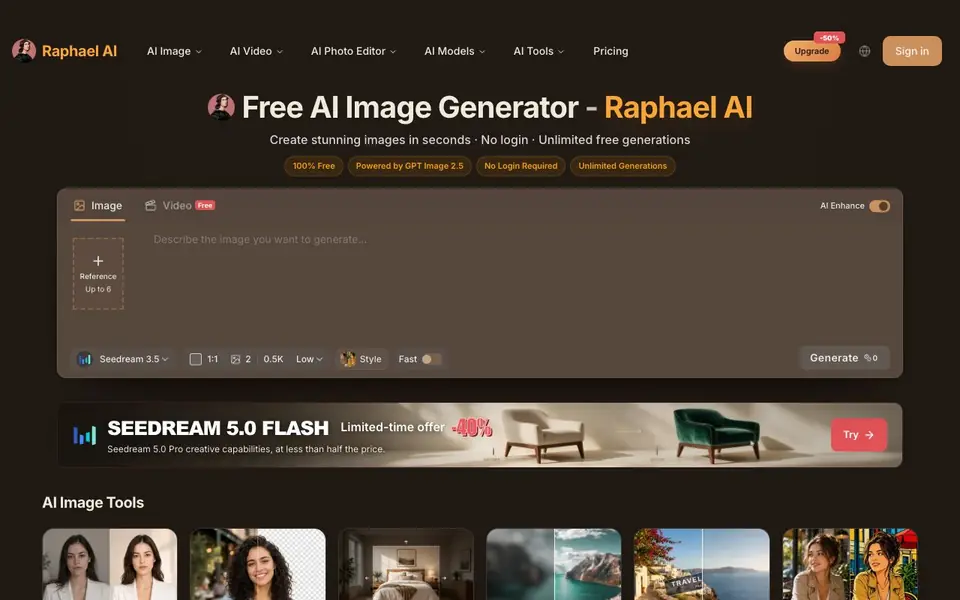
Raphael AI is a free AI image generator that lets you create images from text prompts without needing to log in. It offers unlimited generations, making it easy to experiment with different ideas. The tool is powered by several advanced models, including GPT Image 2.5, Seedream 5.0, and Nano Banana 2, so you can choose the one that fits your needs.
To get started, you simply type a description of the image you want, pick a model, and adjust settings like aspect ratio and resolution. You can also use reference images (up to six) to guide the generation. After the image is created, you can enhance it, remove backgrounds, expand it, upscale it, or transform its style using the built-in editor tools.
Raphael AI suits anyone who wants quick, free image creation—from designers and marketers to hobbyists. The free plan includes a watermark on images. Paid plans offer clean outputs, faster generation, and commercial use. The website also features AI video generation and a photo editor, expanding what you can do beyond still images.
Raphael AI features
- Unlimited free generations: Create as many images as you want without paying or logging in.
- Multiple AI models: Choose from GPT Image 2.5, Seedream 5.0, Nano Banana 2, and more.
- Reference image support: Add up to six reference images to guide the style and content.
- Built-in photo editor: Remove backgrounds, upscale, expand, and transform styles after generating.
- AI video generation: Create videos alongside images using the same platform.
What you can do with Raphael AI
- Generate marketing visuals from text prompts quickly.
- Edit product photos by removing backgrounds or upscaling.
- Create consistent brand visuals with portrait-focused models.
- Experiment with different art styles using style transfer tools.
How to get started with Raphael AI
- Go to the Raphael AI website and type your image description in the prompt box.
- Choose a model, set aspect ratio and resolution, then click Generate.
- Use the photo editor tools to enhance, expand, or upscale your result.
Tips for better results with Raphael AI
- Choose Seedream 3.5 Pro for consistent portraits and brand visuals, as it is free and designed for that purpose.
- Use up to six reference images with Raphael AI to guide style and content, especially when you need specific compositions.
- Experiment with different models like GPT Image 2.5 for natural detail or Nano Banana 2 for fast style control to match your subject.
- After generating, use the built-in editor to remove backgrounds or upscale, saving time on post-production tasks.
Raphael AI pricing
Raphael AI has a free way to start, with paid plans for heavier use. Check raphael.app for current limits and prices.
What to check before you rely on Raphael AI
- Check whether the free plan's watermark meets your needs, since paid plans are required for clean outputs and commercial use.
- Verify if the model you want is free or credit-based, as some like Nano Banana 2 Lite cost 11 credits per generation.
- Confirm the platform's data privacy policy, as the website does not state how your prompts or images are handled.
Who Raphael AI is for
Raphael AI suits designers, marketers, content creators and hobbyists. If that is not you, the AI image generators below may fit better.
Similar tools compared with Raphael AI
| Tool | What it is | Pricing |
|---|---|---|
| Raphael AI | Free unlimited AI image generator | Freemium |
| SiImageGen | AI image generator and photo editor | Freemium |
| FreeSiTools | Free AI image prompt generator | Free |
| SiPhotoEditor | AI photo editor by description | Paid |
| Civitai | AI art community and model library | Freemium |
Raphael AI FAQ
Is Raphael AI really free?
Yes, the free plan offers unlimited image generations without requiring login. However, free images include a watermark. Paid plans remove the watermark and offer faster generation and commercial use.
What AI models does Raphael AI use?
It features several models, including GPT Image 2.5, Seedream 5.0 (Flash, Pro, and 3.5 Pro), Nano Banana 2 (Lite and Pro), and GPT Image 2. Each model has different strengths, like speed, fidelity, or 4K rendering.
Can I edit images after generating them?
Yes, Raphael AI includes a photo editor with tools for removing backgrounds, expanding images, upscaling, removing watermarks, and transforming style. You can also use reference images during generation for more control.
Do I need to create an account to use Raphael AI?
No, the free tier does not require login. Some models, like Nano Banana, may require signing in to start. The website does not specify if login is needed for other features.
Can Raphael AI export images in formats other than PNG or JPG?
The Raphael AI website does not specify which export formats are available. You can check the download options after generating an image, or contact support for details. The site focuses on generation and editing features rather than file format specifics.
Does Raphael AI work on mobile devices or only on desktop?
Raphael AI is a web-based tool, so you can use it in any browser on a phone, tablet, or computer. The website does not mention dedicated mobile apps. For the best experience, use a modern browser with a stable internet connection.
What does the free plan of Raphael AI include besides watermarked images?
The free plan includes unlimited image generations without login, access to all AI models, reference image support, and basic editing tools like background removal and upscaling. Images come with a watermark. The website does not list any other free limitations, so you can try most features.


