

What is QuoteCraft AI?
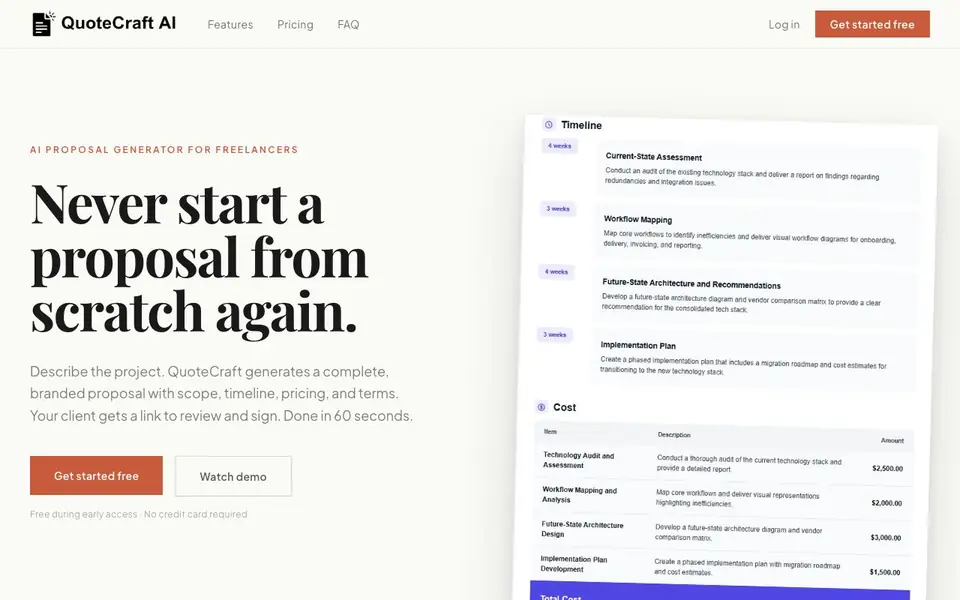
QuoteCraft AI is a proposal generator built for freelancers. You describe a project, and it creates a complete proposal with scope, timeline, pricing, and terms. Your client reviews and signs it from a branded link, all without PDF attachments or separate e-signature tools.
To use it, you type or speak a short project description. QuoteCraft drafts the full proposal, which you can edit field by field or ask the AI to revise. You can also upload a past proposal, and the tool learns your tone, structure, and pricing format for future projects.
It suits freelancers who want to move fast after a client meeting. The tool includes real-time open tracking, a one-click Upwork cover letter generator, and a change request workflow. During early access, it is free with no credit card required, and paid plans start at $9 per month after that period.
QuoteCraft AI features
- AI proposal generation: Creates scope, timeline, pricing, and terms from your project description.
- Voice or text input: Describe the project by typing or speaking, taking about 60 seconds.
- Style learning: Upload a past proposal and the AI matches your tone and pricing format.
- Client e-signature: Clients review, request changes, and sign from one branded URL with timestamps.
- Upwork cover letter: Generates a tailored cover letter from your proposal in one click.
What you can do with QuoteCraft AI
- Create a branded proposal right after a client meeting.
- Generate an Upwork cover letter and attach your proposal PDF.
- Send a proposal for client review and e-signature in one link.
- Track when a client opens your proposal to time your follow-up.
How to get started with QuoteCraft AI
- Describe the project by typing or using voice input.
- Review and refine the generated proposal, editing any field or asking the AI to revise.
- Send the branded link to your client for review and signature.
Tips for better results with QuoteCraft AI
- Upload a past proposal you are proud of so QuoteCraft AI learns your tone, structure, and pricing format for future projects.
- Describe the project with specific numbers like budget, timeline, and deliverables to help QuoteCraft AI generate accurate scope and pricing.
- Review and edit every field after QuoteCraft AI drafts the proposal, since the output is a starting point, not a final contract.
- Use the real-time open tracking to time your follow-up, but wait a few hours after the client views the proposal before reaching out.
QuoteCraft AI pricing
QuoteCraft AI has a free way to start, with paid plans for heavier use. Check quotecraftai.com for current limits and prices.
What to check before you rely on QuoteCraft AI
- Confirm whether the free early access period has ended and what the $9 per month plan includes, as the website does not list current plan details.
- Check if QuoteCraft AI supports your preferred export formats beyond PDF, since the website only mentions PDF attachment for Upwork.
- Verify how your uploaded proposals are stored and whether they are used to train the AI, as the website does not state a privacy policy.
Who QuoteCraft AI is for
QuoteCraft AI suits freelancers, independent consultants and Upwork freelancers. If that is not you, the AI business tools below may fit better.
Similar tools compared with QuoteCraft AI
| Tool | What it is | Pricing |
|---|---|---|
| QuoteCraft AI | AI proposal and cover letter generator | Freemium |
| Tidio | AI customer service and sales platform | Freemium |
| Chatbase | AI customer experience and support agents | Free trial |
| Copy.ai | AI-native go-to-market platform | See website |
| Harvey | AI platform for legal and professional services | See website |
QuoteCraft AI FAQ
How fast can I generate a proposal?
QuoteCraft says you can go from project description to a complete proposal in about 60 seconds. You describe the project, the AI drafts it, and you review before sending.
Can I edit proposals before sending them?
Yes. You can edit any field directly in the proposal, or ask the AI to revise it. The tool is designed so it's your proposal, not a fixed template.
How does QuoteCraft learn my style?
You can upload a past proposal, and QuoteCraft reads your tone, structure, and pricing format. It then carries that style forward into every new proposal you generate.
Is QuoteCraft free to use?
It is free during early access with no credit card required. The website states paid plans will start at $9 per month after early access ends.
Does QuoteCraft AI let me export my proposals as PDFs?
Yes, QuoteCraft AI lets you download your proposal as a branded PDF, which you can attach to your Upwork bid or send separately. The website shows this option in the Upwork workflow, so you can use it beyond just the branded link for client review and signature.
Can I use QuoteCraft AI on my phone or tablet?
QuoteCraft AI supports voice input, which suggests you can describe a project by speaking, likely on a mobile device. However, the website does not specify whether there is a dedicated mobile app or if it is only accessible through a web browser. Check the website's current features for platform details.
What does the free plan of QuoteCraft AI include?
During early access, QuoteCraft AI is free with no credit card required. This includes all features like AI proposal generation, style learning, client e-signature, open tracking, and Upwork cover letter generation. After early access, paid plans start at $9 per month, but the website does not detail what changes in the free tier then.


