

What is Quizgecko?
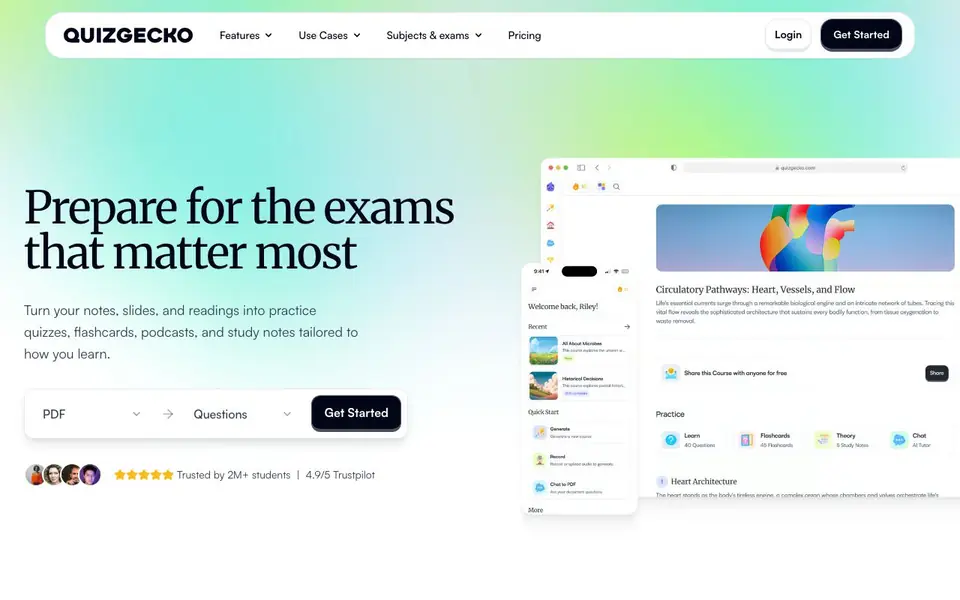
Quizgecko is an AI study tool that converts your own study material into practice quizzes, flashcards, study notes, and audio reviews. It is built for students preparing for exams, from high-stakes professional tests to everyday class finals. The platform is trusted by over 2 million students and holds a 4.9/5 rating on Trustpilot.
You start by uploading the material you already trust: notes, PDFs, lecture slides, web links, or textbook pages. Quizgecko builds a course around that content. Then you practice active recall in multiple formats, such as multiple-choice questions, flashcards, or audio summaries you can listen to on the go. After each session, you review results, identify weak areas, and plan your next study session.
The tool also offers reading modes tailored to different needs, including dyslexia-friendly, ADHD-friendly, and readable options. It covers subjects like medicine, nursing, pharmacy, dentistry, law, biology, psychology, finance, and languages. A mobile app lets you keep studying whenever you have spare time. The website does not list specific pricing details beyond a free trial, so check its pricing page for current plans.
Quizgecko features
- Quiz generation: Create practice quizzes from any uploaded text, document, or website link in seconds.
- Flashcard creation: Turn your study material into flashcards for quick memorization and recall.
- Study notes: Generate summarized notes from your uploaded content to simplify revision.
- Audio reviews: Listen to your notes as podcasts, perfect for studying while commuting or exercising.
- Accessibility modes: Switch to dyslexia-friendly, ADHD-friendly, or readable text formats for easier reading.
What you can do with Quizgecko
- Upload lecture slides to create practice quizzes before a midterm exam.
- Turn a textbook chapter into flashcards for memorizing key terms and definitions.
- Generate audio reviews of your notes to listen to during a workout or walk.
- Use NCLEX-style questions to prepare for nursing board exams.
How to get started with Quizgecko
- Sign up for a free trial on the Quizgecko website.
- Upload your study material, such as notes, PDFs, slides, or web links.
- Choose a format like quizzes, flashcards, or audio reviews, then start practicing and reviewing results.
Tips for better results with Quizgecko
- Upload your own lecture slides or notes directly into Quizgecko, then generate quizzes from that material to ensure questions match exactly what your instructor covered.
- Use Quizgecko's flashcard feature to turn textbook chapters into quick recall drills, focusing on key terms and definitions you struggle to remember.
- Create audio reviews in Quizgecko from your summarized notes, then listen during commutes or workouts to reinforce weak areas without extra study time.
- After each Quizgecko practice session, review your results to spot weak topics, then regenerate questions on those specific areas to target your next study session.
Quizgecko pricing
Quizgecko offers a free trial before you pay. Check quizgecko.com for current plans.
What to check before you rely on Quizgecko
- Check Quizgecko's pricing page for current plan costs and limits, since the website only lists a free trial and does not state specific prices or quotas.
- Verify that Quizgecko supports the file types you plan to upload, such as PDFs or slides, and whether web links work reliably for your source material.
- Review Quizgecko's data and privacy policy to confirm how your uploaded study materials are stored and used, as the website does not detail this.
Who Quizgecko is for
Quizgecko suits students, medical and nursing students, law students and professionals seeking certification. If that is not you, the AI tools for students below may fit better.
Similar tools compared with Quizgecko
| Tool | What it is | Pricing |
|---|---|---|
| Quizgecko | AI quiz, flashcard, and note maker | Free trial |
| Gauth | AI homework helper with step-by-step answers | Freemium |
| Khanmigo | AI teaching assistant and tutor | Freemium |
| ChatPDF | AI chat and summarizer for PDFs | Freemium |
| Jenni AI | AI academic writing and research assistant | Freemium |
Quizgecko FAQ
What can I upload to Quizgecko?
You can upload notes, PDFs, lecture slides, web links, or textbook pages. The tool builds a study course around whatever material you provide, so you can work with content you already trust.
Is Quizgecko free?
The website mentions a free trial, but it does not specify whether there is a permanent free plan or only paid plans after the trial. Check the pricing page on Quizgecko's website for the latest details.
Who is Quizgecko for?
It is designed for students preparing for exams, including high-stakes tests in medicine, nursing, pharmacy, dentistry, and law. It also suits learners in biology, psychology, finance, accounting, business, and languages.
Can I listen to my study material?
Yes. Quizgecko can turn your notes into audio reviews, which you can listen to like a podcast. This is useful for studying while at the gym, walking, or doing other activities.
Does Quizgecko have a mobile app for studying on the go?
Yes, Quizgecko offers a mobile app that lets you keep studying whenever you have spare time. The website mentions the app as part of its study workflow, but it does not list which platforms it supports. Check the app store or Quizgecko's website for device compatibility details.
What does Quizgecko's free trial include?
Quizgecko offers a free trial, but the website does not specify what features or limits are included in that trial. To know exactly what you can do without paying, visit Quizgecko's pricing page or sign up and see what is available in your account.
Can Quizgecko export my quizzes or notes to other apps?
Quizgecko's website does not mention any export options for quizzes, flashcards, or notes. It focuses on creating and practicing within the platform. If you need to move your study material elsewhere, check Quizgecko's help center or contact support for current export capabilities.


