

What is PRDKit?
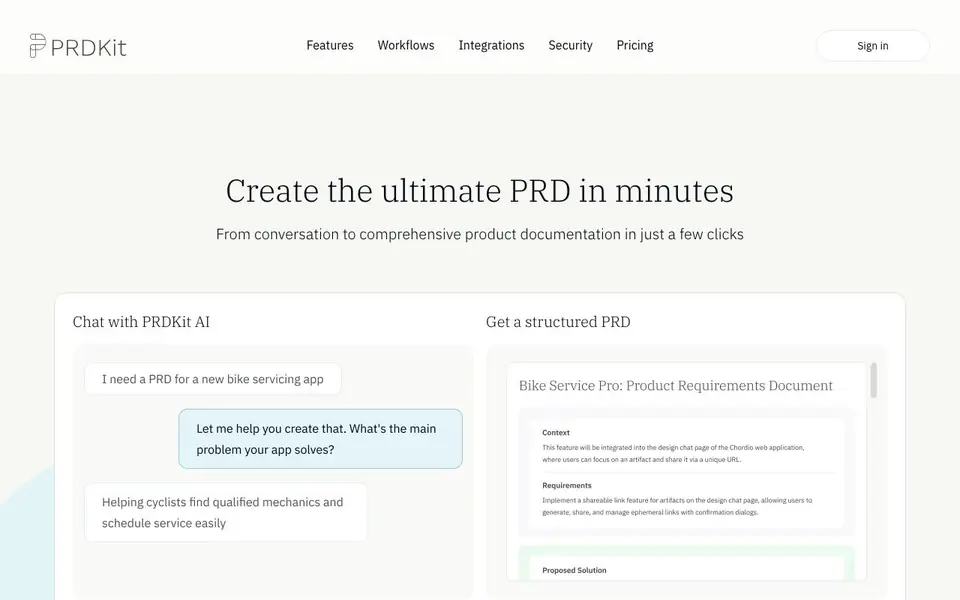
PRDKit is an AI-powered tool that helps you create product requirements documents (PRDs) from a simple conversation. It turns your chat into a structured PRD, then adds complementary content like wireframes, user flow diagrams, and social media posts to support product launches. The tool is designed for product managers and teams who want to move from idea to documentation quickly.
To get started, you chat with PRDKit AI about your product idea. The AI structures your input into a comprehensive PRD. You can then enhance it with visual aids, user flows, and simulated product reviews. For existing products, you can paste a homepage URL or upload product screens, and PRDKit automatically gathers context about your product, audience, and business objectives.
PRDKit works in your existing workflow. You can export your PRD to LLM-optimized formats for live prototyping with tools like Bolt, Loveable, v0, or Cursor. You can also share it via a link or copy it into Notion, Confluence, or other team workspaces. The tool is accessible via web app, with Slack and Microsoft Teams integrations coming soon. Your data is not used to train public AI models.
PRDKit features
- Structured PRD generation: Chat with the AI to get a comprehensive product requirements document in minutes.
- Wireframe creation: Visual aids show how your product might look, helping you fine-tune design before committing resources.
- User flow diagrams: Clear diagrams illustrate how users will navigate through your product.
- Automated context gathering: Paste a homepage URL or upload product screens to automatically gather insights about your product.
- Knowledge Hub: Build product knowledge with automatically generated personas, user journeys, and business objectives.
What you can do with PRDKit
- Create a structured PRD from a product idea conversation.
- Generate wireframes and user flows to visualize a new product.
- Draft social media announcements for a product launch.
- Export a PRD to LLM-optimized format for live prototyping with tools like Bolt or Cursor.
How to get started with PRDKit
- Sign in to PRDKit and start a chat with the AI about your product idea.
- Review the structured PRD and add enhancements like wireframes or user flows.
- Export or share the PRD with your team via a link or your workspace tools.
Tips for better results with PRDKit
- Start with a clear, detailed description of your product idea, including target users and key features, to get a more accurate structured PRD from PRDKit.
- Paste your existing homepage URL or upload product screens into PRDKit to automatically gather context about your product, audience, and business objectives before refining the PRD.
- Use PRDKit's generated wireframes and user flow diagrams to visually review and adjust your product's design and navigation early, saving time before development.
- Export your PRD from PRDKit to LLM-optimized formats for live prototyping with tools like Bolt or Cursor, then share the link with your team for faster feedback.
- checks
PRDKit pricing
PRDKit’s homepage does not list prices. Check prdkit.ai for current plans.
What to check before you rely on PRDKit
- Check PRDKit's pricing page for plan details and costs, as the website does not list any pricing information.
- Verify whether PRDKit's Slack and Microsoft Teams integrations are available yet, since the website marks them as coming soon.
- Confirm your data handling expectations with PRDKit's privacy policy, as the site states your data is not used to train public AI models but does not detail other storage practices.
Who PRDKit is for
PRDKit suits product managers, product teams, startups and enterprise product teams. If that is not you, the AI business tools below may fit better.
Similar tools compared with PRDKit
| Tool | What it is | Pricing |
|---|---|---|
| PRDKit | AI product requirements document generator | See website |
| Tidio | AI customer service and sales platform | Freemium |
| Chatbase | AI customer experience and support agents | Free trial |
| Copy.ai | AI-native go-to-market platform | See website |
| Harvey | AI platform for legal and professional services | See website |
PRDKit FAQ
What does PRDKit do?
PRDKit turns a conversation about your product into a structured product requirements document. It also generates supporting content like wireframes, user flows, and social media posts to help you validate and launch your product.
Is PRDKit free?
The website does not state pricing details. You can check the Pricing section on PRDKit's website for current plans and any free options.
Who is PRDKit for?
PRDKit is designed for product managers and cross-functional teams who need to create and share product requirements quickly. It also supports iterating on enterprise-scale products with automated context gathering.
Can I use PRDKit with my existing tools?
Yes. You can export your PRD to LLM-optimized formats for live prototyping with tools like Bolt, Loveable, v0, or Cursor. You can also share via a link or copy into Notion, Confluence, or other team workspaces.
What can PRDKit export to besides Notion and Confluence?
PRDKit lets you export your PRD to an LLM-optimized format for live prototyping with tools like Bolt, Loveable, v0, or Cursor. You can also get a shareable link or copy and paste it into any team workspace. The website does not list other specific export destinations.
Does PRDKit work on mobile devices?
PRDKit is accessible through a web app from any browser, so you can use it on mobile via your browser. The website also mentions Slack and Microsoft Teams integrations as coming soon, which would let you chat with PRDKit where you already work. No native mobile app is mentioned.
What does PRDKit's free plan include?
The PRDKit website does not specify what a free plan includes, as pricing details are not listed. To find out what you can do without paying, check the pricing page on prdkit.ai or contact the team directly for current plan options.


