

What is Piooy AI Image Generator?
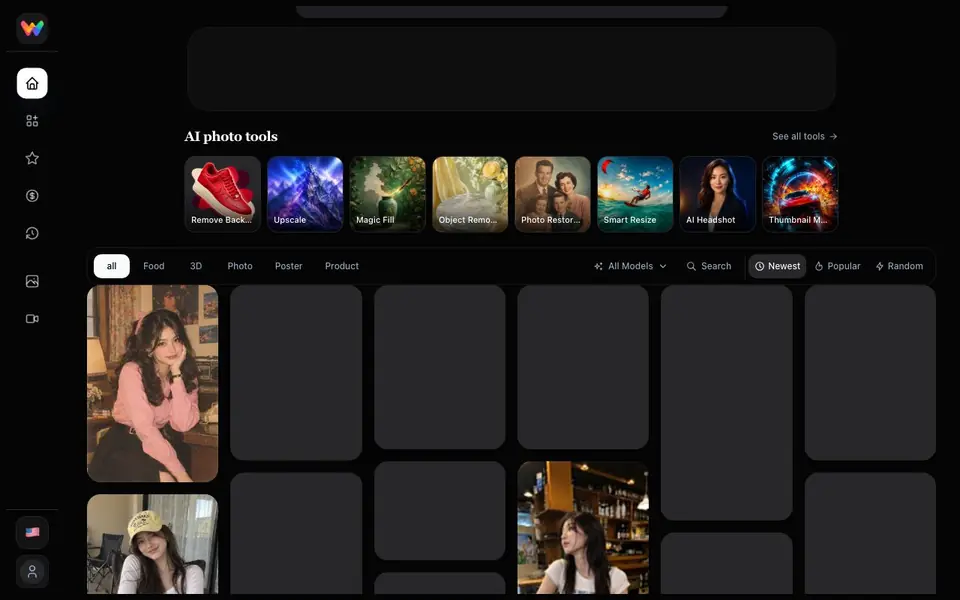
Piooy AI Image Generator is a prompt library and workspace for AI image creation. You can browse a collection of ready-made prompts with visual examples, covering styles like portraits, posters, 3D art, food, and product shots. The prompts work with models like GPT Image, Nano Banana, Seedream, and Grok.
You start by searching or scrolling through the gallery to find a prompt that matches your idea. Each prompt shows a visual example, so you know what to expect. You can then adapt that prompt in the Wenimg workspace to generate your own version. The tool also includes AI photo tools like background removal, upscaling, magic fill, object removal, photo restoration, smart resize, AI headshots, and thumbnail making.
The site is designed for anyone who wants to create AI images without starting from a blank prompt. It is useful for designers, marketers, and hobbyists who need inspiration or a quick starting point. The website does not state pricing details, so you would need to check the site for plan information.
Piooy AI Image Generator features
- Prompt gallery: Browse a large collection of AI image prompts with visual examples.
- Model compatibility: Prompts are designed for GPT Image, Nano Banana, Seedream, and Grok.
- Workspace editing: Adapt existing prompts in the Wenimg workspace for your own images.
- Photo tools: Access background removal, upscaling, magic fill, and object removal.
- Style variety: Find prompts for food, 3D, photo, poster, and product styles.
What you can do with Piooy AI Image Generator
- Create a vintage poster design from a ready-made prompt.
- Generate a realistic portrait using a Nano Banana prompt.
- Design a product shot with a photorealistic style.
- Make a travel poster with continuous line art.
- Restore or edit an existing photo with the built-in tools.
How to get started with Piooy AI Image Generator
- Go to the gallery and browse or search for a prompt that fits your idea.
- Click a prompt to see its visual example and details.
- Open the prompt in the Wenimg workspace to adapt and generate your image.
Tips for better results with Piooy AI Image Generator
- Start by browsing the Piooy gallery for a prompt whose visual example closely matches your idea, then open it in the Wenimg workspace to adapt it.
- When you use Piooy, tweak the prompt text directly in the workspace—change subjects, colors, or composition—to make the output your own instead of copying the example exactly.
- Pair Piooy prompts with the built-in photo tools like upscaling or magic fill to refine your generated image, especially if you need a cleaner background or higher resolution.
- Test the same Piooy prompt across different models like GPT Image or Seedream to see which one delivers the style you want, since results can vary noticeably.
Piooy AI Image Generator pricing
Piooy AI Image Generator’s homepage does not list prices. Check wenimg.com for current plans.
What to check before you rely on Piooy AI Image Generator
- Check the Piooy website for any pricing or plan details, since the site does not state costs or whether a free tier exists.
- Verify which AI models you can actually run prompts with in your account, as Piooy lists compatibility but does not confirm access limits.
- Review the export formats and download options for generated images, because the site does not specify file types or resolution settings.
Who Piooy AI Image Generator is for
Piooy AI Image Generator suits designers, marketers, content creators and hobbyists. If that is not you, the AI image generators below may fit better.
Similar tools compared with Piooy AI Image Generator
| Tool | What it is | Pricing |
|---|---|---|
| Piooy AI Image Generator | AI image prompt library and workspace | See website |
| SiImageGen | AI image generator and photo editor | Freemium |
| FreeSiTools | Free AI image prompt generator | Free |
| SiPhotoEditor | AI photo editor by description | Paid |
| Civitai | AI art community and model library | Freemium |
Piooy AI Image Generator FAQ
What does Piooy AI Image Generator do?
It is a library of reusable AI image prompts with visual examples. You can browse prompts, see what they produce, and adapt them in the Wenimg workspace to create your own images.
Which AI models does it support?
The prompts are designed for GPT Image, Nano Banana, Seedream, and Grok. You can use these prompts with those models to generate images.
Is there a free plan?
The website does not state pricing or free plan details. You would need to check the site directly for any pricing information.
Can I edit photos with this tool?
Yes, the site includes AI photo tools like background removal, upscaling, magic fill, object removal, photo restoration, and smart resize alongside the prompt library.
Can Piooy AI Image Generator export images or connect to other apps?
The Piooy AI Image Generator website does not mention any export formats or integrations with other apps. You can generate and edit images within the Wenimg workspace, but for details on saving or sharing your work, check the site's own documentation or help section.
Does Piooy AI Image Generator work on mobile devices or only on desktop?
The Piooy AI Image Generator website does not specify which devices or platforms it supports. Since it is a web-based tool, it likely works in a browser on any device, but for confirmation on mobile compatibility, check the site's FAQ or contact support.
What does the free plan of Piooy AI Image Generator include?
The Piooy AI Image Generator website does not state whether a free plan exists or what it includes. The existing FAQ mentions a free plan, but the site itself does not list pricing or plan details. To know what you get for free, visit the site's pricing page or sign up to see available options.


