

What is PicLumen?
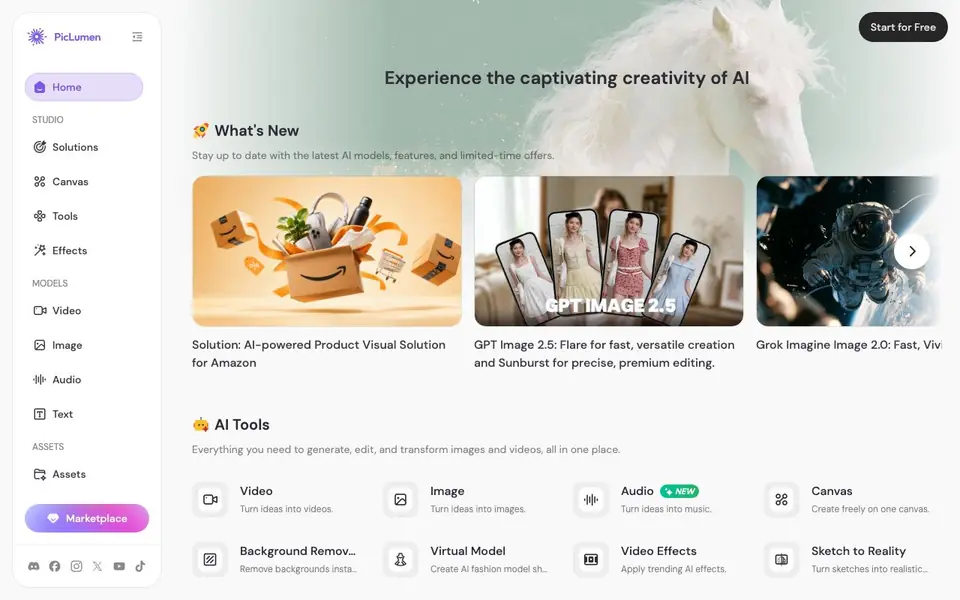
PicLumen is an all-in-one platform for generating and editing images and videos. It brings together many AI models, including GPT Image, Seedream, Seedance, and Wan, so you can turn text prompts into visuals or edit existing media. You can also create music and audio, making it a versatile creative hub.
You start by choosing a model or tool from the studio. For images, you can generate from text, remove backgrounds, swap faces, or turn sketches into realistic renders. For videos, you can create full scenes, apply trending effects, or produce product showcase clips. The Canvas feature lets you build pipelines on an infinite canvas, connecting multiple steps.
PicLumen suits creators, marketers, and business owners. It offers ready-made solutions like E-commerce Studio for product images and UGC ads, plus a community where you can browse and remix others' work. The site highlights new models and features regularly, so there's always something fresh to try.
PicLumen features
- Multi-model support: Access various AI models for images, videos, and audio in one place.
- Canvas pipelines: Build multi-step AI workflows on an infinite canvas for complex projects.
- Background remover: Instantly remove backgrounds from images with a single click.
- Face swap: Swap faces naturally in photos or videos for creative or practical use.
- E-commerce Studio: Upload products to generate on-brand images, UGC videos, and marketing content.
What you can do with PicLumen
- Generate product images for Amazon listings with the AI-powered product visual solution.
- Create short cinematic films from script to screen using AI video models.
- Apply trending video effects like dances or transformations to your clips.
- Turn sketches into realistic renders for design or concept work.
- Produce UGC video ads for social media marketing campaigns.
How to get started with PicLumen
- Sign up for free on the PicLumen website to access the studio.
- Choose a model or tool, such as text-to-image or background remover.
- Enter your prompt or upload media, then generate and download your result.
Tips for better results with PicLumen
- Start with a specific model like Seedream 5.0 Pro for detailed image edits, then refine your prompt with clear subject, style, and lighting descriptions to get closer to your vision.
- Use PicLumen's Canvas feature to chain multiple steps, such as background removal followed by face swap, so you can test variations without redoing earlier work.
- For product visuals, upload your item to E-commerce Studio and specify the background and angle; review the output and tweak the prompt if the scene feels off-brand.
- Remix community creations that match your style, then adjust the prompt or model settings; this gives you a proven starting point instead of a blank prompt.
- When making videos, pick a trending effect like Tokyo Drift and apply it to a short clip first, then extend the duration only after you confirm the effect looks natural.
- Check the model's update notes, like GPT Image 2.5 Flare for speed versus Sunburst for precision, and choose based on whether you need quick drafts or polished edits.
PicLumen pricing
PicLumen has a free way to start, with paid plans for heavier use. Check piclumen.com for current limits and prices.
What to check before you rely on PicLumen
- Verify which models are available on your free plan, since PicLumen's pricing label says freemium but the site does not list specific free limits or credit costs.
- Confirm whether your generated images and videos can be exported in the formats you need, as the website does not state export options or resolution details.
- Review PicLumen's data and privacy policy before uploading sensitive product photos or face images, since the site does not explain how your media is stored or used.
Who PicLumen is for
PicLumen suits creators, marketers, e-commerce sellers and content producers. If that is not you, the AI image generators below may fit better.
Similar tools compared with PicLumen
| Tool | What it is | Pricing |
|---|---|---|
| PicLumen | AI image and video creation suite | Freemium |
| SiImageGen | AI image generator and photo editor | Freemium |
| FreeSiTools | Free AI image prompt generator | Free |
| SiPhotoEditor | AI photo editor by description | Paid |
| Civitai | AI art community and model library | Freemium |
PicLumen FAQ
What can I create with PicLumen?
You can generate images from text, create videos from prompts, edit photos with tools like background removal and face swap, and even make music. It supports multiple AI models for different styles and purposes.
Is PicLumen free to use?
The site offers a 'Start for Free' option, and there are paid plans with bonus Lumens (credits) on upgrades. The exact free limits and pricing details are not fully stated on the homepage, so check the site for specifics.
Who is PicLumen for?
It's designed for creators, marketers, and business owners who need AI-generated visuals. There are ready-made solutions for e-commerce, like product images and UGC ads, plus tools for general creative projects.
Can I use my own images with PicLumen?
Yes, you can upload your own images for editing tasks like background removal, face swap, or creating product shots. The E-commerce Studio specifically lets you upload products to generate marketing content.
What can PicLumen export or connect to?
PicLumen lets you generate and edit images and videos, and you can download your results. The website does not list specific export formats or integrations with other apps. For details on export options or connections, check the platform's help or support pages.
Does PicLumen have a mobile app or is it web-based?
PicLumen is a web-based platform, so you can use it in your browser on most devices. The website does not mention a dedicated mobile app. To see if there's an app, check the official app stores or PicLumen's site for announcements.
What does the free plan of PicLumen include?
PicLumen is freemium, meaning you can start for free, but the website does not specify exactly what the free plan includes. It likely offers limited credits or features. For precise details on the free tier, visit the pricing or sign-up page.


