

What is NodeLand?
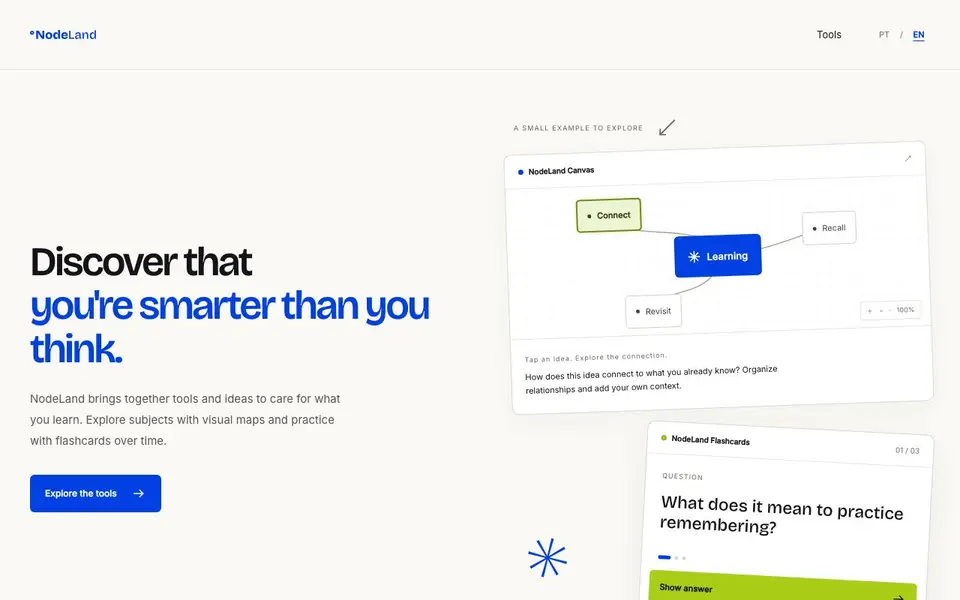
NodeLand is a learning toolkit with two main tools: Canvas and Flashcards. Canvas gives your ideas a visual shape, letting you organize notes and explore how concepts connect. Flashcards help you practice recalling information over time with spaced reviews.
You start by exploring a subject with a visual map. Tap an idea to see its connections and add your own context. When you want to practice, create questions in Flashcards, try answering them, and revisit material at growing intervals.
The tools share one NodeLand account, so you can move between them. The approach is based on learning research: connect new ideas to what you know, practice active recall, and revisit material with spaced repetition. The site notes these practices guide product choices, not a promise of individual results.
NodeLand features
- Visual maps: Organize notes and see the whole subject in one connected space.
- Connected notes: Explore relationships between ideas and add your own context.
- Flashcards: Create questions and practice answering them at your own pace.
- Spaced review: Revisit material at growing intervals to help it stick.
- Shared account: Use both Canvas and Flashcards with the same NodeLand login.
What you can do with NodeLand
- Map out a new subject to see how ideas fit together.
- Create flashcards for a topic you want to remember long-term.
- Review notes before an exam using spaced repetition.
- Add personal context to visual maps for deeper understanding.
How to get started with NodeLand
- Visit the NodeLand website and explore the two tools.
- Open Canvas to start a visual map and organize your notes.
- Create flashcards to practice recalling what you learned.
Tips for better results with NodeLand
- Start each new subject in Canvas by building a visual map of what you already know, then add new ideas as connections to that foundation.
- When creating Flashcards in NodeLand, phrase questions in your own words and test yourself before checking the answer to strengthen active recall.
- Use the shared NodeLand account to move between Canvas and Flashcards, turning mapped concepts into practice questions without switching tools.
- Schedule short review sessions at growing intervals in Flashcards, revisiting material while you can still remember it to make spaced repetition work.
- checks
NodeLand pricing
NodeLand’s homepage does not list prices. Check nodeland.io for current plans.
What to check before you rely on NodeLand
- Check whether NodeLand offers a free plan or trial, since the website does not list any pricing or plan details.
- Verify what export formats are available for your Canvas maps and Flashcards, as the site does not mention exporting options.
- Review the privacy policy to confirm how your notes and learning data are stored, since the site does not state data handling specifics.
Who NodeLand is for
NodeLand suits students, self-learners and curious people. If that is not you, the AI tools for students below may fit better.
Similar tools compared with NodeLand
| Tool | What it is | Pricing |
|---|---|---|
| NodeLand | Visual maps and flashcards for learning | See website |
| Gauth | AI homework helper with step-by-step answers | Freemium |
| Khanmigo | AI teaching assistant and tutor | Freemium |
| ChatPDF | AI chat and summarizer for PDFs | Freemium |
| Jenni AI | AI academic writing and research assistant | Freemium |
NodeLand FAQ
What does NodeLand do?
NodeLand gives you two learning tools: Canvas for visual maps and Flashcards for practice. You organize ideas visually, connect them, and then practice remembering with spaced reviews.
Is NodeLand free?
The website does not state pricing details. Check the site's pricing or sign-up page for current plans and whether a free option exists.
Who is NodeLand for?
It suits anyone studying or learning on their own. The tools are designed for people who want to organize ideas visually and practice remembering over time.
Can I use Canvas and Flashcards together?
Yes. Both tools use the same NodeLand account, so you can move between visual maps and flashcards as you study.
Does NodeLand work on mobile devices or only in a web browser?
The NodeLand website does not specify which devices or platforms the tool runs on. It appears to be web-based, but you should check the site or contact support to confirm if there are dedicated mobile apps or if it works on tablets and phones.
Can I export my notes or flashcards from NodeLand to another app?
The NodeLand website does not mention any export options or integrations with other apps. If you need to move your data elsewhere, check the site's documentation or support pages for details on exporting or syncing your content.
What does the free plan of NodeLand include?
The NodeLand website does not clearly describe a free plan or its limits. It says you can explore the tools, but pricing details are not listed. To know what's free, check the site's pricing page or contact support for a clear breakdown.


