

What is My Tattoo Ideas?
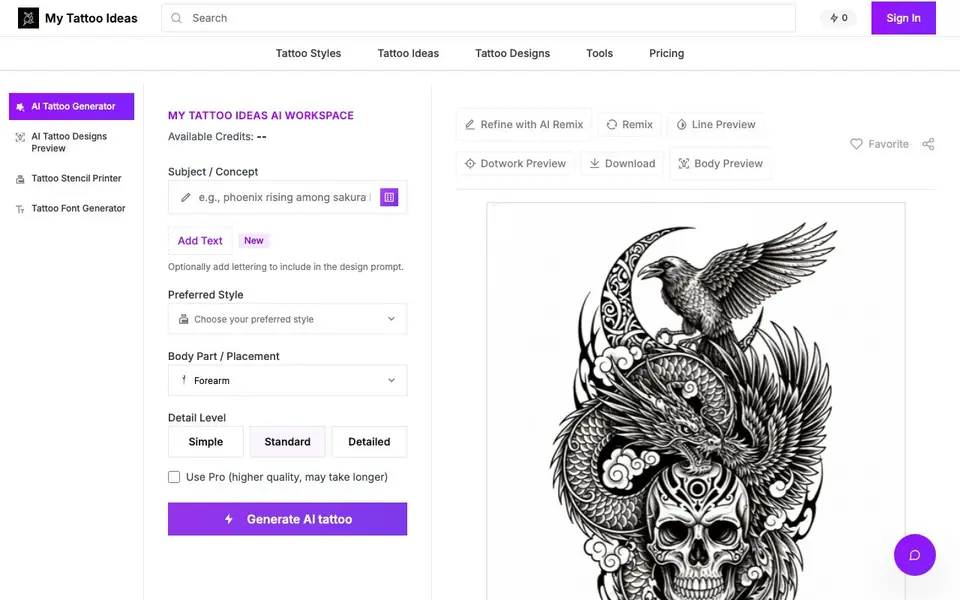
My Tattoo Ideas is an AI-powered workspace for generating tattoo concepts. You describe a subject, pick a style, choose a body part, and set a detail level. The AI then creates a design you can preview on realistic body templates.
You start with 6 free credits, no signup needed. Each generation, edit, or placement preview costs 2 credits, giving you 3 complete workflows. You can refine designs with text commands, download stencils and prep sheets, and upgrade for unlimited runs and pro tools.
The tool supports 12+ styles like American Traditional, Irezumi, Watercolor, and Blackwork. It offers 13+ body placements with smart templates, from full sleeves to hand tattoos. Three detail levels let you control complexity, from simple flash-ready designs to intricate pieces.
My Tattoo Ideas features
- AI Tattoo Generator: Turns your subject and style choices into a tattoo design in seconds.
- Body Preview Studio: Shows your design on realistic body parts like forearms, chests, and backs.
- Text-Based Refinement: Describes changes like "add more shading" to tweak your design instantly.
- Stencil Printer: Exports stencils and prep sheets for use in tattoo sessions.
- Tattoo Font Generator: Adds lettering options to include in your design prompts.
What you can do with My Tattoo Ideas
- Generate a unique tattoo idea for your next session.
- Preview how a design looks on your forearm or back before committing.
- Refine a design by adding elements or changing colors with text prompts.
- Download a stencil to bring to your tattoo artist.
How to get started with My Tattoo Ideas
- Open the studio and claim 6 free credits, no signup required.
- Enter your subject, pick a style, body part, and detail level, then generate.
- Refine with text edits, preview on body, and download stencils or upgrade for more.
Tips for better results with My Tattoo Ideas
- Start with a clear subject and style, then use the text-based refinement to add details like shading or color changes, saving credits by perfecting the design before generating a new one.
- Use the body preview studio to check how your tattoo looks on different placements like forearm or back, and adjust the placement before downloading a stencil.
- For My Tattoo Ideas, spend your 6 free credits on three complete workflows: generate, refine, and preview, then upgrade only if you need unlimited runs for multiple designs.
- Experiment with the three detail levels—simple, standard, detailed—to control complexity, and use the stencil printer for a clean, ready-to-use sheet for your artist.
My Tattoo Ideas pricing
My Tattoo Ideas has a free way to start, with paid plans for heavier use. Check mytattooideas.ai for current limits and prices.
What to check before you rely on My Tattoo Ideas
- Check if the free 6 credits are enough for your needs, since each generation, edit, or placement costs 2 credits, and the website does not list a free plan with recurring credits.
- Verify whether the pro tools and unlimited runs require a paid upgrade, as the website does not state the upgrade price or what exactly is included beyond 'unlimited runs and pro tooling'.
- Confirm the export formats for stencils and prep sheets, as the website mentions downloading them but does not specify file types like PDF or PNG.
Who My Tattoo Ideas is for
My Tattoo Ideas suits tattoo enthusiasts, tattoo artists and people planning their first tattoo. If that is not you, the AI image generators below may fit better.
Similar tools compared with My Tattoo Ideas
| Tool | What it is | Pricing |
|---|---|---|
| My Tattoo Ideas | AI tattoo generator and body preview studio | Freemium |
| SiImageGen | AI image generator and photo editor | Freemium |
| FreeSiTools | Free AI image prompt generator | Free |
| SiPhotoEditor | AI photo editor by description | Paid |
| Civitai | AI art community and model library | Freemium |
My Tattoo Ideas FAQ
Is My Tattoo Ideas free to use?
Yes, you get 6 free credits instantly without signing up. Each design, edit, or placement costs 2 credits, so you can complete 3 workflows. For unlimited runs and pro tools, you can upgrade via the pricing page.
What tattoo styles does it support?
It supports 12+ styles including American Traditional, Neo-Traditional, Irezumi, Black & Grey Realism, Fine Line, Watercolor, Blackwork, Geometric, Biomechanical, Dark Art Sketch, Surrealism, and Engraving.
Can I preview my tattoo on a body part?
Yes. The body preview studio offers 13+ placements like full sleeve, forearm, chest, back, and hand. Smart templates adjust the design to fit real anatomy with proper aspect ratios.
Can I edit a generated tattoo design?
Yes. You can use text-based editing to describe changes like "add more shading" or "make it feminine." The AI refines the design instantly, and you can do unlimited refinements.
Does My Tattoo Ideas require an account to use the free credits?
No, you can start using My Tattoo Ideas without signing up. The website states you receive 6 free credits instantly when you open the studio, with no signup required. After using those credits, you may need to create an account to continue, but the initial free usage does not require one.
What can I export or download from My Tattoo Ideas?
My Tattoo Ideas lets you download stencils and prep sheets for use in tattoo sessions. The website also mentions a Stencil Printer feature that exports these files. It does not specify other export formats like PNG or PDF, so check the tool's download options after generating a design for exact file types.
Does My Tattoo Ideas work on mobile devices or only on desktop?
The website does not specify which devices or platforms My Tattoo Ideas runs on. It appears to be a web-based tool, so it likely works in any browser, but for confirmation on mobile compatibility, you can test it on your phone or check the site's help or FAQ sections for device-specific details.


