

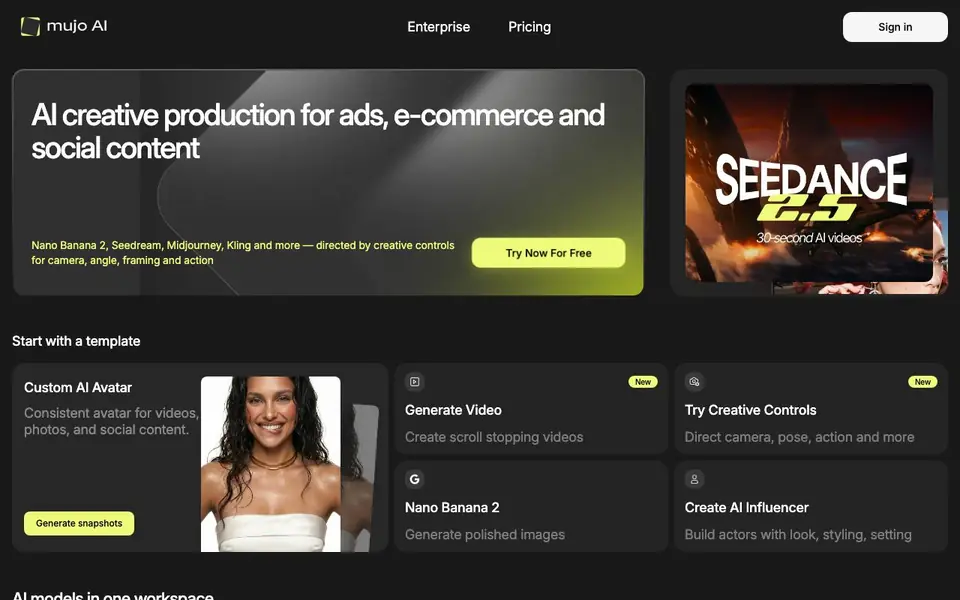
What is Mujo AI?
Mujo AI is a creative platform that brings many top AI image and video models into one workspace. You can run models like Nano Banana 2, Seedream, Midjourney, Kling, and GPT Image without switching between apps. It is built for ads, e-commerce, and social content production.
You start with a template or a prompt. Then you use the control bar to direct camera angle, pose, lighting, location, and style. There are over 1000 pre-made creative controls and a prompt library with curated packs. You can also turn a selfie into a full photoshoot or build a product gallery from a single input.
The platform includes tools for teams: an AI Avatar Builder, Content Studio for publish-ready video, a Design Editor with background remover, and a Copy Editor for e-commerce text. Plans start with a free option to test ideas, and paid plans offer more credits, parallel generations, and a commercial license.
Mujo AI features
- Multi-model workspace: Run image and video models like Midjourney, Kling, and Seedream in one interface.
- Creative controls: Direct camera, pose, emotion, lighting, and angle with over 1000 pre-made options.
- AI Avatar Builder: Create a consistent avatar for videos, photos, and social content.
- E-commerce Studio: Turn a single product input into a full gallery or campaign image pack.
- Prompt Library: Browse curated prompt packs from Mujo and creators for consistent image sets.
What you can do with Mujo AI
- Generate product visuals for online listings with high-conversion style.
- Create cinematic brand videos with consistent characters and motion.
- Build a fashion lookbook or photoshoot series from one selfie.
- Produce social content with expressive AI avatars and styled scenes.
How to get started with Mujo AI
- Sign up and choose a free plan to start experimenting.
- Pick a template or write a prompt in the workspace.
- Use creative controls to adjust camera, pose, and lighting, then generate your image or video.
Tips for better results with Mujo AI
- Start with a template or a prompt pack from the library to get consistent results, then adjust the control bar for camera, lighting, and pose to match your vision.
- Use Mujo AI's creative controls to set specific parameters like angle and emotion before generating, so you avoid random outputs and get closer to the shot you need.
- For product visuals, feed Mujo AI a single product input and use the E-commerce Studio to build a gallery, then refine with the Design Editor for text and layout.
- Test different models like Nano Banana 2 for product shots or Kling for motion, and compare outputs in the same workspace to find the best fit for your content.
- checks
Mujo AI pricing
Mujo AI has a free way to start, with paid plans for heavier use. Check mujoai.com for current limits and prices.
What to check before you rely on Mujo AI
- Check if the free plan includes a commercial license, since the site lists it only for paid plans, and confirm what credit limits apply before using outputs in client work.
- Verify whether the platform supports export formats you need, like transparent backgrounds or 4K video, as the website does not list specific download options.
- Review the privacy policy to see how your uploaded images and prompts are stored or used, since the site does not state data handling details.
- Confirm which models are available on your plan, as some like Midjourney 8 are marked 'Soon' and may not be accessible yet.
Who Mujo AI is for
Mujo AI suits marketers, e-commerce teams, creative agencies and social media managers. If that is not you, the AI image generators below may fit better.
Similar tools compared with Mujo AI
| Tool | What it is | Pricing |
|---|---|---|
| Mujo AI | AI creative studio for images and video | Freemium |
| SiImageGen | AI image generator and photo editor | Freemium |
| FreeSiTools | Free AI image prompt generator | Free |
| SiPhotoEditor | AI photo editor by description | Paid |
| Civitai | AI art community and model library | Freemium |
Mujo AI FAQ
What can I create with Mujo AI?
You can create images, videos, AI avatars, product galleries, and fashion lookbooks. The platform supports multiple models like Midjourney, Kling, and Seedream, so you can switch between styles and formats in one workspace.
Is there a free plan?
Yes, Mujo AI offers a free option to play around and test ideas. Paid plans start at $9 per month for more credits, parallel generations, and a commercial license.
Who is Mujo AI for?
It is designed for marketing, e-commerce, and creative teams. You can use it for ads, product visuals, social content, and consistent brand imagery without needing to switch between different AI tools.
Does Mujo AI offer video generation?
Yes, it includes video models like Seedance, Kling, and VEO. You can create cinematic videos up to 30 seconds with creative controls for motion, camera, and style.
Can Mujo AI export my generated images or videos directly to social media platforms?
The Mujo AI website does not mention direct exporting to social media platforms. It focuses on generating and editing content within the platform. You can download your files and then upload them to your social channels manually. Check the platform's help or support section for any updates on direct sharing features.
Does Mujo AI have a mobile app or is it only web-based?
The Mujo AI website does not mention a mobile app. It appears to be a web-based platform that you access through a browser. You can use it on any device with internet access, such as a laptop, tablet, or smartphone. For the best experience, a larger screen is recommended due to the detailed controls.
What exactly does the free plan of Mujo AI include in terms of credits and features?
The Mujo AI website states that there is a free option to test ideas, but it does not specify the exact number of credits or which features are included. Paid plans offer more credits, parallel generations, and a commercial license. For detailed information on the free plan's limits, you would need to sign up or contact Mujo AI directly.


