

What is LoveStudy.ai?
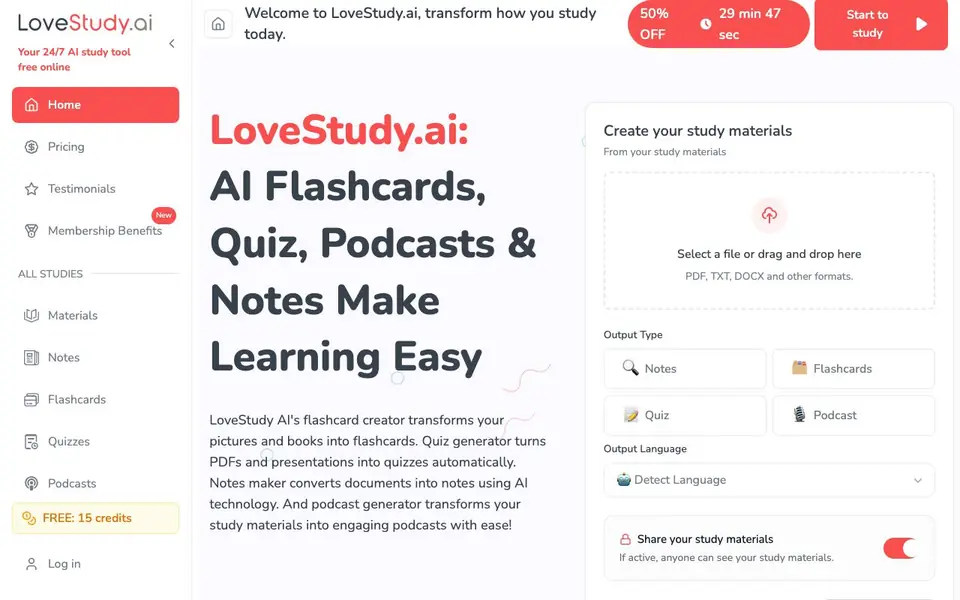
LoveStudy.ai is a free online study tool that helps you turn your study materials into different formats. You can upload files like PDFs, TXT, or DOCX, and the AI will create flashcards, quizzes, notes, or even podcasts from them. It also includes a Bible study tool with topical, Greek, and Hebrew resources.
To use it, you select a file or drag and drop it onto the site. Then you choose the output type you want, such as flashcards or a quiz. You can also pick the output language or let the tool detect it automatically. Once you create your materials, you can choose to share them with others.
The site offers 15 free credits to get started, and there are membership plans available. It is designed for students, teachers, and anyone who wants to make studying more efficient. The tool supports multiple languages and can handle various file formats, making it flexible for different learning needs.
LoveStudy.ai features
- Flashcard maker: Turns pictures and books into flashcards for faster memorization.
- Quiz generator: Converts PDFs and presentations into quizzes automatically.
- Notes maker: Transforms documents into clearly organized notes using AI.
- Podcast generator: Converts study materials into engaging audio podcasts.
- Bible study tools: Offers topical, Greek, and Hebrew Bible study resources online.
What you can do with LoveStudy.ai
- Create flashcards from your textbook chapters for quick review.
- Turn lecture slides into practice quizzes to test your knowledge.
- Convert dense articles into concise notes for easier studying.
- Generate podcasts from your notes to study while on the go.
How to get started with LoveStudy.ai
- Upload a file by selecting it or dragging it into the drop zone.
- Choose your output type: notes, flashcards, quiz, or podcast.
- Pick the output language or let the tool detect it, then click Create.
Tips for better results with LoveStudy.ai
- Upload clean, well-structured files like PDFs or DOCX to LoveStudy.ai so the AI can extract the key points accurately for your flashcards, notes, or quizzes.
- Choose the output language manually in LoveStudy.ai instead of relying on auto-detect when your material mixes languages, to avoid mixed-language results.
- Use LoveStudy.ai's podcast generator for dense articles you need to review repeatedly, then listen during commutes or workouts to reinforce the material.
- Turn on sharing in LoveStudy.ai when you create study sets for a group, so teammates can access the same flashcards or quizzes without re-uploading.
LoveStudy.ai pricing
LoveStudy.ai has a free way to start, with paid plans for heavier use. Check lovestudy.ai for current limits and prices.
What to check before you rely on LoveStudy.ai
- Check your credit balance before starting a large project, since LoveStudy.ai gives only 15 free credits and the website does not state how many credits each output type consumes.
- Verify whether your uploaded files contain sensitive personal data, as LoveStudy.ai's sharing feature is active by default and the privacy policy is not detailed on the site.
- Confirm that the output formats (like flashcards or quizzes) can be exported or downloaded for offline use, because the website does not list export options or file types.
Who LoveStudy.ai is for
LoveStudy.ai suits students, teachers, language learners and Bible study groups. If that is not you, the AI tools for students below may fit better.
Similar tools compared with LoveStudy.ai
| Tool | What it is | Pricing |
|---|---|---|
| LoveStudy.ai | AI flashcards, quizzes, notes and podcasts | Freemium |
| Gauth | AI homework helper with step-by-step answers | Freemium |
| Khanmigo | AI teaching assistant and tutor | Freemium |
| ChatPDF | AI chat and summarizer for PDFs | Freemium |
| Jenni AI | AI academic writing and research assistant | Freemium |
LoveStudy.ai FAQ
Is LoveStudy.ai free to use?
The website says it is a free online study tool and offers 15 free credits to start. There are also membership plans, so it follows a freemium model where you can begin without paying.
What file formats can I upload?
You can upload PDF, TXT, DOCX, and other formats. The site mentions these specifically, so other common document types may also work.
What can I create with LoveStudy.ai?
You can create flashcards, quizzes, notes, and podcasts from your uploaded materials. There is also a separate Bible study tool with topical, Greek, and Hebrew resources.
Can I share my study materials with others?
Yes, the site has an option to share your study materials. If you activate sharing, anyone can see the materials you create.
Does LoveStudy.ai require an account to use it?
LoveStudy.ai gives you 15 free credits to start, and you log in to access your studies. The website does not state whether an account is mandatory for all features, so check the sign-up or login page for the exact requirements before you start.
Can LoveStudy.ai export my flashcards, quizzes, notes, or podcasts to other apps or files?
LoveStudy.ai lets you create and share your study materials, but the website does not mention exporting them to specific apps or file formats like CSV or MP3. To see what export options are available, look for a download or export button after you generate your materials.
What devices or platforms does LoveStudy.ai run on?
LoveStudy.ai is described as a free online study tool, so it works in a web browser on any device with internet access, such as a computer, tablet, or phone. The website does not mention dedicated mobile apps for iOS or Android, so you can use it through your browser instead.


