

What is Lightfield?
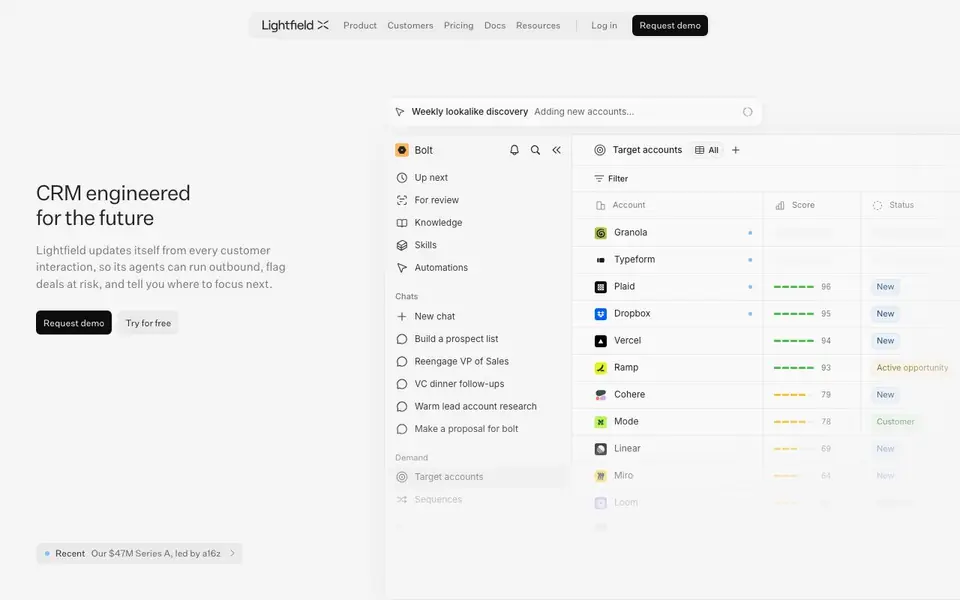
Lightfield is an AI-native CRM designed for companies that want to capture, analyze, and understand everything about their customers. It automatically updates from every call, email, meeting, and Slack thread, building a context graph that agents use to work. This means your CRM always reflects the latest customer interactions without manual data entry.
You can use Lightfield to generate pipeline, run outbound campaigns, and get sales assistance. Its agents find prospects similar to your best customers, book meetings, capture commitments, and handle follow-ups. The system also diagnoses funnel weaknesses and learns from your top sellers to codify successful strategies.
Lightfield suits sales teams, operations, and executives who want a shared understanding of customers. The website mentions features like meeting recorder, CRM data capture, and pipeline generation. It also highlights solutions for improving sales execution, building high-quality pipeline, ramping new hires, and forecasting.
Lightfield features
- Pipeline generation: Automatically finds prospects that look like your best customers and books meetings with them.
- Sales assistant: Handles account research, deal qualification, meeting prep, and follow-ups for every opportunity.
- CRM data capture: Updates itself from calls, emails, meetings, and Slack threads without manual entry.
- Meeting recorder: Records and analyzes meetings to capture commitments and next steps.
- Automations: Runs multi-channel outreach and automates follow-ups based on your sales process.
What you can do with Lightfield
- Build target lists modeled off your fastest growing customers.
- Run multi-channel outreach to high-intent prospects.
- Diagnose where your funnel is weak and improve sales execution.
- Measure pipeline coverage and forecast deal slippage.
How to get started with Lightfield
- Request a demo or try for free on Lightfield's website.
- Connect your communication channels like email, meetings, and Slack.
- Let Lightfield build your context graph and start using its agents for outbound and deal management.
Tips for better results with Lightfield
- Connect Lightfield to your email, calendar, and Slack channels so it captures every customer interaction automatically, then review its generated context graph weekly to ensure accuracy.
- Use Lightfield's pipeline generation to model target lists off your fastest-growing customers, then refine the criteria based on your ideal customer profile for better prospect matches.
- Let Lightfield's sales assistant handle meeting prep and follow-ups, but always review its suggested commitments and next steps before sending them to clients to avoid miscommunication.
- Leverage Lightfield's automations for multi-channel outreach, but segment your audience by deal stage or signal type to avoid generic messaging that reduces response rates.
Lightfield pricing
Lightfield has a free way to start, with paid plans for heavier use. Check lightfield.app for current limits and prices.
What to check before you rely on Lightfield
- Check whether Lightfield's free plan includes all features you need, like meeting recording and pipeline generation, since the website lists pricing as freemium but doesn't detail limits.
- Verify how Lightfield handles data privacy for recorded meetings and Slack threads, as the website doesn't specify encryption or compliance standards.
- Confirm which platforms Lightfield integrates with, such as email providers or Slack, because the website mentions these but doesn't list all supported systems.
Who Lightfield is for
Lightfield suits sales teams, GTM leaders, operations and executives. If that is not you, the AI business tools below may fit better.
Similar tools compared with Lightfield
| Tool | What it is | Pricing |
|---|---|---|
| Lightfield | AI-native CRM for modern sales teams | Freemium |
| Tidio | AI customer service and sales platform | Freemium |
| Chatbase | AI customer experience and support agents | Free trial |
| Copy.ai | AI-native go-to-market platform | See website |
| Harvey | AI platform for legal and professional services | See website |
Lightfield FAQ
What does Lightfield do?
Lightfield is an AI-native CRM that automatically updates from every customer interaction. It helps sales teams run outbound, flag deals at risk, and know where to focus next.
Is Lightfield free?
Lightfield offers a free trial option, as indicated by the 'Try for free' button on its website. For full pricing details, you'd need to check their pricing page.
Who is Lightfield for?
Lightfield is for sales teams, GTM leaders, operations, and executives who want a shared understanding of customers. It helps improve sales execution, build pipeline, and ramp new hires faster.
How does Lightfield capture data?
Lightfield updates itself from every call, email, meeting, and Slack thread. It assembles a context graph that agents use to reason and act, so your CRM stays current without manual entry.
Does Lightfield integrate with other tools like Slack or email providers?
Lightfield updates itself from calls, emails, meetings, and Slack threads, so it works with those communication channels. The website does not list specific integrations with other CRM or productivity tools. To see if a particular tool connects, check the Docs section on the Lightfield website.
What platforms or devices can I use Lightfield on?
Lightfield is a web-based CRM, so you can access it through a browser on your computer. The website does not mention dedicated mobile apps for iOS or Android. For the most current information about device support, check the Lightfield website or contact their team.
Does Lightfield require a credit card to start the free plan?
Lightfield offers a free trial, and the website says you can 'Try for free' without mentioning a credit card requirement. The pricing label is freemium, meaning there is a free tier. For exact details on what the free plan includes, check the Pricing page on the Lightfield website.


