

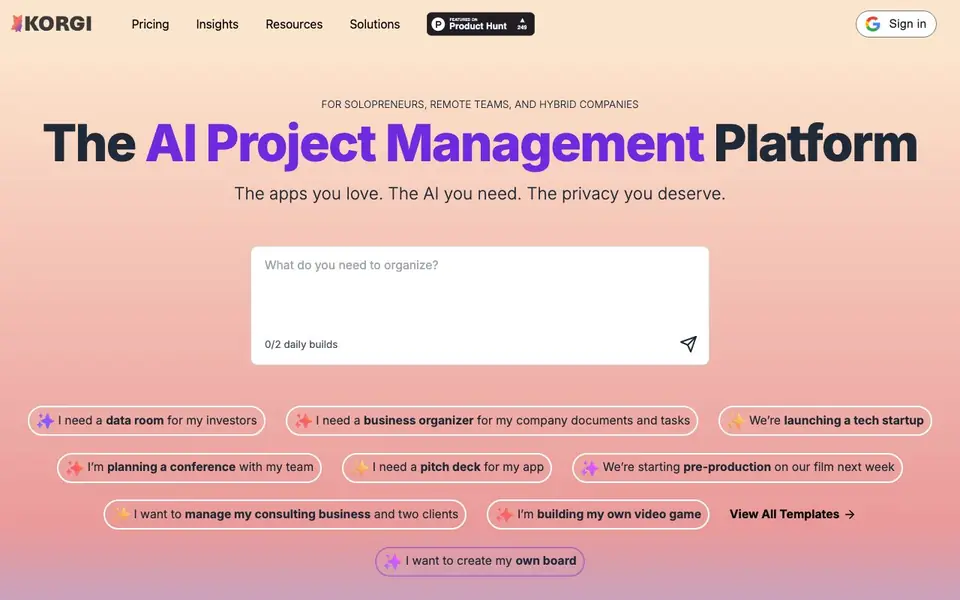
What is Korgi?
Korgi is an AI-powered project management platform built around kanban boards. It helps you plan, execute, and deliver work by turning your ideas into structured boards with stages, steps, and resources in under a minute. You can connect your existing tools like Google Workspace, Microsoft 365, and Zoom, so everything lives in one place.
You start by typing what you need, and Korgi builds a complete project board for you. Then you use your own apps and drives directly on the board, and ask Korgi AI questions about your connected items for insights and guidance. When you are ready, you export your work into formatted documents with one click, saving time and avoiding tab-switching.
Korgi suits solopreneurs, remote teams, and hybrid companies. It emphasizes privacy: your queries are submitted anonymously, and Korgi does not train on them or save them to its servers. Users report saving 5-6 hours per week, and templates are available for scenarios like startup launches, conferences, and film pre-production.
Korgi features
- AI board generation: Type a need and get a full project board with stages, steps, and resources quickly.
- App integration: Connect Google Workspace, Microsoft 365, and Zoom directly into your board.
- AI knowledge base: Query your board and connected items for ongoing information and guidance.
- One-click export: Turn your board into formatted documents you can share instantly.
- Privacy protection: Your queries are anonymous and not used for training or saved on servers.
What you can do with Korgi
- Plan a startup launch with a structured project board in minutes.
- Organize a conference by creating stages and tasks for your team.
- Manage consulting clients with a board that tracks documents and tasks.
- Start film pre-production with a board for schedules and resources.
How to get started with Korgi
- Type what you need, like a data room or conference plan, into the prompt.
- Let Korgi generate a complete board with stages, steps, and resources.
- Connect your apps, query the board with AI, and export your work as a document.
Tips for better results with Korgi
- Start each board by typing a clear, specific outcome like 'data room for investors' so Korgi generates stages and resources that match your real project needs.
- Connect your Google Workspace, Microsoft 365, or Zoom accounts to your Korgi board before asking questions, so the AI can pull insights from your actual files and meetings.
- Use Korgi's AI knowledge base to ask about connected items directly on the board, which helps you find documents or next steps without switching tabs or digging through folders.
- Export your finished board to a formatted document with one click, then review the output for accuracy before sharing it with stakeholders or clients.
- Check your daily build limit before starting multiple boards, since Korgi shows '0/2 daily builds' on the homepage, which may cap how many projects you can generate in a day.
Korgi pricing
Korgi’s homepage does not list prices. Check korgiboard.com for current plans.
What to check before you rely on Korgi
- Verify the daily build limit of two boards per day, as shown on the homepage, to ensure it fits your project volume before relying on Korgi for frequent planning.
- Confirm whether the free tier includes all features like app integrations and one-click export, since the website does not list pricing or plan details.
- Review Korgi's privacy policy to confirm that your queries are anonymous and not saved, as stated, before entering sensitive project information.
Who Korgi is for
Korgi suits solopreneurs, remote teams, hybrid companies and project managers. If that is not you, the AI business tools below may fit better.
Similar tools compared with Korgi
| Tool | What it is | Pricing |
|---|---|---|
| Korgi | AI project management with kanban boards | See website |
| Tidio | AI customer service and sales platform | Freemium |
| Chatbase | AI customer experience and support agents | Free trial |
| Copy.ai | AI-native go-to-market platform | See website |
| Harvey | AI platform for legal and professional services | See website |
Korgi FAQ
What does Korgi do?
Korgi is an AI project management platform that builds kanban boards from your descriptions. It connects your existing apps like Google Workspace and Zoom, lets you query the board with AI, and exports your work into formatted documents.
Is Korgi free?
The website does not state pricing details. You can check the Pricing page linked on the site for current plans and any free options.
Who is Korgi for?
Korgi is designed for solopreneurs, remote teams, and hybrid companies. It also works for event producers, consultants, and non-profits, as shown in customer stories on the site.
How does Korgi protect my privacy?
Korgi submits your queries anonymously and does not train on them or save them to its servers. You can also store data in your own drives, like Google Sheets, for long-term safety.
What apps and tools can Korgi connect to on my board?
Korgi lets you connect Google Workspace, Microsoft 365, and Zoom directly into your board. This means you can use your own apps and drives without switching tabs. The website lists these three integrations, so if you need a different tool, check Korgi's official site for the latest updates.
Can I export my Korgi board to a document for sharing?
Yes, Korgi includes a one-click export feature that turns your board into formatted documents you can share instantly. This helps you deliver work without tab-jumping or folder-diving. The website doesn't specify which document formats are supported, so check Korgi's site for details on export options.
Does Korgi require me to create an account before using it?
The Korgi website shows a Sign in option, which suggests you likely need an account to use the platform. However, the site doesn't clearly state whether an account is mandatory or if you can try it without one. For the exact sign-up requirements, visit korgiboard.com and look for their pricing or getting started pages.


