

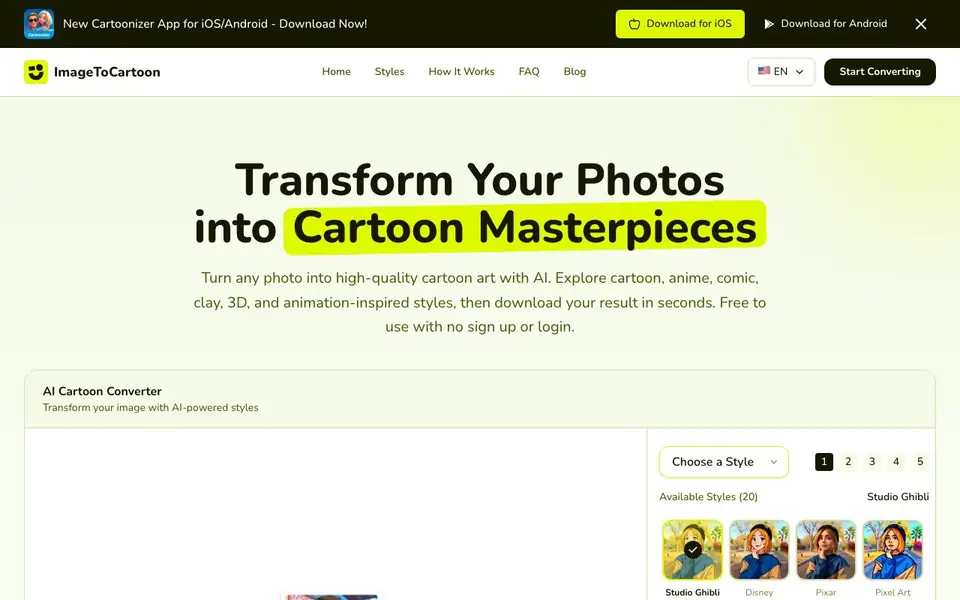
What is Imagetocartoon?
ImageToCartoon is a free online tool that converts your photos into cartoon-style artwork using AI. It offers over 80 unique styles, including Studio Ghibli, Disney, Pixar, Japanese Anime, Manga, Claymation, and 3D animation looks. You can upload a JPG, PNG, or WebP image up to 10MB, choose a style, and get a high-quality result in seconds. No account or payment is needed.
To use it, you upload your photo by dragging and dropping, pasting from clipboard, or using an image URL. Then you pick a style from the library or use your own custom styles. The AI processes your image and you download the finished cartoon, ready for social media, prints, or avatars.
It suits anyone wanting quick cartoon versions of themselves, pets, or creative projects. The website notes that uploaded images are automatically deleted within 2 hours, and there is no sign-up required. It also offers a mobile app for iOS and Android.
Imagetocartoon features
- 80+ styles: Choose from anime, comic, 3D, clay, and more unique cartoon looks.
- Free no sign-up: Convert photos without creating an account or paying fees.
- Fast processing: Get your cartoon result in seconds after uploading.
- Multiple upload options: Drag and drop, paste from clipboard, or use an image URL.
- Privacy protection: Original and generated images are auto-deleted within 2 hours.
What you can do with Imagetocartoon
- Create a cartoon avatar for your social media profile.
- Turn a pet photo into a playful cartoon portrait.
- Make anime-style versions of your favorite pictures.
- Generate comic-style images for creative projects or prints.
How to get started with Imagetocartoon
- Upload your photo by dragging and dropping, pasting, or entering an image URL.
- Choose a style from the 80+ options, like anime, Disney, or claymation.
- Click convert and download your cartoon image in seconds.
Tips for better results with Imagetocartoon
- Upload a well-lit, high-resolution photo with the subject centered to help ImageToCartoon capture facial details and produce a cleaner cartoon result.
- Experiment with different styles in ImageToCartoon, like Studio Ghibli or Claymation, to find the look that best matches your photo's mood and composition.
- Use the match input image aspect ratio option in ImageToCartoon to avoid unwanted cropping, especially if you plan to print or post the result.
- For best results, choose a photo with a simple background and one main subject, as ImageToCartoon's AI focuses better on clear focal points.
Imagetocartoon pricing
Imagetocartoon is free to use according to its website.
What to check before you rely on Imagetocartoon
- Check if the free plan includes all 80+ styles or if some styles require payment, since the website lists only 20 styles on the main page.
- Verify the output resolution and file format before using the result for prints, as the site does not specify export options or image sizes.
- Confirm the 2-hour auto-deletion policy applies to both original and generated images, and review the privacy page for any data retention details.
Who Imagetocartoon is for
Imagetocartoon suits social media users, content creators, casual users and anime fans. If that is not you, the AI image generators below may fit better.
Similar tools compared with Imagetocartoon
| Tool | What it is | Pricing |
|---|---|---|
| Imagetocartoon | AI photo to cartoon converter | Free |
| SiImageGen | AI image generator and photo editor | Freemium |
| FreeSiTools | Free AI image prompt generator | Free |
| SiPhotoEditor | AI photo editor by description | Paid |
| Civitai | AI art community and model library | Freemium |
Imagetocartoon FAQ
Is ImageToCartoon really free to use?
Yes, the website states it is free to use with no sign-up or login required. You can upload photos, apply styles, and download results without paying any fees.
What image formats and sizes are supported?
You can upload JPG, PNG, and WebP images up to 10MB. The tool also allows you to paste from clipboard or use an image URL for uploads.
What happens to my uploaded photos?
Your original image and the generated cartoon result are automatically deleted from their systems within 2 hours. No registration or payment details are needed.
Can I use my own custom styles?
Yes, the tool offers a 'Use Your Styles' option in addition to the built-in style library. The website does not detail how to create or upload custom styles, so check the app for specifics.
Can I use ImageToCartoon on my phone or tablet?
Yes, ImageToCartoon offers a mobile app for both iOS and Android, so you can convert photos on the go. The website also works in a mobile browser, but the app provides a dedicated experience. You can download it from the App Store or Google Play.
Does ImageToCartoon let me download the cartoon in different file formats?
The ImageToCartoon website does not specify which output formats are available for download. You can see the result on screen and likely save it as an image, but for exact format options, check the app or the site's download section after converting.
What can I do with the cartoon images I create with ImageToCartoon?
ImageToCartoon is designed for personal and creative use. You can use the cartoons for social media avatars, prints, or creative projects. The site does not mention any restrictions on commercial use, but for specific licensing details, review the terms on the website.


