

What is GradingPal?
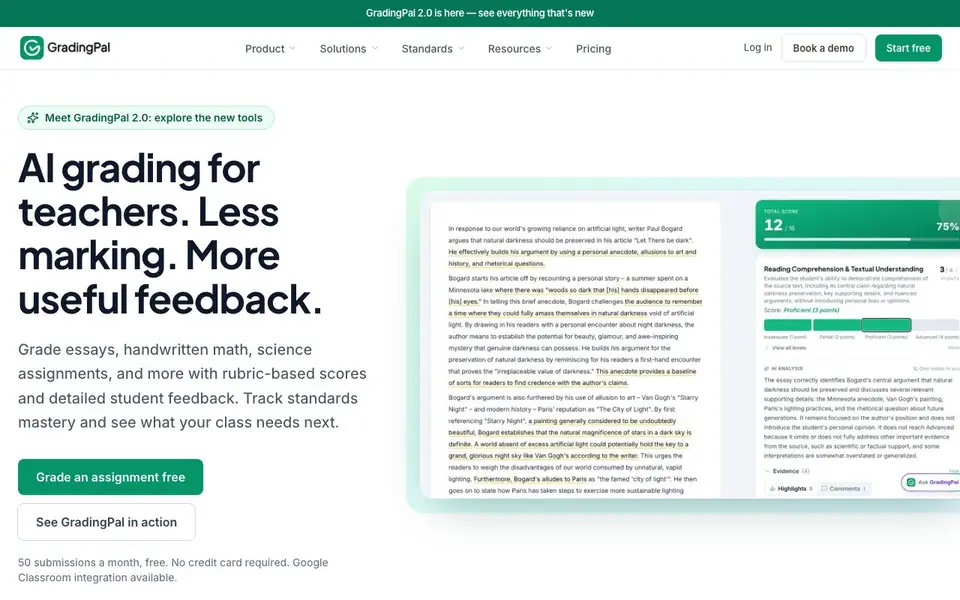
GradingPal is an AI grading tool built for teachers. It reads student work across subjects like English, math, physics, chemistry, biology, and history. You can upload essays, worksheets, quizzes, problem sets, lab reports, handwritten scans, presentations, and even video or audio submissions. The tool scores each submission against your rubric, explains the scores, and generates feedback in your teaching voice.
You start by creating or importing an assignment and setting your rubric. Students submit work, and GradingPal assesses each response question by question or as a whole. You review the scores with the student's work beside them, adjust anything you want, and then return the graded work with individual next steps. The system also tracks standards mastery and shows class-wide strengths and gaps.
GradingPal suits teachers in K-12 and higher education who want to cut down repetitive marking while giving students detailed, actionable feedback. The free plan covers 50 submissions a month with no credit card needed, and Google Classroom integration is available. For schools and districts, there are broader options you can explore by booking a demo.
GradingPal features
- Rubric-based scoring: Scores student work against your own rubric and explains each score.
- Actionable feedback: Generates individual comments in your teaching voice for each student.
- Handwritten work support: Reads scanned math and science work, including notation and explanations.
- Classroom analytics: Shows shared strengths, recurring difficulties, and progress against standards.
- Multi-format grading: Handles essays, worksheets, quizzes, problem sets, labs, presentations, and video or audio.
- Google Classroom integration: Connects with Google Classroom for easier assignment and grade management.
What you can do with GradingPal
- Grade a class set of essays with individual comments on arguments and evidence.
- Score handwritten math problem sets with partial-credit feedback on reasoning.
- Assess lab reports in biology, chemistry, or physics with rubric-based scores.
- Evaluate recorded oral presentations and give feedback linked to specific moments.
- Identify which questions your class struggled with on a quiz or exam.
How to get started with GradingPal
- Create or import an assignment and set your rubric in GradingPal.
- Upload student submissions, including handwritten scans or video files.
- Review the AI-generated scores and feedback, then return the graded work to students.
Tips for better results with GradingPal
- Upload your rubric before grading so GradingPal scores against your criteria, not generic expectations. Review the explanations beside each student's work and adjust any score you disagree with before returning it.
- Use GradingPal's handwritten work support for math and science problem sets to get partial-credit feedback on reasoning. Check that scans are clear and legible to avoid misreads, then verify scores question by question.
- Grade a full class set in one session to spot patterns in the analytics. Look at shared strengths and recurring difficulties to decide what to reteach, then use that insight to plan your next assignment.
- Try the free 50-submission monthly plan first to test GradingPal with your own assignments and rubrics. Confirm it handles your file types, like video or audio, before committing to a paid plan.
GradingPal pricing
GradingPal has a free way to start, with paid plans for heavier use. Check gradingpal.com for current limits and prices.
What to check before you rely on GradingPal
- Check whether the free 50-submission monthly limit is enough for your class size, and confirm what happens when you exceed it before relying on GradingPal for a full term.
- Verify that GradingPal supports the specific file formats your students submit, such as handwritten scans or video, since the website does not list all accepted formats.
- Review the pricing page for paid plans and data privacy policies, as the website does not state costs beyond the free tier or how student data is handled.
Who GradingPal is for
GradingPal suits K-12 teachers, higher education instructors and schools and districts. If that is not you, the AI tools for students below may fit better.
Similar tools compared with GradingPal
| Tool | What it is | Pricing |
|---|---|---|
| GradingPal | AI grading for teachers with feedback | Freemium |
| Gauth | AI homework helper with step-by-step answers | Freemium |
| Khanmigo | AI teaching assistant and tutor | Freemium |
| ChatPDF | AI chat and summarizer for PDFs | Freemium |
| Jenni AI | AI academic writing and research assistant | Freemium |
GradingPal FAQ
What subjects and assignment types can I grade with GradingPal?
You can grade English essays, short responses, research papers, math and science worksheets, quizzes, exams, problem sets, lab reports, handwritten work, presentations, and even video or audio submissions. Supported subjects include English, math, physics, chemistry, biology, and history.
Is GradingPal free to use?
Yes, there is a free plan that includes 50 submissions per month with no credit card required. For schools and districts, you can explore broader options by booking a demo. The website does not list specific paid plan prices.
How does GradingPal handle handwritten math and science work?
GradingPal reads scanned student responses, including mathematical notation and written explanations. It scores the method and answer against your rubric, provides partial-credit instructions, and lets you review the original handwriting beside the scores and feedback.
Can I connect GradingPal to Google Classroom?
Yes, Google Classroom integration is available. This lets you bring in assignments and manage grades more easily. The website does not detail the exact setup steps, but you can start free and explore the integration from your workspace.
Can GradingPal export grades or feedback to other platforms besides Google Classroom?
The GradingPal website mentions Google Classroom integration but does not list other export options or connections. To see if your school's grading system or LMS is supported, check the GradingPal website or contact their team directly.
Does GradingPal work on tablets or mobile devices?
The GradingPal website does not specify which devices or platforms it runs on. It is likely accessible via a web browser on a computer, but for confirmation about tablet or mobile support, check the GradingPal website or reach out to their support.
What exactly does the free plan include besides 50 submissions a month?
The free plan includes 50 submissions per month with no credit card required, and Google Classroom integration is available. The website does not detail other features or limits of the free plan, so for specifics, check the GradingPal pricing page or contact them.


