

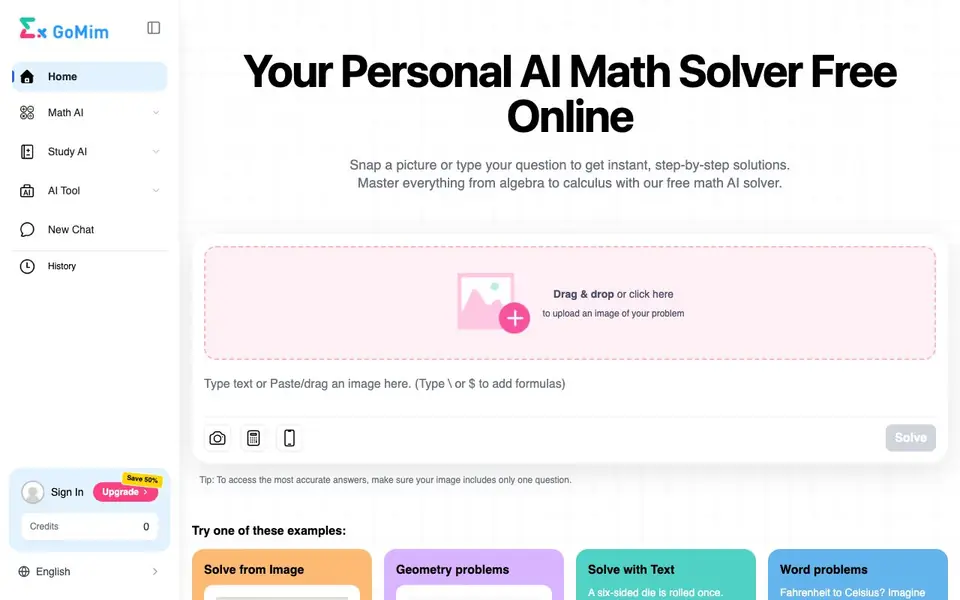
What is GoMim Math AI?
GoMim Math AI is an online math solver that helps you work through problems from basic arithmetic to advanced calculus. You can upload a picture of a handwritten or printed question, or type it directly, and the tool returns a clear, step-by-step solution. It covers topics like algebra, geometry, statistics, and more.
To use it, you drag and drop an image or click to upload one, then press Solve. You can also use a smart keyboard for typing formulas or scan a problem with your phone camera. The tool works best when your image contains only one question, as the website notes that this gives the most accurate answers.
The platform is free to start with no sign-up required, and it gives you daily free credits. You can sync results between mobile and desktop. It suits students who want quick homework help and anyone who wants to understand the reasoning behind math solutions, not just the final answer.
GoMim Math AI features
- Photo scanning: Upload a picture of a math problem and get a solution without typing it out.
- Step-by-step breakdowns: Each solution is explained logically so you can follow the method.
- Wide topic coverage: Handles basic math, algebra, geometry, calculus, and statistics.
- Smart keyboard input: Type formulas directly for problems that are hard to photograph.
- Free daily credits: Use the core features daily without paying, no account needed.
What you can do with GoMim Math AI
- Solve a geometry problem by uploading a diagram or written question.
- Check your calculus homework by typing in a derivative or integral.
- Practice probability questions with instant feedback on your answers.
- Verify a word problem conversion, like Fahrenheit to Celsius, step by step.
How to get started with GoMim Math AI
- Go to the GoMim website and find the Math AI solver section.
- Upload an image of your math problem or type it using the smart keyboard.
- Click Solve to see the step-by-step solution and review each part.
Tips for better results with GoMim Math AI
- Upload an image containing only one question to get the most accurate answer from GoMim Math AI, as the website explicitly recommends this for best results.
- Use the smart keyboard to type formulas for problems that are hard to photograph, such as derivatives or integrals, to ensure GoMim Math AI reads them correctly.
- Take advantage of the daily free credits without signing up, and sync your results between mobile and desktop to keep your work consistent across devices.
- Check your step-by-step solutions by reworking the problem yourself, since GoMim Math AI provides logical breakdowns that you can follow to verify each method.
GoMim Math AI pricing
GoMim Math AI has a free way to start, with paid plans for heavier use. Check gomim.com for current limits and prices.
What to check before you rely on GoMim Math AI
- Confirm how many daily free credits you get and what happens when they run out, since the website mentions daily credits but does not state the exact limit.
- Check whether the free tier includes all topics like calculus and statistics, or if some advanced problems require payment, as the site does not specify.
- Verify if you can export or save your solved problems, because the website does not list any export formats or download options for your results.
Who GoMim Math AI is for
GoMim Math AI suits students, parents, tutors and self-learners. If that is not you, the AI tools for students below may fit better.
Similar tools compared with GoMim Math AI
| Tool | What it is | Pricing |
|---|---|---|
| GoMim Math AI | AI math solver and homework helper | Freemium |
| Gauth | AI homework helper with step-by-step answers | Freemium |
| Khanmigo | AI teaching assistant and tutor | Freemium |
| ChatPDF | AI chat and summarizer for PDFs | Freemium |
| Jenni AI | AI academic writing and research assistant | Freemium |
GoMim Math AI FAQ
Is GoMim Math AI really free?
Yes, the website says it is free and requires no sign-up. You get daily free credits to use the core features. There is also a paid upgrade option that saves you 50%, but the free tier keeps core features unlocked.
What math topics does it cover?
It covers basic math like fractions and percentages, algebra with linear equations and polynomials, geometry including area and theorems, calculus with limits and integrals, and statistics with probability and data analysis.
Can I use it on my phone?
Yes, you can scan a math problem using your phone camera. The website also mentions syncing results between mobile and desktop, so you can switch devices.
Do I need to create an account?
No, the website says it is a free, no sign-up platform. You can start solving problems right away without registering. If you want extra credits or features, you can sign in and upgrade later.
Can GoMim Math AI export or save my solved problems?
The GoMim Math AI website does not mention any export or save feature for your solved problems. You can see solutions on screen and sync results between mobile and desktop, but for saving or exporting, check the website's guidelines or contact support for more details.
What devices and platforms does GoMim Math AI work on?
GoMim Math AI is an online tool that works in a web browser, so you can use it on any device with internet access, including phones, tablets, and computers. The website mentions syncing between mobile and desktop, and you can scan problems with your phone camera.
What does the free plan of GoMim Math AI include?
The free plan of GoMim Math AI gives you daily free credits to use core features like photo scanning, step-by-step solutions, and smart keyboard input. You don't need an account to start. For details on credit limits or what's included, check the website's pricing or guidelines.


