

What is Flux Pro AI?
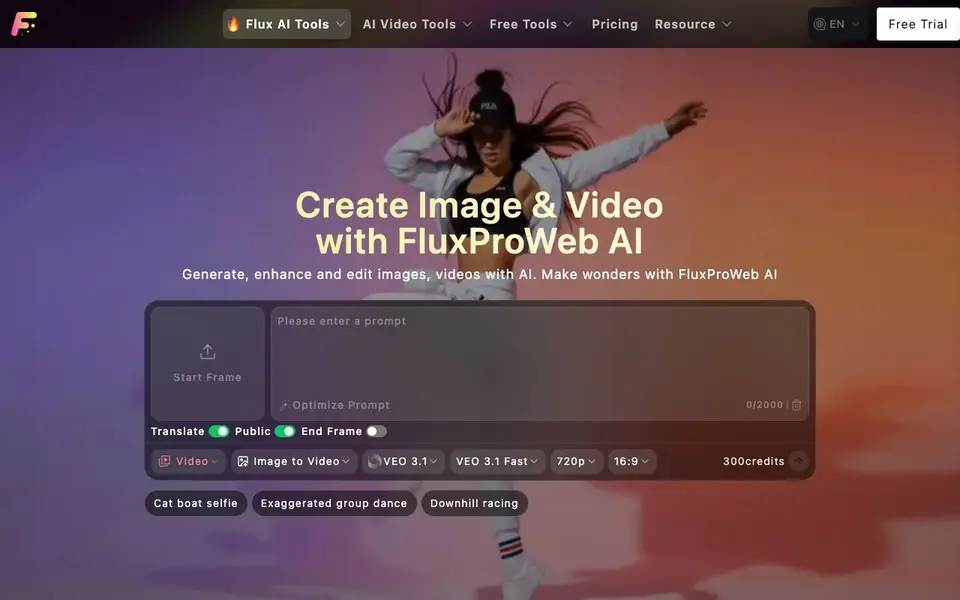
FluxProWeb AI is a web platform that brings many AI image and video tools together in one place. You can generate new images from text prompts, transform existing photos, create videos from images or text, and edit pictures with features like inpainting and background removal. The site offers a range of models, including Flux Pro, Nano Banana, Seedream, and Kling, so you can pick the one that fits your task.
To start, you choose a tool, such as the image generator or video maker. You type a prompt or upload an image, pick a model and settings like resolution or aspect ratio, and the AI creates your result. For videos, you can set a start and end frame, choose a duration, and even generate audio. The platform also includes free tools like image upscaling and prompt generation.
FluxProWeb AI suits creators who want a single place for many AI media tasks without switching between apps. The website mentions free tools and a free trial, while advanced models require credits. It does not list specific pricing details on the homepage, so check the Pricing page for costs.
Flux Pro AI features
- Text-to-image generation: Create new images from your text prompts using models like Flux Pro and Seedream.
- Image-to-image editing: Upload a photo and transform it with AI tools like Flux Image to Image and Redux.
- Text-to-video and image-to-video: Generate videos from prompts or images with models like Kling and VEO.
- Inpainting tools: Edit specific parts of an image using Nano Banana Inpainting or Flux Fill AI.
- Avatar and headshot generators: Create avatars, headshots, and themed images like New Year or Ghibli style.
What you can do with Flux Pro AI
- Generate marketing images from text descriptions for social media posts.
- Create short videos from a single photo for product demos or announcements.
- Restore old family photos with the AI old photo restorer tool.
- Try on different hairstyles with the AI hair cut filter before a salon visit.
How to get started with Flux Pro AI
- Go to the FluxProWeb AI website and choose an image or video tool from the menu.
- Type your prompt or upload an image, then select a model and adjust settings like resolution or duration.
- Generate your result and download it, or use additional tools like upscaling to refine it.
Tips for better results with Flux Pro AI
- Start with the free tools like image upscaling and prompt generation to test FluxProWeb AI's output quality before spending credits on advanced models.
- Match your task to the right model in FluxProWeb AI: use Flux Pro for realistic images, Seedream for stylized art, and Kling for cinematic video.
- For video generation, set both start and end frames in FluxProWeb AI to control motion precisely, and enable audio only when your final cut needs it.
- Write detailed prompts with specific subjects, lighting, and composition for FluxProWeb AI, and use the Optimize Prompt feature to refine vague ideas before generating.
- checks:
Flux Pro AI pricing
Flux Pro AI has a free way to start, with paid plans for heavier use. Check fluxproweb.com for current limits and prices.
What to check before you rely on Flux Pro AI
- Check the Pricing page on FluxProWeb AI before committing, since the homepage does not list specific credit costs or free trial limits.
- Verify which models require credits versus free tools, as the website does not clearly state credit amounts for each feature.
- Confirm your intended output formats and resolution options are available for your chosen model, since the site does not list export specifications.
- Review the privacy policy for how your uploaded images and videos are handled, as the website does not state data retention or usage terms.
Who Flux Pro AI is for
Flux Pro AI suits content creators, marketers, social media managers and hobbyists. If that is not you, the AI image generators below may fit better.
Similar tools compared with Flux Pro AI
| Tool | What it is | Pricing |
|---|---|---|
| Flux Pro AI | AI image and video creation suite | Freemium |
| SiImageGen | AI image generator and photo editor | Freemium |
| FreeSiTools | Free AI image prompt generator | Free |
| SiPhotoEditor | AI photo editor by description | Paid |
| Civitai | AI art community and model library | Freemium |
Flux Pro AI FAQ
What can I create with FluxProWeb AI?
You can create images from text prompts, edit existing photos, generate videos from text or images, and use specialized tools like avatar makers, background removal, and old photo restoration. The platform supports many models, so you have options for different styles and quality.
Is FluxProWeb AI free to use?
The website mentions free tools and a free trial, so you can start without paying. However, advanced models and features require credits. The homepage does not list exact pricing, so check the Pricing page for details on credit costs and plans.
Who is FluxProWeb AI for?
It is for anyone who wants to create or edit images and videos with AI, including content creators, marketers, and hobbyists. The range of tools from simple image generation to video creation makes it useful for both beginners and more advanced users.
What video models are available?
The site lists models like VEO 3.1, Kling 3.0, Flux Video, Wan 2.6, and Hailuo 2.3. Each offers different features such as audio, resolution, or duration. You can choose a model based on your needs, like realism or cinematic style.
Can Flux Pro AI export my generated images or videos to other platforms like social media or cloud storage?
The FluxProWeb AI website does not mention direct export options to social media or cloud storage. You can download your generated files from the platform, but for sharing, you would need to upload them manually. Check the website's help or resource section for any updated export features.
Does Flux Pro AI work on mobile devices or tablets, or is it only for desktop computers?
FluxProWeb AI is a web platform, so it runs in any modern web browser on desktop, laptop, tablet, or smartphone. The website does not list specific device limitations, but for the best experience with video generation, a stable internet connection and a newer device are recommended. No app download is mentioned.
What does the free plan on Flux Pro AI include, and do I need to create an account to use it?
The FluxProWeb AI website mentions free tools and a free trial, but it does not list the exact limits of the free plan. You likely need an account to track your usage and credits, but the site does not explicitly state this. For precise details, visit the Pricing page or contact support.


