

What is DryMerge?
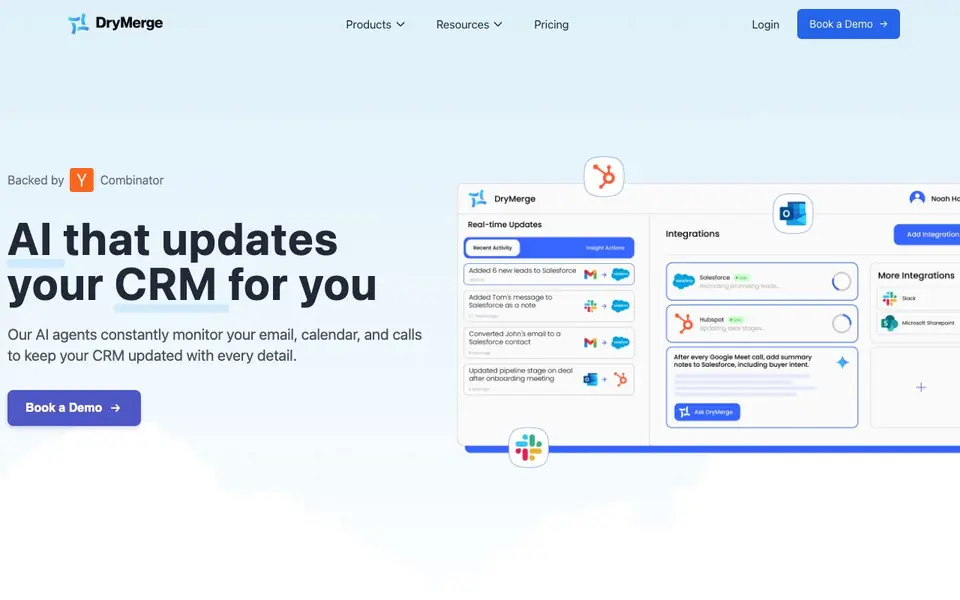
DryMerge is an AI-powered tool that automatically keeps your CRM updated. Its agents work in the background, monitoring your email, calendar, and calls to capture every detail. You get complete, accurate CRM data without manual entry.
To start, you connect your business tools and CRM system. DryMerge integrates with 50+ apps, including Gmail, Outlook, Slack, and Teams. Then, its AI agents analyze your communications, extracting context, relationship dynamics, next steps, and deal insights. The agents work 24/7, fitting your specific deal process and using your custom fields.
DryMerge suits sales teams, asset managers, operations teams, and startups. It promises no training on your data, encryption, role-based access control, and scalable infrastructure. The website highlights white-glove onboarding and founder-led support, but does not list specific pricing details.
DryMerge features
- Automatic activity capture: AI agents analyze emails, meetings, and messages to log every interaction in your CRM.
- 50+ app integrations: Connect Gmail, Outlook, Slack, Teams, and other business tools to centralize your data.
- 24/7 background operation: Agents work continuously without needing breaks, so your CRM stays updated around the clock.
- Custom field support: The tool adapts to your deal process, using your custom fields and communication style.
- Data privacy protection: Your data is never used for model training, and encryption safeguards it at all stages.
What you can do with DryMerge
- Keep your Salesforce CRM updated with call and email details automatically.
- Create notes, contacts, and accounts in HubSpot after every client call.
- Track relationship dynamics and next steps across your entire tech stack.
- Ensure deal records are complete before handoffs or follow-ups.
How to get started with DryMerge
- Book a demo or get started on the DryMerge website.
- Connect your business tools and CRM system in minutes.
- Let AI agents monitor your communications and update your CRM automatically.
Tips for better results with DryMerge
- Connect DryMerge to your primary email and calendar first, then add your CRM, so its agents can capture the full context of every interaction from the start.
- Map your custom fields in DryMerge before testing, so the AI logs deal insights and next steps into the exact places your team relies on.
- Run DryMerge for a week alongside your manual entry process, then compare records to spot where its extraction misses nuance or mislabels relationships.
- Use DryMerge's white-glove onboarding to tune its agents to your deal process, since the website says it adapts to your communication style and workflows.
- Check DryMerge's activity logs regularly to confirm it captures calls and meetings from all connected apps, not just email, before you trust it fully.
DryMerge pricing
DryMerge’s homepage does not list prices. Check drymerge.com for current plans.
What to check before you rely on DryMerge
- Verify whether DryMerge's pricing is available on its site, as the website does not list specific costs or plan tiers.
- Confirm which of your 50+ integrations DryMerge actually supports for your CRM, since the site lists apps but not every combination.
- Check DryMerge's data retention and deletion policies, as the site promises encryption but does not state how long your data is stored.
- Test DryMerge with a low-stakes deal first, because the website does not specify accuracy guarantees or error rates for its AI capture.
Who DryMerge is for
DryMerge suits sales teams, asset managers, operations teams and startups. If that is not you, the AI business tools below may fit better.
Similar tools compared with DryMerge
| Tool | What it is | Pricing |
|---|---|---|
| DryMerge | AI agents that update your CRM | See website |
| Tidio | AI customer service and sales platform | Freemium |
| Chatbase | AI customer experience and support agents | Free trial |
| Copy.ai | AI-native go-to-market platform | See website |
| Harvey | AI platform for legal and professional services | See website |
DryMerge FAQ
How does DryMerge update my CRM?
DryMerge's AI agents constantly monitor your email, calendar, and calls. They analyze each interaction and extract details like context, next steps, and deal insights, then add this information to your CRM automatically.
Which tools can I connect to DryMerge?
DryMerge integrates with 50+ business apps, including Gmail, Outlook, Slack, Teams, and numerous other tools. The website says it can connect to any business tool where your relationship data lives.
Is DryMerge suitable for my team?
The website mentions sales teams, asset managers, operations teams, and startups as typical users. It adapts to your deal process, using your custom fields and workflows, so it can fit various team structures.
What does DryMerge cost?
The website does not state specific pricing. It offers a 'Book a Demo' option and a pricing page, so you likely need to contact them for a quote or see pricing after logging in.
Does DryMerge work on mobile devices or only on desktop?
The DryMerge website does not specify whether it offers a mobile app or a mobile-optimized interface. It focuses on connecting your email, calendar, and calls from tools like Gmail and Outlook, which you can access on various devices. For the latest on device support, check DryMerge's website or contact their team.
Can DryMerge export data from my CRM to other tools?
DryMerge primarily captures data from your connected tools and writes it into your CRM, keeping it updated. The website does not mention exporting data out of your CRM to other systems. If you need specific export capabilities, it's best to ask DryMerge directly or review their integration documentation.
Does DryMerge require a credit card to sign up for a free trial?
The DryMerge website does not state whether a credit card is needed for a free trial. It highlights a demo and white-glove onboarding, suggesting a hands-on setup process. To find out about trial terms and any payment requirements, you should contact DryMerge or book a demo through their site.


