

What is Cranston AI?
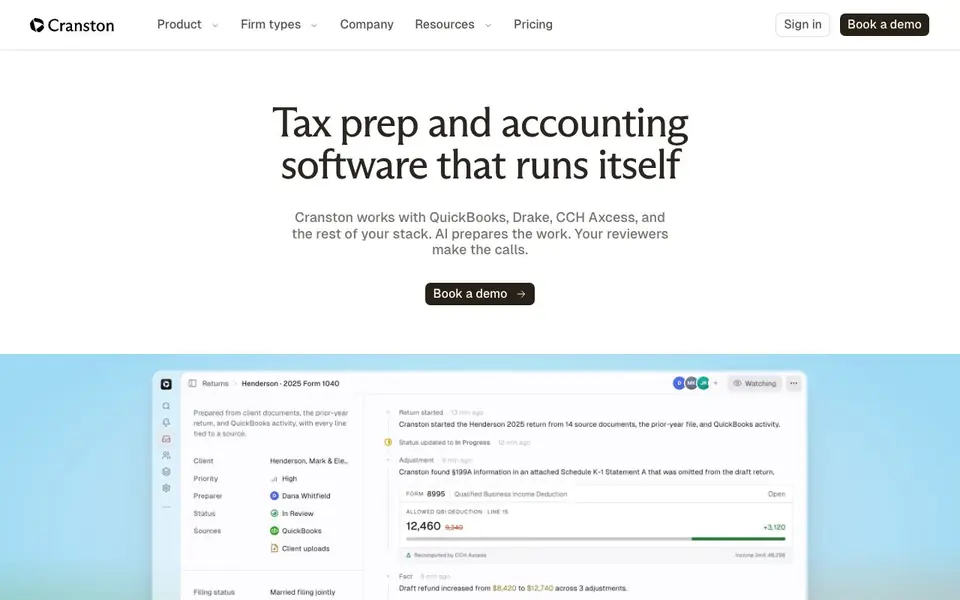
Cranston is an AI tax and accounting tool built for CPA firms. It works inside the software you already use, like QuickBooks, Drake, CCH Axcess, and UltraTax. The AI prepares the work, and your team reviews and approves it before anything is sent or filed.
You start by giving Cranston a complete client file. It reads the documents, checks them against last year's return, and flags anything missing or wrong. It then drafts the tax return, bookkeeping entries, or client follow-up emails. Your reviewer checks the finished draft and makes the final call.
Cranston suits solo practitioners, growing firms, and multi-office firms. It keeps each client's documents, books, returns, and email together. The site mentions SOC 2 Type II examination in progress, encryption, role-based access, and GLBA alignment for security. Pricing is per client book and per prepared return, with flat rates and no credits or tokens.
Cranston AI features
- Tax prep: Reads client documents and enters the return in Drake, Lacerte, CCH Axcess, or UltraTax for your review.
- Document check: Compares documents against last year's return and flags missing or wrong items.
- Bookkeeping: Classifies transactions, reconciles accounts, and drafts journal entries in your existing QuickBooks.
- Tax research: Answers tax questions in plain English with citations from the IRC, regulations, and rulings.
- Reviewer approval: Nothing posts, files, or reaches a client until your reviewer approves it.
What you can do with Cranston AI
- Prepare tax returns inside Drake, Lacerte, CCH Axcess, or UltraTax.
- Catch missing 1099s or wrong-year statements before prep starts.
- Complete monthly bookkeeping in QuickBooks with a short exception list.
- Answer tax research questions with cited sources for your team to verify.
How to get started with Cranston AI
- Book a demo on Cranston's website to see how it fits your firm.
- Connect your existing software like QuickBooks, Drake, or CCH Axcess.
- Upload client documents and let Cranston prepare the work for your review.
Tips for better results with Cranston AI
- Give Cranston a complete client file before starting, including all documents and last year's return, so it can flag missing items and draft accurate work from the beginning.
- Use Cranston's document check feature to compare each package against the prior return, then review its flagged exceptions and draft follow-up emails before you approve sending anything.
- Ask Cranston tax research questions in plain English, then verify the cited IRC, regulation, or ruling sources yourself to confirm the answer fits your client's specific situation.
- Review every draft Cranston prepares inside QuickBooks, Drake, CCH Axcess, or UltraTax before approving, since nothing posts or files until your reviewer gives the final okay.
Cranston AI pricing
Cranston AI is a paid product. Check cranston.ai for current plans and whether a demo or trial is offered.
What to check before you rely on Cranston AI
- Check that your tax software versions, like Drake or CCH Axcess, are compatible with Cranston's integration, since the site lists supported tools but not version specifics.
- Verify whether the $30 per client book and $40 per prepared return prices include all forms and states, as the site does not state extra fees for complex returns.
- Confirm Cranston's SOC 2 Type II examination status is complete before handling sensitive client data, since the site says the examination is in progress, not finished.
Who Cranston AI is for
Cranston AI suits solo practitioners, growing CPA firms and multi-office accounting firms. If that is not you, the AI business tools below may fit better.
Similar tools compared with Cranston AI
| Tool | What it is | Pricing |
|---|---|---|
| Cranston AI | AI tax prep and accounting software | Paid |
| Tidio | AI customer service and sales platform | Freemium |
| Chatbase | AI customer experience and support agents | Free trial |
| Copy.ai | AI-native go-to-market platform | See website |
| Harvey | AI platform for legal and professional services | See website |
Cranston AI FAQ
Does Cranston replace our tax software?
No. Cranston works with the tax software your firm already uses, including CCH Axcess and Drake. It prepares the work and sends the finished draft back for review and e-file.
How is Cranston different from other AI tax tools?
Cranston prepares the work inside your existing software rather than replacing it. Your team reviews every judgment call, and nothing is sent or filed without approval.
Who signs the return?
Your reviewer does. Cranston prepares the draft, but your team makes the final call and approves before anything is filed or sent to a client.
How does Cranston collect client documents?
The website does not detail the document collection process. It mentions comparing document packages against last year's return and flagging missing items, so check the demo for specifics.
Can Cranston export data or connect to tools other than QuickBooks, Drake, Lacerte, CCH Axcess, and UltraTax?
Cranston's website mentions connections to QuickBooks, Drake, TaxDome, and Gmail, and it works with Lacerte, CCH Axcess, and UltraTax for tax prep. It does not list other export options or integrations. For a full list, check the pricing or security pages or contact the team.
What devices or platforms does Cranston run on?
Cranston is a cloud-based platform, so you access it through a web browser on any device with internet. The website does not specify particular operating systems or mobile apps. For the most current technical requirements, check the site or ask Cranston directly.
Does Cranston have a free plan or trial?
Cranston's pricing is paid per client book and per prepared return, with flat rates and no credits or tokens. The website does not mention a free plan or trial. To see if a trial is available, you can book a demo or contact the sales team.


