

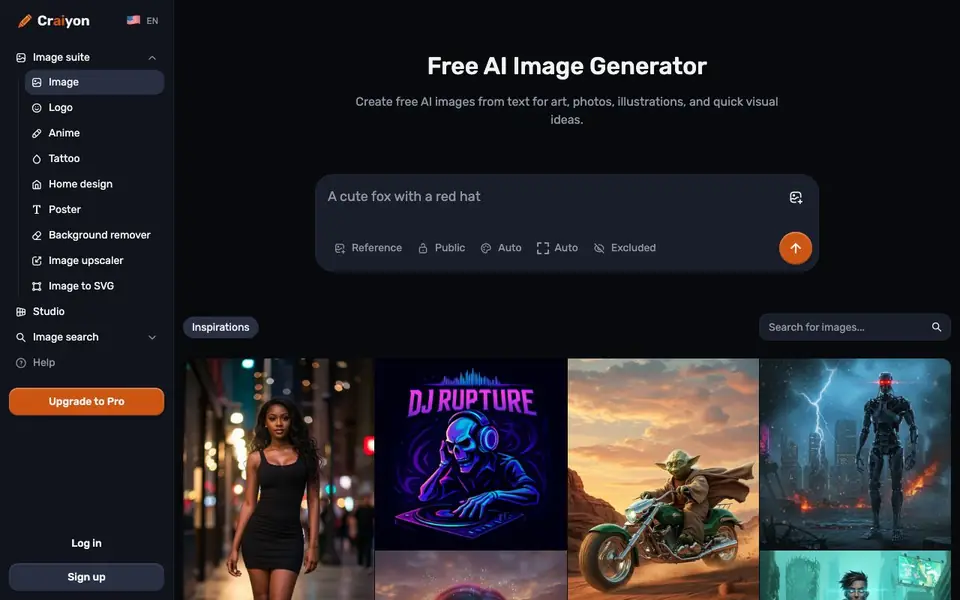
What is Craiyon?
Craiyon is an AI art generator that turns your text descriptions into unique images in seconds. It started as DALL·E mini in 2021 and rebranded in 2022. You can create anything from abstract art to photorealistic images by simply typing what you want to see.
To get started, you type your idea, choose a style like Artistic, Photo, Anime, Illustration, Vector, or Raw, and pick an aspect ratio. Then you hit DRAW and watch your idea transform. You can refine your prompt, exclude unwanted elements, or draw inspiration from similar images in the search feature.
Craiyon offers both free and paid tiers. Free users have limited images and functionality, while subscribers get higher quality models, more options, faster access, and no watermark. The tool suits beginners exploring creativity and professionals needing high-quality images for social posts, prints, or references.
Craiyon features
- Style selection: Choose from Artistic, Photo, Anime, Illustration, Vector, or Raw for varied results.
- Exclude field: Specify what you don't want in your image, like people or text, for more precise results.
- Aspect ratio options: Pick square, landscape, or portrait to fit your needs.
- Image search: Explore what others have created and click images to see the prompts used.
- Additional tools: Access background remover, image upscaler, and image to SVG in the suite.
What you can do with Craiyon
- Create visuals for social media posts and marketing concepts.
- Generate art for prints, references, or further editing.
- Explore creative directions quickly for fun or business projects.
- Prepare images with specific styles like anime or vector for design work.
How to get started with Craiyon
- Type your idea with specific details for better results.
- Choose a style and aspect ratio from the options provided.
- Hit DRAW and refine your prompt or exclude elements as needed.
Tips for better results with Craiyon
- Write detailed prompts with specific subjects, settings, and moods, then use the Exclude field to block unwanted elements like people or text for cleaner results.
- Use Craiyon's Image search to browse community creations and click any image to see the exact prompt used, then adapt that prompt for your own needs.
- Pick a style like Photo or Anime and an aspect ratio before drawing, then refine your prompt and redraw multiple times to narrow down the best composition.
- For professional work, subscribe to Craiyon's paid tier to access higher quality models, faster generation, and no watermark, which free users lack.
Craiyon pricing
Craiyon has a free way to start, with paid plans for heavier use. Check craiyon.com for current limits and prices.
What to check before you rely on Craiyon
- Check your plan's image generation limits, as free users have a limited number of images and functionality, but the website doesn't specify exact numbers.
- Verify whether the free tier includes commercial use rights, since the FAQ mentions no accreditation required for subscribers but doesn't state free user terms.
- Confirm export formats and resolution for your use case, as the site lists better download quality for subscribers but doesn't detail free options.
Who Craiyon is for
Craiyon suits beginners, professionals, content creators and businesses. If that is not you, the AI image generators below may fit better.
Similar tools compared with Craiyon
| Tool | What it is | Pricing |
|---|---|---|
| Craiyon | Free AI image generator from text | Freemium |
| SiImageGen | AI image generator and photo editor | Freemium |
| FreeSiTools | Free AI image prompt generator | Free |
| SiPhotoEditor | AI photo editor by description | Paid |
| Civitai | AI art community and model library | Freemium |
Craiyon FAQ
Is Craiyon free to use?
Yes, Craiyon offers free image generation to everyone, but free users have a limited number of images and functionality. Subscribers get more options like higher quality models, faster access, and no watermark.
How do I create AI art with Craiyon?
Type your idea, choose a style from Artistic, Photo, Anime, Illustration, Vector, or Raw, pick an aspect ratio, and hit DRAW. You can refine your prompt or exclude unwanted elements for better results.
Can I make higher quality images?
Yes, subscribers have access to the highest quality models with more detail, sharpness, and accuracy. Free users have limited access, while subscribers get any aspect ratio, better download quality, and faster access.
Is Craiyon related to DALL·E mini?
Yes, Craiyon started as DALL·E mini in 2021 and rebranded in 2022. The core team, led by CEO Boris Dayma, has been continuously improving the technology since then.
Can Craiyon export images in formats other than PNG or JPG?
The Craiyon website does not mention specific export formats. You can download your generated images directly from the site, but for details on available file types, check the download options after creating an image or visit the help section.
Does Craiyon have a mobile app for iOS or Android?
The Craiyon website does not mention a dedicated mobile app. You can use Craiyon in a web browser on your phone or tablet, but for app availability, check the official app stores or the Craiyon website for updates.
What does the free plan include exactly in Craiyon?
Craiyon's free plan gives you limited image generations and access to basic features. You can create images with style and aspect ratio options, but you may have fewer choices and a watermark on your results. For full details, see the pricing page on the Craiyon website.


