

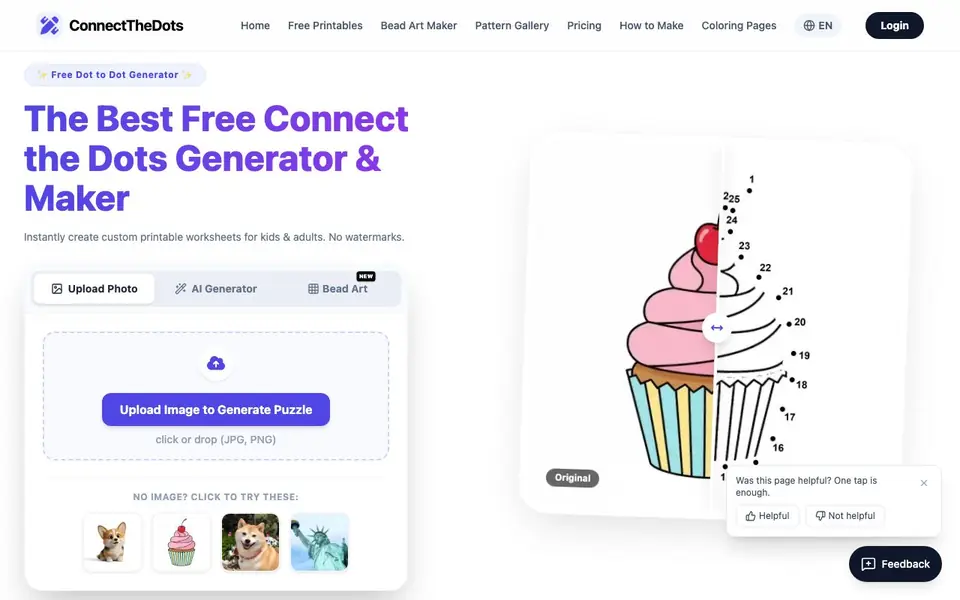
What is ConnectTheDots Generator?
ConnectTheDots Generator is a free online tool that creates custom dot-to-dot puzzles from your own images or simple text descriptions. You can upload a photo or drawing, and the AI turns it into a numbered worksheet ready for printing. It also offers a library of pre-made puzzles, from easy animal designs for young children to complex mandalas for adults.
To make your own puzzle, you start by uploading a clear photo or drawing. The tool works best with high-contrast images or simple line art. Next, you choose a difficulty level—Easy, Medium, or Hard—or manually set the number of dots. Finally, you download your puzzle as a high-resolution PDF or PNG, with no watermarks, and print it at home or school.
The tool also includes a prompt-to-puzzle feature, where you can describe anything, like "a robotic dragon" or "a Victorian house," and the AI generates a puzzle. There's also a perler bead pattern maker that converts any image into printable bead patterns with color guides. It's designed for parents, teachers, and puzzle enthusiasts, and you can start without signing up.
ConnectTheDots Generator features
- Photo to puzzle: Upload any image and get a numbered dot-to-dot worksheet in seconds.
- Prompt to puzzle: Describe a scene or object and the AI builds a printable puzzle from your text.
- Difficulty control: Choose Easy, Medium, or Hard, or manually set the dot count.
- No watermarks: All generated printables are clean and professional for printing.
- Bead pattern maker: Convert photos into perler bead patterns with color matching and guides.
What you can do with ConnectTheDots Generator
- Create custom dot-to-dot worksheets for your classroom or homeschool lessons.
- Turn a child's favorite photo into a fun puzzle activity for a birthday party.
- Generate a challenging mandala dot-to-dot for adult relaxation and focus.
- Make perler bead patterns from any image for a crafting project.
How to get started with ConnectTheDots Generator
- Upload a clear photo or drawing, or use the AI generator with a text prompt.
- Adjust the difficulty level or set the dot count to match the skill level.
- Download your puzzle as a high-resolution PDF or PNG and print it instantly.
Tips for better results with ConnectTheDots Generator
- Upload high-contrast images or simple line art for the best results, since the tool works best with clear outlines and avoids cluttered backgrounds.
- Set the difficulty level manually by choosing the dot count, which gives you precise control over puzzle complexity for your audience.
- Use the prompt-to-puzzle feature for creative ideas like 'a robotic dragon,' and describe the scene clearly to get a usable generated puzzle.
- Download your puzzle as a high-resolution PDF or PNG, then print it at home or school, since the tool exports without watermarks.
ConnectTheDots Generator pricing
ConnectTheDots Generator has a free way to start, with paid plans for heavier use. Check connectthedotsprintable.online for current limits and prices.
What to check before you rely on ConnectTheDots Generator
- Check the pricing page for any limits on free usage, since the site labels itself freemium but does not state specific plan details.
- Verify that your uploaded images are clear and high-contrast, as the tool's quality depends on the input, and poor images may produce unusable puzzles.
- Review the privacy policy for how your uploaded photos are handled, since the website does not state data retention or sharing practices.
Who ConnectTheDots Generator is for
ConnectTheDots Generator suits parents, teachers, puzzle enthusiasts and crafters. If that is not you, the AI image generators below may fit better.
Similar tools compared with ConnectTheDots Generator
| Tool | What it is | Pricing |
|---|---|---|
| ConnectTheDots Generator | AI dot-to-dot puzzle and worksheet maker | Freemium |
| SiImageGen | AI image generator and photo editor | Freemium |
| FreeSiTools | Free AI image prompt generator | Free |
| SiPhotoEditor | AI photo editor by description | Paid |
| Civitai | AI art community and model library | Freemium |
ConnectTheDots Generator FAQ
Is ConnectTheDots Generator really free?
Yes, the tool is free to use. You can upload images and generate puzzles without signing up, and there are no watermarks on the printables. The site also offers a free library of pre-made puzzles. There is a pricing page, but the visible text doesn't detail any paid plans.
What image formats can I upload?
You can upload JPG or PNG files. The tool works best with high-contrast images or simple line art, so clear photos and drawings give the best results for dot-to-dot mapping.
Can I control the difficulty of the puzzles?
Yes. You can select Easy, Medium, or Hard difficulty levels, or manually set the dot count. This lets you tailor puzzles for young children, older kids, or adults who want a challenge.
What can I make besides dot-to-dot puzzles?
The tool also includes a perler bead pattern maker. You can upload any image and get a printable bead pattern with color guides and bead counts. There's also a library of free bead patterns for beginners.
Does ConnectTheDots Generator require an account to use?
No, you can start using ConnectTheDots Generator without signing up. The website states you can begin creating puzzles immediately, and the free plan includes access to the core features like uploading images and downloading PDFs. For any advanced features, check the Pricing page on the site.
What file formats can I export from ConnectTheDots Generator?
ConnectTheDots Generator lets you download your puzzles as high-resolution PDF or PNG files. These are ready for printing at home or school. The website does not mention exporting to other formats like SVG or JPG, so stick with PDF or PNG for your printables.
Can I use ConnectTheDots Generator on my phone or tablet?
ConnectTheDots Generator is an online tool, so you can access it from any device with a web browser, including phones and tablets. The website does not specify dedicated mobile apps, but the responsive design should work on most screens. For the best experience, use a device with a larger screen for detailed puzzles.


