

What is ConceptViz?
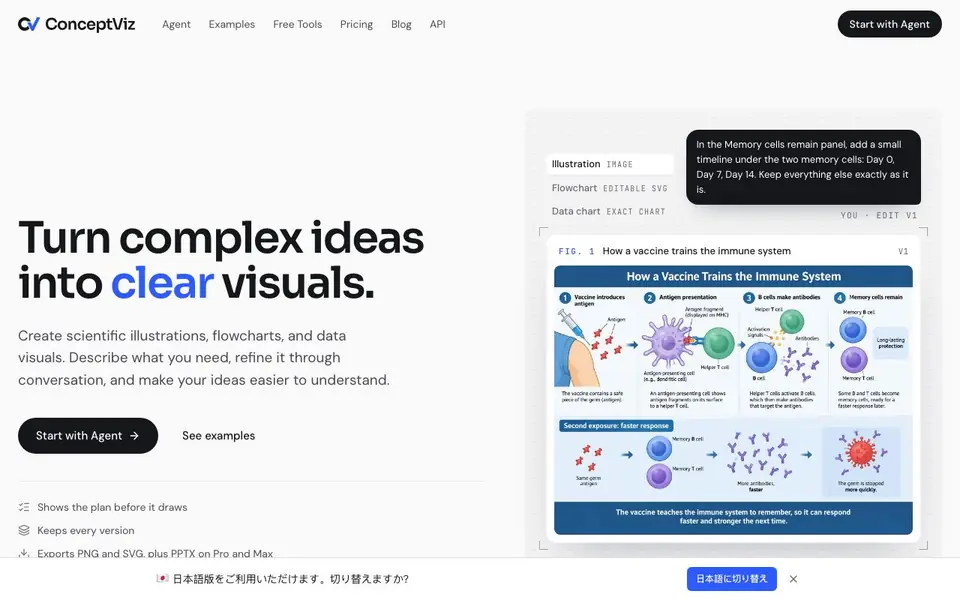
ConceptViz is an AI-powered tool for creating scientific illustrations, flowcharts, and data visuals. You describe what you need, and the agent turns it into a clear figure. It is built for teachers, students, and researchers who want to explain complex ideas visually.
You start by typing your request or attaching notes, slides, or a PDF. The agent first shows you its plan and settings before generating anything, so no credits are spent until you approve. After the figure is drawn, you can ask for changes in plain words, and every version is kept for comparison. You can export as PNG or JPG, or as SVG and PPTX on higher plans for further editing.
The tool includes over 257 generators for common figures, such as conceptual frameworks, PRISMA flow diagrams, plant and animal cell diagrams, free body diagrams, and more. It is trusted by over 40,000 teachers, students, and researchers. A free trial gives you 2 image credits and a short agent trial for 7 days, with no card required.
ConceptViz features
- Plan before drawing: The agent writes the prompt and settings first, so nothing is generated until you approve.
- Version history: Every version of your figure is kept, letting you compare and revert anytime.
- SVG export: Download editable SVG files to keep adjusting your diagrams in other tools.
- PPTX export: On Pro and Max plans, export figures as PowerPoint files for presentations.
- Specialized generators: Over 257 tools for specific diagrams, from PRISMA flowcharts to Bohr models.
What you can do with ConceptViz
- Create scientific illustrations for lectures and teaching materials.
- Generate flowcharts for research papers and methodologies.
- Visualize data charts for reports and presentations.
- Convert your notes or PDFs into clear diagrams and figures.
How to get started with ConceptViz
- Describe what you need, or attach notes, slides, or a PDF.
- Review the agent's plan and settings, then press Generate.
- Refine your figure with plain-language requests and export it.
Tips for better results with ConceptViz
- Describe your audience and desired style in your initial request, so ConceptViz can tailor the figure before you approve the plan and spend credits.
- Review the agent's proposed prompt and settings carefully before generating, since ConceptViz keeps every version and lets you compare iterations easily.
- Use ConceptViz's specialized generators for common figures like PRISMA flowcharts or cell diagrams to speed up setup and get more accurate starting points.
- Ask for changes in plain language after each draft, and check the version history to revert or compare, ensuring your final figure meets your needs.
ConceptViz pricing
ConceptViz has a free way to start, with paid plans for heavier use. Check conceptviz.app for current limits and prices.
What to check before you rely on ConceptViz
- Verify your free trial credits and 7-day agent trial limits before starting, since the website does not state exact usage caps beyond the initial offer.
- Confirm whether your plan includes SVG or PPTX export, as the website only lists these for higher tiers and does not specify all plan details.
- Check ConceptViz's data handling for uploaded notes or PDFs, as the site does not explicitly state privacy or retention policies for your materials.
Who ConceptViz is for
ConceptViz suits teachers, students, researchers and scientists. If that is not you, the AI tools for students below may fit better.
Similar tools compared with ConceptViz
| Tool | What it is | Pricing |
|---|---|---|
| ConceptViz | AI diagram and illustration maker | Freemium |
| Gauth | AI homework helper with step-by-step answers | Freemium |
| Khanmigo | AI teaching assistant and tutor | Freemium |
| ChatPDF | AI chat and summarizer for PDFs | Freemium |
| Jenni AI | AI academic writing and research assistant | Freemium |
ConceptViz FAQ
What is ConceptViz?
ConceptViz is an AI tool that creates scientific illustrations, flowcharts, and data visuals from your descriptions. You refine the output through conversation, and it keeps every version. It is designed for teachers, students, and researchers.
How is it different from ChatGPT or other AI image tools?
ConceptViz shows you the plan before drawing, so you approve the approach first. It keeps every version for comparison and exports editable SVG and PPTX files. It also has specialized generators for scientific and educational diagrams.
Are the figures scientifically accurate?
The website does not guarantee scientific accuracy. It is a tool to help you create visuals, and you should review the output for correctness. The tool is used by researchers and educators, but you are responsible for final accuracy.
Can I edit a figure after it is made?
Yes. You can ask for changes in plain words, and the agent will revise the figure. Every version is kept, so you can compare and revert if needed. You can also export as SVG to edit further in other software.
Can ConceptViz export figures to PowerPoint or other presentation tools?
Yes, ConceptViz lets you export figures as PNG or JPG on all plans. On Pro and Max plans, you can also export as SVG or PPTX for further editing in other tools. The website does not mention exporting to other formats like PDF or Word.
Does ConceptViz work on mobile devices or only on desktop?
ConceptViz is a web-based tool, so it runs in any modern web browser on a computer, tablet, or phone. The website does not mention dedicated mobile apps for iOS or Android. You can access it from your device's browser without installing anything.
What does the free plan of ConceptViz include?
The free trial gives you 2 image credits and a short agent trial for 7 days, with no credit card required. After that, you need to choose a paid plan to continue generating figures. The website does not detail what the free plan includes beyond the trial.


