

What is Capitol AI?
Capitol AI is a platform for institutions that need reliable, decision-ready outputs from their own data. It codifies your proprietary data, expertise, and processes into governed workflows. Instead of just generating content, it helps you consistently execute complex, knowledge-intensive work. Each deployment improves and reinforces those workflows, creating a compounding advantage as usage grows.
You start by connecting the sources your teams already use, such as internal systems, repositories, data rooms, documents, databases, and spreadsheets. Capitol prepares the data, normalizes formats, and reconciles fragmented inputs. You control access by role, team, workflow, or agent, and keep lineage intact so outputs can be traced back to the sources and decisions that produced them.
You then design workflows without code, defining steps, rules, model calls, tools, review points, and approvals. Your experts decide where AI acts and where people review. The platform routes each step to the best model, optimizing cost, speed, and quality, with no lock-in. Outputs include finished reports, filings, models, decks, and web pages, with attribution built in. The website does not state pricing, so you'd need to contact them for details.
Capitol AI features
- Governed data: Securely use approved data where it already lives, without moving files into one-off chats.
- Institutional workflows: Turn individual methods into canonical workflows the whole organization can run, review, and improve.
- Model independence: Connect data, models, and tools without tying your operating model to a single closed ecosystem.
- Defensible artifacts: Produce finished work with sources, steps, approvals, evaluations, and human review built in.
- No-code workflow design: Build workflows without writing code, though engineers can go deeper when needed.
What you can do with Capitol AI
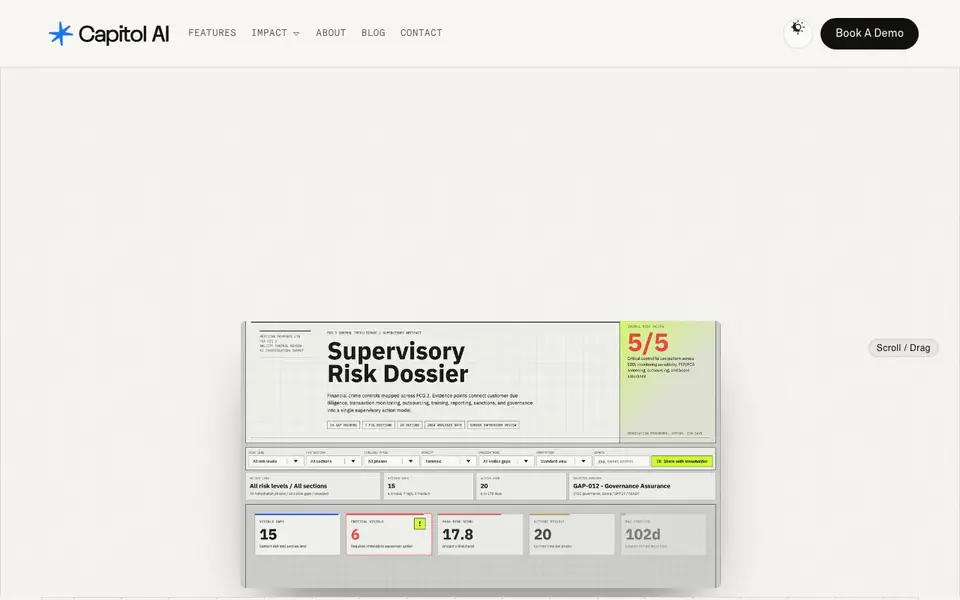
- Generate executive risk summaries as PowerPoint files from your data sources.
- Create GTM intelligence dashboards as web pages for your sales team.
- Produce sentiment analysis spreadsheets from transcripts and records.
- Build intelligence agents that run deep research workflows with approvals.
How to get started with Capitol AI
- Connect the internal systems, repositories, and data sources your team already uses.
- Define your workflow steps, rules, model calls, and approval points in the no-code designer.
- Run the workflow, review outputs with human steering, and refine it over time.
Tips for better results with Capitol AI
- Connect all your internal systems and repositories first, then normalize and reconcile the data before designing workflows, so Capitol AI starts with clean, consistent inputs.
- Define explicit review points and approvals in your Capitol AI workflows so experts can check outputs before they become final reports or filings.
- Use Capitol AI's no-code workflow designer to map each step, then route model calls per step to balance cost, speed, and quality based on your task needs.
- Trace every output back to its sources and steps in Capitol AI, so you can audit decisions and improve workflows as you learn what works.
Capitol AI pricing
Capitol AI’s homepage does not list prices. Check capitol.ai for current plans.
What to check before you rely on Capitol AI
- Check whether your data sources can be connected securely without moving files, since Capitol AI emphasizes governed access but the website does not list specific integrations.
- Verify that your team can manage access controls by role and workflow, but the website does not state how granular those permissions are in practice.
- Confirm what export formats are available for finished work like reports or decks, as the website mentions outputs but does not list specific file types.
Who Capitol AI is for
Capitol AI suits institutional teams, risk and compliance officers, knowledge workers and operations leaders. If that is not you, the AI business tools below may fit better.
Similar tools compared with Capitol AI
| Tool | What it is | Pricing |
|---|---|---|
| Capitol AI | Governed AI workflow and document platform | See website |
| Tidio | AI customer service and sales platform | Freemium |
| Chatbase | AI customer experience and support agents | Free trial |
| Copy.ai | AI-native go-to-market platform | See website |
| Harvey | AI platform for legal and professional services | See website |
Capitol AI FAQ
What does Capitol AI do?
It turns your team's expertise and data into governed, repeatable AI workflows. You define the process, set where AI acts and where people review, and the platform produces finished work products like reports, decks, and dashboards with traceability built in.
Is Capitol AI free or paid?
The website does not state pricing. It offers a demo request, so you likely need to contact them for a quote. There is no mention of a free plan or trial.
Who is Capitol AI for?
It's for institutions and teams that handle complex, knowledge-intensive work, such as risk analysis, research, or compliance. It suits organizations that need control over data, approvals, and audit trails, not just quick content generation.
Can I use my own data sources with Capitol AI?
Yes. Capitol connects internal systems, repositories, data rooms, documents, databases, spreadsheets, archives, public sources, and live research. It prepares the data and governs access, keeping lineage intact so outputs are traceable.
Can Capitol AI export its finished work products to formats like PowerPoint, web pages, or spreadsheets?
Yes, Capitol AI can produce finished work products such as PowerPoint files, web pages, and spreadsheets. The platform supports generating outputs like executive risk summaries, GTM intelligence dashboards, and sentiment analysis spreadsheets. For a full list of export formats, check the website's feature details or contact Capitol AI directly.
Does Capitol AI run on my own infrastructure or in the cloud?
Capitol AI is designed to run workflows inside your environment, keeping your data secure and controlled. The website mentions that it works within the customer's environment, but it does not specify whether it supports on-premises, cloud, or hybrid deployments. For specific infrastructure requirements, contact Capitol AI for more details.
What does the free plan of Capitol AI include?
The Capitol AI website does not mention a free plan or any pricing details. It appears to be a paid platform, but you would need to contact them to learn about pricing and plan options. The website offers a demo request, which may provide more information about what is included.


