

What is AnkiDecks?
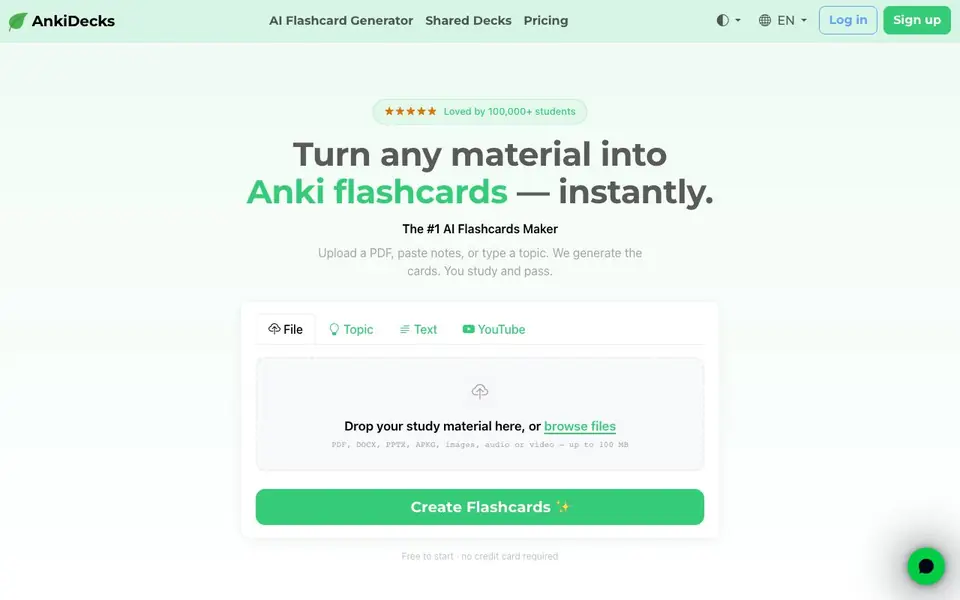
AnkiDecks is an AI-powered flashcard maker that converts your study material into ready-to-use Anki decks. You can upload files like PDFs, Word docs, PowerPoints, Excel sheets, EPUBs, images, audio, or video, paste text, or simply type a topic. The AI extracts key concepts and creates question-answer, cloze, or multiple-choice cards automatically.
To get started, you upload or paste your material, and the AI generates cards within minutes. You can then study directly in your browser using built-in spaced repetition, or export the deck as an.apkg file to use in Anki desktop, Android, or iOS. The platform also supports image occlusion for diagrams and handwritten notes, and can generate cards in over 50 languages.
It's designed for students, especially in medicine, law, and language learning, but works for any subject. The website mentions a free start with no credit card required, and a community of over 100,000 shared decks you can browse and clone. You can share decks with links and set them to public, private, or link-only.
AnkiDecks features
- Multi-format upload: Upload PDF, DOCX, PPTX, XLSX, EPUB, images, audio, or video up to 100 MB.
- AI card generation: Automatically creates question-answer, cloze, and multiple-choice cards from your material.
- YouTube to flashcards: Paste a video URL to get transcribed and turned into flashcards with timestamps.
- Image occlusion: Hide labels on diagrams or handwritten notes to test your recall of parts.
- One-click Anki export: Download any deck as an.apkg file compatible with Anki desktop, Android, and iOS.
What you can do with AnkiDecks
- Turn lecture slides into study-ready flashcards for an upcoming exam.
- Generate vocabulary cards in 50+ languages for language learning.
- Convert a YouTube tutorial into flashcards with timestamped references.
- Create image occlusion cards from anatomy diagrams for medical study.
How to get started with AnkiDecks
- Go to anki-decks.com and click 'Create Flashcards' to start.
- Upload a file, paste text, or type a topic—then let the AI generate your cards.
- Study online with spaced repetition or export the deck as an.apkg file for Anki.
Tips for better results with AnkiDecks
- Upload your source file directly instead of typing a topic, since AnkiDecks extracts more accurate cards from your actual material.
- Use the YouTube feature by pasting a video URL to get timestamped flashcards, which helps you review specific moments in lectures or tutorials.
- Review the generated cards in AnkiDecks before exporting, and edit any that are unclear, to ensure your deck is accurate for studying.
- Export your deck as an.apkg file from AnkiDecks and import it into Anki desktop to use its full review features offline.
AnkiDecks pricing
AnkiDecks has a free way to start, with paid plans for heavier use. Check anki-decks.com for current limits and prices.
What to check before you rely on AnkiDecks
- Check the free plan's limits on card generation or exports, since the website only states 'free to start' and does not list specific caps.
- Verify whether your uploaded files are kept private or used to train the AI, as the website does not state its data privacy policy.
- Confirm that the.apkg export works with your Anki version, since the site mentions compatibility but does not specify version requirements.
Who AnkiDecks is for
AnkiDecks suits medical students, language learners, law students and teachers and tutors. If that is not you, the AI tools for students below may fit better.
Similar tools compared with AnkiDecks
| Tool | What it is | Pricing |
|---|---|---|
| AnkiDecks | AI flashcard generator for any material | Freemium |
| Gauth | AI homework helper with step-by-step answers | Freemium |
| Khanmigo | AI teaching assistant and tutor | Freemium |
| ChatPDF | AI chat and summarizer for PDFs | Freemium |
| Jenni AI | AI academic writing and research assistant | Freemium |
AnkiDecks FAQ
Is AnkiDecks free to use?
The website says 'Free to start · no credit card required,' which suggests there is a free plan. It also has a Pricing page, so there are likely paid plans, but the details are not shown on the homepage.
What file formats can I upload to create flashcards?
You can upload PDF, DOCX, PPTX, XLSX, EPUB, images, audio, or video files up to 100 MB. The AI reads the content and extracts key concepts to make flashcards.
Can I study flashcards directly on AnkiDecks without using Anki?
Yes. The site has a built-in spaced repetition study mode, so you can study in your browser without needing Anki. You can also export decks as.apkg files if you prefer to use Anki desktop.
Does AnkiDecks support languages other than English?
Yes, it supports over 50 languages. You can upload material in one language and get cards in another, which is useful for language learners. The homepage lists examples like German, French, Spanish, Japanese, and more.
Does AnkiDecks have a mobile app or is it only a website?
AnkiDecks is a web-based tool, so you use it in your browser on any device. The website does not mention a dedicated mobile app. You can still export your decks as.apkg files and open them in the Anki mobile apps for Android and iOS.
Can I use AnkiDecks to create flashcards from a YouTube video without uploading a file?
Yes, AnkiDecks lets you paste a YouTube URL directly. The AI transcribes the video, extracts key concepts, and generates flashcards with timestamped references. This works for any public YouTube video, including lectures, tutorials, and language lessons.
What does the free plan on AnkiDecks include, and do I need to enter a credit card?
AnkiDecks is free to start and does not require a credit card to begin. The website says you can create flashcards and study them in your browser, but it does not specify any limits on the free plan, such as the number of decks or cards. Check the pricing page for details on what is included.


