

What is AI Image Editor?
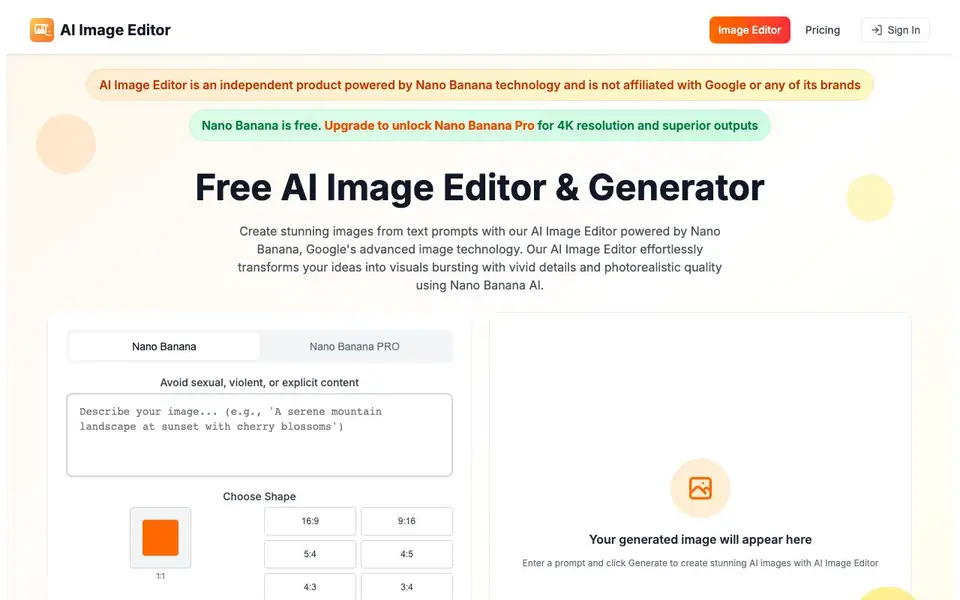
AI Image Editor is a web-based tool that uses Google's Nano Banana technology, built on the Gemini 2.5 Flash Image model, to create and edit images. You can generate new pictures from text prompts or modify existing ones through natural language instructions. The tool is free to use and requires no account, with an optional Pro upgrade for higher-quality outputs like 4K resolution.
To get started, you simply enter a text prompt describing what you want and click Generate. For editing, you can have a conversation with the AI, telling it to change specific elements, remove objects, or transform backgrounds. The tool handles complex requests in a single pass, so you don't need to iterate multiple times. It also preserves character identities across edits, making it useful for consistent digital personas.
The platform supports various aspect ratios and artistic styles, from hyperrealistic to anime and cyberpunk. It includes features like inpainting to replace or extend image regions, background removal, and facial refinement. Most images generate within seconds. The website notes that it is an independent product and not affiliated with Google. It also prohibits sexual, violent, or explicit content.
AI Image Editor features
- Text-to-image generation: Create images from detailed text prompts using Nano Banana AI.
- Conversational editing: Modify images by chatting with the AI about the changes you want.
- Character consistency: Keep facial features and personal traits intact across multiple edits.
- Scene blending: Merge edits naturally into existing environments for realistic results.
- Style transformation: Apply artistic styles like watercolor, cyberpunk, or anime with one click.
What you can do with AI Image Editor
- Generate unique artwork from a text description for personal or creative projects.
- Edit photos by removing unwanted objects or replacing backgrounds through text commands.
- Create consistent character images for branding or digital personas.
- Expand or inpaint image regions to extend the canvas or refine details.
How to get started with AI Image Editor
- Go to the AI Image Editor website and choose an aspect ratio for your image.
- Enter a text prompt describing what you want to generate or edit.
- Click Generate and wait a few seconds for the result to appear.
Tips for better results with AI Image Editor
- Write detailed prompts that specify subject, lighting, composition, and style, since Nano Banana responds best to clear, descriptive language for both generation and editing.
- Use conversational editing by describing changes step by step, like asking to remove an object or change a background, and rely on the tool's single-pass precision to avoid repeated attempts.
- Maintain character consistency by starting with a clear reference image and using the same identity across edits, so Nano Banana preserves facial features and personal traits reliably.
- Experiment with aspect ratios and artistic styles like cyberpunk or anime directly in the prompt, and check the shape selector before generating to match your intended output format.
AI Image Editor pricing
AI Image Editor has a free way to start, with paid plans for heavier use. Check image-editor.org for current limits and prices.
What to check before you rely on AI Image Editor
- Verify whether the free tier includes commercial usage rights, since the website does not state licensing terms for generated images.
- Check the Pro plan's exact pricing and credit system, as the site mentions upgrades but does not list specific costs or limits.
- Confirm data handling and privacy policies, because the website does not explain how uploaded images or prompts are stored or used.
Who AI Image Editor is for
AI Image Editor suits creators, designers, marketers and hobbyists. If that is not you, the AI image generators below may fit better.
Similar tools compared with AI Image Editor
| Tool | What it is | Pricing |
|---|---|---|
| AI Image Editor | Free AI image generator and editor | Freemium |
| SiImageGen | AI image generator and photo editor | Freemium |
| FreeSiTools | Free AI image prompt generator | Free |
| SiPhotoEditor | AI photo editor by description | Paid |
| Civitai | AI art community and model library | Freemium |
AI Image Editor FAQ
Is AI Image Editor free to use?
Yes, the basic Nano Banana version is free and requires no login. There is an optional Nano Banana Pro upgrade for 4K resolution and better outputs, which you can subscribe to or buy credits for.
What can I do with AI Image Editor?
You can generate new images from text prompts, edit existing photos through natural language, remove or change backgrounds, apply artistic styles, and preserve character identities across edits. It also supports inpainting and expanding image regions.
Do I need to create an account?
No, you can use the tool without logging in. The website states that no login is required for the free version, making it easy to start creating right away.
Is this tool affiliated with Google?
No, AI Image Editor is an independent product powered by Nano Banana technology. The website clearly states it is not affiliated with Google or any of its brands.
What image formats can AI Image Editor export or download?
The AI Image Editor website does not list specific export formats. You can generate and edit images directly in your browser, and the tool typically provides a downloadable result. For exact format options, check the download button or help section on the site after generating an image.
Does AI Image Editor work on mobile devices or tablets?
AI Image Editor is a web-based tool, so you can access it through any modern web browser on a phone, tablet, or computer. The website does not mention dedicated mobile apps, but the interface is designed to work in a browser, so you can use it on the go as long as you have an internet connection.
What does the free plan of AI Image Editor include, and what does Pro add?
With AI Image Editor's free plan, you can generate and edit images without paying or logging in. The Pro upgrade, called Nano Banana Pro, offers higher-quality outputs like 4K resolution and increased or unlimited usage. For specific limits on the free tier, check the pricing page on the website.


