

What is AI Baby Video?
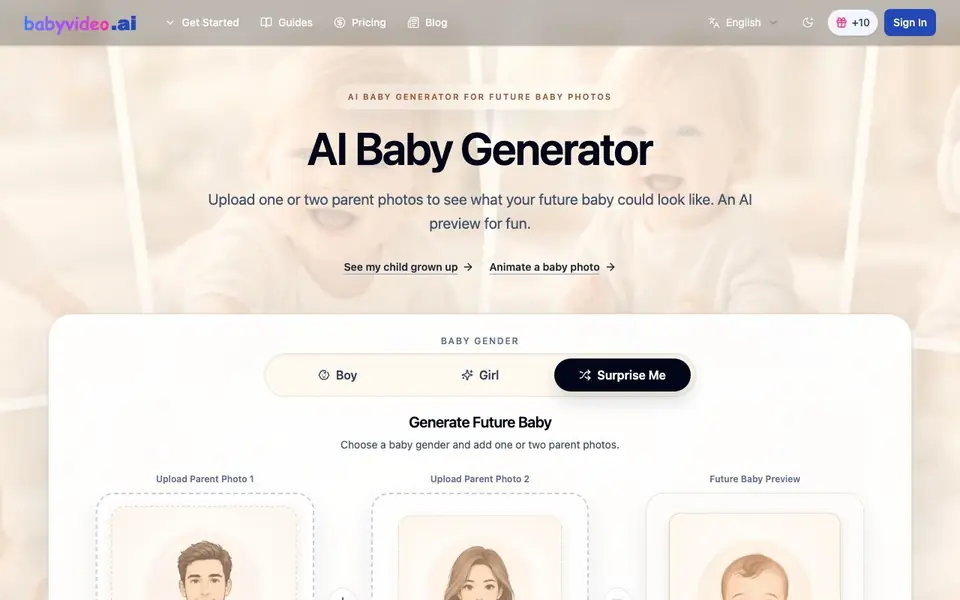
AI Baby Video (BabyVideo.ai) is a playful AI tool that turns photos of one or two parents into a realistic baby portrait. You pick a baby boy, baby girl, or let it surprise you. The AI blends visible facial traits like eye color, hair color, skin tone, and face shape into a cute baby-style image. It is made for entertainment, not for predicting real genetics or health.
To use it, you upload one or two clear, front-facing parent photos. The tool works best with sharp selfies where both eyes, nose, mouth, and face shape are visible. After choosing a gender, you generate your preview. Each image costs 2 credits. New accounts get 30 free credits valid for 3 days, so you can test it before paying.
This tool suits couples who are curious, party planners for baby showers, or anyone wanting a fun social post. The website notes results can vary between generations and that photo quality matters. It also says your parent photos are private and not shown publicly. You can also animate a baby photo, though details are limited on the homepage.
AI Baby Video features
- Gender selection: Choose boy, girl, or surprise me to control the baby preview style.
- Parent photo upload: Add one or two photos to blend facial traits into the result.
- Facial trait analysis: AI considers eye color, hair color, skin tone, face shape, and more.
- Free credits: New accounts receive 30 credits valid for 3 days to test the tool.
- Entertainment disclaimer: Results are creative previews, not medical or genetic predictions.
What you can do with AI Baby Video
- Upload your photos to imagine what your future baby could look like together.
- Create prediction images for baby shower party games or family reactions.
- Generate boy and girl versions for playful gender reveal comparisons.
- Share a sweet future baby preview on social media with friends or family.
How to get started with AI Baby Video
- Sign in to your account to get your free credits.
- Upload one or two clear, front-facing parent photos.
- Choose a baby gender or select surprise me, then generate your preview.
Tips for better results with AI Baby Video
- Upload a sharp, front-facing selfie where both eyes, nose, mouth, and face shape are clearly visible, as AI Baby Video relies on these details for realistic blends.
- Remove sunglasses, hats, masks, or heavy shadows before generating, since AI Baby Video needs unobstructed facial traits to create a believable baby portrait.
- Avoid side profiles and blurry photos, because AI Baby Video analyzes facial symmetry and features best when both eyes and your full face are in frame.
- Use your 30 free credits within 3 days to test different gender options and photo pairs, so you can see how AI Baby Video responds before spending credits.
AI Baby Video pricing
AI Baby Video has a free way to start, with paid plans for heavier use. Check babyvideo.ai for current limits and prices.
What to check before you rely on AI Baby Video
- Confirm your free 30 credits are still valid, since they expire after 3 days and the site does not state what happens after that.
- Check the pricing page for credit costs beyond the initial free allowance, as the homepage only lists 2 credits per image and does not show paid plans.
- Review the privacy policy for how your uploaded parent photos are stored or deleted, since the site only says they are private and not shown publicly.
Who AI Baby Video is for
AI Baby Video suits couples, party planners, social media users and curious families. If that is not you, the AI image generators below may fit better.
Similar tools compared with AI Baby Video
| Tool | What it is | Pricing |
|---|---|---|
| AI Baby Video | AI baby preview from parent photos | Freemium |
| SiImageGen | AI image generator and photo editor | Freemium |
| FreeSiTools | Free AI image prompt generator | Free |
| SiPhotoEditor | AI photo editor by description | Paid |
| Civitai | AI art community and model library | Freemium |
AI Baby Video FAQ
What does AI Baby Video do?
It creates a realistic baby portrait from one or two parent photos. You pick a boy, girl, or surprise me, and the AI blends visible facial traits like eye color, hair color, and face shape into a cute preview. It is for fun, not genetic prediction.
Is AI Baby Video free?
New accounts get 30 free credits valid for 3 days. Each image costs 2 credits. After that, you can buy credit packs or subscriptions. The homepage mentions a free start and a pricing page for full options.
Who is AI Baby Video for?
It is for couples curious about future babies, people planning baby showers, or anyone wanting a fun social post. It is also useful for gender reveal parties. The tool is designed for entertainment, not medical or scientific use.
What photos work best?
Clear, front-facing selfies with both eyes, nose, mouth, and face shape visible work best. Avoid blurry images, sunglasses, hats, masks, or side profiles. Heavy filters can also reduce the quality of the baby preview.
Can AI Baby Video export or share the generated baby photos?
AI Baby Video lets you save or share the baby preview you generate, as stated on its homepage. The website does not mention specific export formats or direct sharing to social platforms. For details on saving options, check the app interface after generating an image.
Does AI Baby Video work on mobile devices or require a specific app?
AI Baby Video is a web-based tool, so you can use it in any browser on your phone, tablet, or computer. The website does not mention a dedicated mobile app or offline access. Just visit babyvideo.ai and sign in to start generating.
What happens to my uploaded photos after using AI Baby Video?
AI Baby Video states that your parent photos are private and not shown publicly. The website does not specify how long they are stored or whether they are deleted after generation. For data retention details, check the privacy policy or contact support.


