

What is TypeLLM?
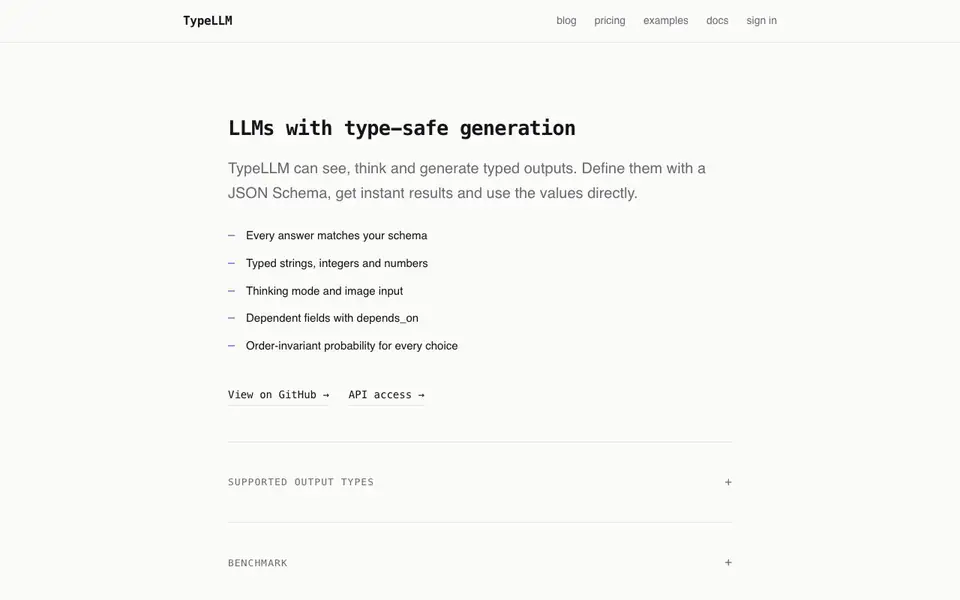
TypeLLM is a developer tool that makes language models produce structured, type-safe outputs. Instead of free-form text, you define a JSON Schema and the model returns data that matches it exactly. This means you can use the results directly in your code without extra parsing or validation.
You start by defining your expected output shape with a JSON Schema. TypeLLM then ensures every answer fits that schema, including typed strings, integers, and numbers. It also supports thinking mode and image input, so the model can reason and see before generating. Dependent fields use a depends_on mechanism, and probability for every choice is order-invariant, giving consistent results.
This tool suits developers who need reliable structured data from LLMs, such as for data extraction, form filling, or agent workflows. The website mentions API access and a GitHub repository, but does not state specific pricing details or free plan availability.
TypeLLM features
- Schema enforcement: Every output matches your defined JSON Schema exactly, so you get valid data every time.
- Typed outputs: Supports strings, integers, and numbers, letting you use results directly in typed code.
- Thinking mode: Lets the model reason before generating, improving accuracy on complex structured tasks.
- Image input: Accepts images as input, enabling vision-based structured extraction and analysis.
- Dependent fields: Uses depends_on to handle fields that rely on other values in the schema.
What you can do with TypeLLM
- Extract structured data from documents or images into typed fields.
- Generate configuration objects or API payloads that match a schema.
- Build agent workflows that return consistent, validated results.
- Create forms or UI components that populate from LLM-generated typed data.
How to get started with TypeLLM
- Visit TypeLLM's website and check the docs and examples to understand schema definition.
- Define your output JSON Schema with supported types and dependencies.
- Call the API with your prompt and optional image input, then use the typed result directly.
Tips for better results with TypeLLM
- Define your JSON Schema with precise types and constraints before calling TypeLLM, since the tool enforces your schema exactly and won't fix ambiguous or overly broad definitions.
- Enable thinking mode in TypeLLM for complex extraction or multi-step tasks, as it lets the model reason before generating, which improves accuracy on structured outputs.
- Use depends_on in your TypeLLM schema to link dependent fields, so the model resolves values in the correct order and avoids inconsistencies in the final output.
- Test TypeLLM with image inputs on a small sample first, because vision-based extraction can vary with image quality, and your schema should account for that variability.
TypeLLM pricing
TypeLLM’s homepage does not list prices. Check typellm.ai for current plans.
What to check before you rely on TypeLLM
- Check whether TypeLLM's pricing fits your budget, since the website does not state any plan costs or free tier availability.
- Verify that TypeLLM's API supports your programming language and runtime, as the site only mentions API access and a GitHub repository without listing specific integrations.
- Review TypeLLM's data handling and privacy policies before sending sensitive or production data, because the website does not detail how inputs or outputs are stored or used.
Who TypeLLM is for
TypeLLM suits developers, AI engineers and backend teams. If that is not you, the AI developer platforms below may fit better.
Similar tools compared with TypeLLM
| Tool | What it is | Pricing |
|---|---|---|
| TypeLLM | Type-safe structured output from LLMs | See website |
| SiVideoAPI | Unified API for top AI video models | Freemium |
| OpenSI | AI model comparison and pricing tool | See website |
| OpenRouter | Unified API for many AI models | Freemium |
| Ollama | Run open models locally or cloud | Freemium |
TypeLLM FAQ
What does type-safe generation mean?
It means the language model returns data that strictly matches a JSON Schema you define. You get typed strings, integers, and numbers, so you can use the output directly in code without manual validation.
Does TypeLLM support image input?
Yes, TypeLLM can see and process images as input. This allows you to extract structured information from visual content, such as images or documents, while still getting schema-validated outputs.
How do dependent fields work?
Dependent fields use a depends_on mechanism, meaning certain output fields can rely on other values in the schema. This helps maintain logical consistency in the generated data.
Is there a free plan or pricing details?
The website mentions pricing in its navigation but does not provide specific details. You would need to check the pricing page or contact the team for current plans and costs.
What can TypeLLM export or connect to?
TypeLLM provides API access and a GitHub repository, so you can integrate it into your own code and workflows. The website does not mention specific integrations with other services or export formats beyond the structured JSON output that matches your schema. Check the docs or GitHub for integration examples.
Does TypeLLM run on any specific devices or platforms?
TypeLLM is a developer tool with API access, so it runs wherever you can make API calls, such as servers, cloud functions, or local scripts. The website does not list specific operating systems or device requirements. For platform-specific guidance, refer to the documentation or GitHub repository.
What does the free plan include for TypeLLM?
The TypeLLM website does not mention a free plan or any pricing details, so it is unclear what a free tier would include. To find out about costs or trial options, you would need to contact the team or check the pricing section if it becomes available. The site currently labels pricing as unknown.


